
I’m about 25% faster in Figma than I am in Bubble. I had a project last year with a friend who designed every screen in Figma. If this functionality existed back then, I expect it probably would’ve cut down on timelines SIGNIFICANTLY because we could be multi-tasking. I’d love to see a world where he designed a screen then I wired it up while he’s designing the next one.
For me the biggest value of Figma is that I can quickly prototype multiple variations of the same UI without Bubble’s non design parts slowing me down. Usually I will prototype an entire app in Figma. At this point, it’s high definition enough that when I have it reviewed, then nuanced and sometimes glaring issues with the design will get spotted. So by trying it out in Figma first I save having to rework a design and logic that comes with it in Bubble. The result is I eventually land on a finalish design where, because I’ve sketched everything out, I’ve forced myself to think through almost all of the app’s logic before having to implement any of it. Ergo time and pain savings.
But again - that just works well for me. If pure Bubble works well enough for you, stick to the tools you love!
I think the following reasons are why Figma is a game-changing design tool:
- Multi-player / user mode that lets you collaborate on designs in real-time
- Plugin ecosystem adds some pretty sweet functionality
- Powerful features like auto-layout and a robust component / team library will save you a lot of time
- It’s super fast and smooth and takes Sketch files seamlessly (lots of great Sketch templates out there)
…until Bubble releases their new editor UI, this Figma to Bubble feature is super exciting to me.
Figma might be faster overall but if you’re creating designs in Figma and then having to import into Bubble and reconcile, I suspect the overall time would actually be longer.
Keen to explore the collaboration aspect of it though.
@allenyang Importing the template below didn’t really go well. The font isn’t taken over. Not sure if the font is available from Bubble’s side.
That might be because you haven’t imported the font in Figma, so neither Bubble nor Figma recognize it:
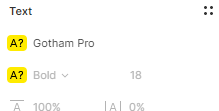
Thanks all for the positive feedback! We’re very excited about this feature and happy to see that the community is as well
Responding to a few folks’ comments from the thread:
@joe5 - Yes, we adjust the sizing of text elements because Figma treats text elements’ padding differently, so we’re attempting to get our imported text elements to look more similarly to Figma’s
@nocodeventure - the imported pages becoming blank sounds like a bug - if the page doesn’t come back, could you please file a bug report? Also re: fonts - yes, as @rukevweb suggested, if the font doesn’t exist in Bubble it won’t get imported. But if you’re trying to import a font that does exist normally in Bubble, please file that as a bug!
@scriptschool - Are you still not seeing the feature? Is this the case across all your apps? That’s odd…could you please file that as a bug report too?
@lantzgould - Sometimes this error is just a temporary thing and you should try again in a little bit. But if you’re consistently getting that error, please file it as a bug and please share the Figma file with us (because it might be something about the file that causes our import to time out, for example)
Hi Allen,
I would rather see the imported files organized inside a Folder map, that way we can organize templates inside one simple demo 
I have personally found moqups slightly easier to use for wireframing over figma, however now that I can import from figma, i will give it a another try. Great addition
This is amazing timing, we just moved our mockup process to Figma - so happy you did this.
FIGMA import button greyed out in settings page
I have a figma frame i want to import. I loaded my api key from figma into the design import section and my figma file ID but Import button is greyed out and not available to select button to begin import. DO I need to adjust any other bubble settings to make this work?

That’s a bit odd - there’s just the most basic of validation behind that button (usually errors will show up in red text below). If this is still happening for you after refreshing the page, could you please file a bug so that we can get details on the API Key / File ID you’re using?
I’m getting the same message also. @allenyang any ideas how to fix it?
ANy ideas on how I can trouble shoot this? I created a new Figma project and a new API key.
Still getting the ‘Network Error’ message…
Have you checked about ad/tracking blockers-blockers ?
@lucas.ar you’re the man! It worked. Thanks so much
Can we import Buttons, drop downs and similar elements to be the correct types in Bubble?
Maybe we can setup a naming convention so that Bubble can do it more reliable.
My first try suggests that a button will be imported as a shape with text element above it?
Please help @allenyang
Hot Suggestion (IMO)! - Add a special “meta-language” to the names of object frames and have Bubble translate them into Bubble Objects:
The idea would be to add a tag to the name of a Figma element ( “{Button}” for example), then have Bubble create an object of that element type (such as a button).
This could work for:
- Buttons
- Text Input
- Text
- Data Groups
- Groups (general)
- Repeating Groups
And then you can extend the concept over time for advanced ideas:
- identifying similar pages as transitions of the same page (to create only one Bubble page.
- Identifying pages to ignore (similar to the concept of importing multiple pages as a single page because they are just transitions of the original.
The key value will come from identifying which elements will be tied to data elements:
- Containers that will be bound to List of Things (like Repeating Groups)
- Containers that will be bound to a Thing (like Repeating Groups)
- Elements that will be bound to fields of a Thing
@allenyang Do we have a future improvement plan for this feature? Like increasing the conversion precision rate (no more “rectangles”).
This is my biggest request.