I have a backend workflow that gets a list of prayer times (in text) in a city and save them to DB in date format, but I am not getting the right time due to timezone issue, most likelhy. I have enabled the timezone override for backend WF.
The API WF takes in a City (which has a timezone), e.g. Jeddah with a timezone of GMT+3, AST, or Etc/GMT+3. I have tried all 3. In the WF, I call an API to get the list of prayer times, e.g. 5:33 for Fajr.
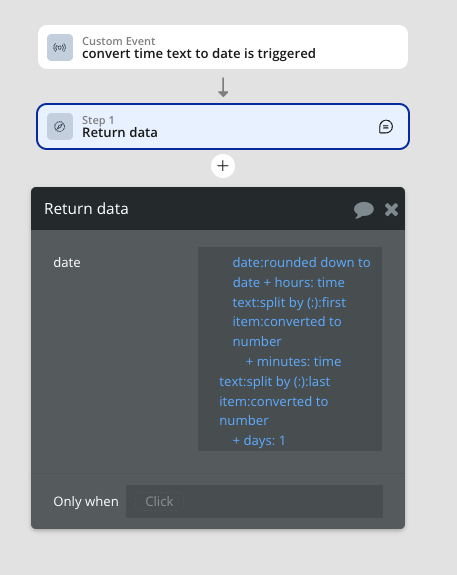
I set the WF tmezone to the City’s timezone. In the WF, I take the current datetime, round it to date, parse the time text (5:33), add the hours and add the minutes add 1 day and then save the resulting datetime to DB.
It should give me the equivalent of 5:33 (GMT+3) in my local timezone when I see the DB and the app, which should be 3:33AM (GMT+1).
Instead I am seeing 6:33AM (GMT+1), which is +3 hour difference.
When dealing with date time in Bubble, always set it up so that the incoming timezone and the workflow’s timezone match. Once that is setup correctly Bubble will handle the rest.
You can override workflow timezones by enabling it in your app settings.
As an additional tip, note that different plugins handle timezones differently depending on how their code is written. This often creates confusion because your workflow or elements might be set correctly but then a block of code in a plugin may not. You end up with unexpected results.