# \[SOLVED\] Get data from HTML Element

**URL:** <https://forum.bubble.io/t/solved-get-data-from-html-element/47994>\
**Category:** Questions\
**Created:** [January 28, 2019, 12:13am UTC](https://forum.bubble.io/t/solved-get-data-from-html-element/47994 "2019-01-28T00:13:50Z")\
**Posts on this page:** 20\
**Page:** 1

<div class="post-metadata">

**Author:** ![julienallard1](https://avatars.discourse-cdn.com/v4/letter/j/ac8455/32.png) [@julienallard1](https://forum.bubble.io/u/julienallard1)\
**Post date:** [January 28, 2019, 12:13am UTC](https://forum.bubble.io/t/solved-get-data-from-html-element/47994/1 "2019-01-28T00:13:50Z")

</div>

Hi, what’s the best way to retrieve data from an HTML element? Say I have an html text input or datalist. How can I put the data into a custom state or get it form a workflow? Or trigger a workflow from an event that happens from HTML element content?

It’s easy to pass data from Bubble to HTML element from “Insert Dynamic Data”, but can’t figure out how to pass data from HTML element to Bubble.

Thanks in advance for any help!

---

<div class="post-metadata">

**Author:** ![mebeingken](https://sea1.discourse-cdn.com/bubble/user_avatar/forum.bubble.io/mebeingken/32/20139_2.png) [@mebeingken](https://forum.bubble.io/u/mebeingken)\
**Post date:** [January 29, 2019, 6:04pm UTC](https://forum.bubble.io/t/solved-get-data-from-html-element/47994/2 "2019-01-29T18:04:55Z")

</div>

Hey @julienallard1,

How about this?

You have an HTML element with an input that has an id attribute:  
 ![06%20AM](https://us1.discourse-cdn.com/bubble/original/3X/8/3/83c7e303ab2263a72d5c4c1a914e6ffbd151349a.png)

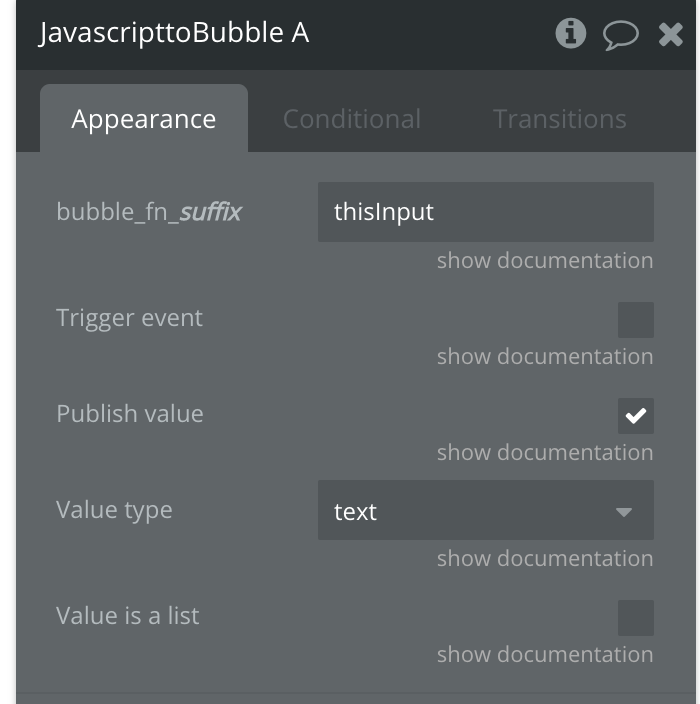
You then use the Javascript to Bubble element from the ever-so-useful [Toolbox plugin](https://bubble.io/plugin/toolbox-1488796042609x768734193128308700) setting up a function which will be called in the next step:
 ![21%20AM](https://us1.discourse-cdn.com/bubble/original/3X/f/2/f2e29403fed5ef3e8fd5d47cdfe52fe8a8819aef.png)

Then run this javascript in your workflow:

`bubble_fn_thisInput(document.getElementById('thisInput').value);`

 ![30%20AM](https://us1.discourse-cdn.com/bubble/original/3X/5/a/5abb4b63acce6431e9d3095f455a1b24032b3c3d.png)

You can then set your custom state:

 ![14%20AM](https://us1.discourse-cdn.com/bubble/original/3X/c/1/c1950028e19953a1024fef7c235dfc80b449c144.png)


* * *

> **Looking to accelerate your app development?**
>
> Let me turn  
> 🤔 😫 😖
> 
> into  
> 😀 🕶 👩‍🎓
> 
> Development through Coaching at [https://uniqueideas.com](https://uniqueideas.com?utm_source=bubble&utm_medium=forum&utm_content=signature-unique-ideas&utm_campaign=builders) or schedule a [free intro session](https://uniqueideas.com/coaching?utm_source=bubble&utm_medium=forum&utm_content=signature-free-intro&utm_campaign=builders) 🎁
> 
> Ken Truesdale  
> [LinkedIn](https://www.linkedin.com/in/mebeingken/)

---

<div class="post-metadata">

**Author:** ![julienallard1](https://avatars.discourse-cdn.com/v4/letter/j/ac8455/32.png) [@julienallard1](https://forum.bubble.io/u/julienallard1)\
**Post date:** [January 29, 2019, 9:37pm UTC](https://forum.bubble.io/t/solved-get-data-from-html-element/47994/3 "2019-01-29T21:37:18Z")

</div>

Just tried it. It’s exactly what I was looking for.  
It would be nice to have a built-in function that could be called directly inside the HTML element allowing to set custom states.

Thank you very much for your help!

---

<div class="post-metadata">

**Author:** ![keith](https://sea1.discourse-cdn.com/bubble/user_avatar/forum.bubble.io/keith/32/56020_2.png) [@keith](https://forum.bubble.io/u/keith)\
**Post date:** [January 30, 2019, 2:15am UTC](https://forum.bubble.io/t/solved-get-data-from-html-element/47994/4 "2019-01-30T02:15:08Z")

</div>

I believe you could also just do this on a Expression element (also from Toolbox) and skip the custom state. (Value of the input will magically be found in Expression’s value. It’s basically a JS function with a built in state.)

---

<div class="post-metadata">

**Author:** ![julienallard1](https://avatars.discourse-cdn.com/v4/letter/j/ac8455/32.png) [@julienallard1](https://forum.bubble.io/u/julienallard1)\
**Post date:** [January 30, 2019, 3:12pm UTC](https://forum.bubble.io/t/solved-get-data-from-html-element/47994/5 "2019-01-30T15:12:50Z")

</div>

The way I ended up using is to insert a scritp tag in my HTML element calling a function _bubble\_fn\_a_ declared in a Javascript to Bubble element and passing it data. I can then refer to it in any other element.

---

<div class="post-metadata">

**Author:** ![anon65040322](https://avatars.discourse-cdn.com/v4/letter/a/fbc32d/32.png) [@anon65040322](https://forum.bubble.io/u/anon65040322)\
**Post date:** [March 6, 2019, 9:55pm UTC](https://forum.bubble.io/t/solved-get-data-from-html-element/47994/6 "2019-03-06T21:55:30Z")

</div>

can this be done with contentEditable?  
im having some problem  
[https://bubble.io/page?name=index&id=contentedit&tab=tabs-1](https://bubble.io/page?name=index&id=contentedit&tab=tabs-1) ,

---

<div class="post-metadata">

**Author:** ![gnelson](https://avatars.discourse-cdn.com/v4/letter/g/6bbea6/32.png) [@gnelson](https://forum.bubble.io/u/gnelson)\
**Post date:** [February 7, 2020, 9:26pm UTC](https://forum.bubble.io/t/solved-get-data-from-html-element/47994/7 "2020-02-07T21:26:19Z")

</div>

Hi @julienallard1,

Would you be willing to go into a little more detail on what a script tag looks like and how you used it?

I’m using [this solution](http://forum.bubble.io/t/hammer-js-and-id-attribute-pinch-zoom/53598/4) that is working great, but I need to extract current variable values, and to know when the javascript is in action to prevent other actions.

Thanks,  
George

---

<div class="post-metadata">

**Author:** ![shubham](https://avatars.discourse-cdn.com/v4/letter/s/85e7bf/32.png) [@shubham](https://forum.bubble.io/u/shubham)\
**Post date:** [June 3, 2021, 12:01pm UTC](https://forum.bubble.io/t/solved-get-data-from-html-element/47994/8 "2021-06-03T12:01:11Z")

</div>

Hello @annon65040322,

Did you find a way to do for the contentEditable ? or any one can help me with this ? I am stuck on how to do it

I have a span with contentEditable and an id but it doesnt work.

Regards,  
Shubham Desai

---

<div class="post-metadata">

**Author:** ![julienallard1](https://avatars.discourse-cdn.com/v4/letter/j/ac8455/32.png) [@julienallard1](https://forum.bubble.io/u/julienallard1)\
**Post date:** [June 7, 2021, 12:49pm UTC](https://forum.bubble.io/t/solved-get-data-from-html-element/47994/9 "2021-06-07T12:49:47Z")

</div>

hey @gnelson , I just realised I never answered to your post… I, myself, hate when someone gets helped to find a solution but then doesn’t dare to share it haha!  
You probably don’t need an answer anymore, but for the sake of sharing solutions, here it goes…

Since the time of my post, I found a simpler solution that doesn’t require a script tag. Instead I call up a _Javascript to Bubble_ element directly from the HTML input like so:  
`<input type="text" oninput="bubble_fn_myFunc(this.value)">`

While the `oninput` make the interface more snappy since the input’s value is updated every time the user presses (and release) a key, it is only good for client side subsequent actions (no database interaction).  
If the goal is to imitate the _auto-binding_ feature of Bubble where user inputs are saved automatically in the database. You should replace `oninput` by `onchange`. So instead of sending a database request every time a key is pressed, it will only fire once the input looses focus and then content has changed.

* * *

**About HTML tags with _contentEditable_ attribute:**  
Follow the same logic than with the input, but rather than passing the _value_, we’re passing it it’s _innerText_ like so:  
`<p contentEditable oninput="bubble_fn_myFunc(this.innerText)">`

> Please be cautious with how you handle the content of the _innerText_ if you intend to re-display it’s content elsewhere in your app, as the user could inject custom javascript tags…

Unlike the input tag, there is no `onchange` event called when a contentEditable was modified. If you want to save the result in the database, like I explained above, you should never do it on a “per-key-strike” basis.  
If such solution is needed, I suggest to use a function that sets a countdown before saving (like 3 seconds). The function would be called on every key strike, but when called, it will cancel any previous existing countdown that hasn’t completed. This way you get an auto-saving feature that won’t bomb the database with save requests:

```auto
<p contentEditable oninput="save(this.innerText)">
<script>
    var countdown;
    function save(txt) {
        clearTimeout(countdown);
        setInterval(() => {
            bubble_fn_myFunc(txt);
        }, 3000);
    }
</script>

```

---

<div class="post-metadata">

**Author:** ![julienallard1](https://avatars.discourse-cdn.com/v4/letter/j/ac8455/32.png) [@julienallard1](https://forum.bubble.io/u/julienallard1)\
**Post date:** [June 7, 2021, 1:25pm UTC](https://forum.bubble.io/t/solved-get-data-from-html-element/47994/10 "2021-06-07T13:25:27Z")

</div>

Hey sorry that I didn’t replied. I guess I skipped the notification…

you and @shubham can have a look at my previous post, it contains a solution for contentEditable…

---

<div class="post-metadata">

**Author:** ![timothymugendi](https://sea1.discourse-cdn.com/bubble/user_avatar/forum.bubble.io/timothymugendi/32/148742_2.png) [@timothymugendi](https://forum.bubble.io/u/timothymugendi)\
**Post date:** [November 22, 2021, 8:15pm UTC](https://forum.bubble.io/t/solved-get-data-from-html-element/47994/11 "2021-11-22T20:15:57Z")

</div>

Hello @julienallard1 ,

This is a good solution. I have one challenge though, I need this to function when the run in iframe property on html element is checked. Do you have any idea how i could go about this?

Regards

---

<div class="post-metadata">

**Author:** ![julienallard1](https://avatars.discourse-cdn.com/v4/letter/j/ac8455/32.png) [@julienallard1](https://forum.bubble.io/u/julienallard1)\
**Post date:** [November 23, 2021, 12:49pm UTC](https://forum.bubble.io/t/solved-get-data-from-html-element/47994/12 "2021-11-23T12:49:03Z")

</div>

That is a good question since iFrames can’t access the parent page. It turns out that there is a way to pass data with `window.postMessage()`. The page must have an event listener for `MessageEvent` to receive data from the iFrame.

This is currently all the time I have to help. You can find more info on [MDN Web Docs](https://developer.mozilla.org/en-US/docs/Web/API/Window/postMessage)

---

<div class="post-metadata">

**Author:** ![timothymugendi](https://sea1.discourse-cdn.com/bubble/user_avatar/forum.bubble.io/timothymugendi/32/148742_2.png) [@timothymugendi](https://forum.bubble.io/u/timothymugendi)\
**Post date:** [November 23, 2021, 4:07pm UTC](https://forum.bubble.io/t/solved-get-data-from-html-element/47994/13 "2021-11-23T16:07:21Z")

</div>

Thanks for help @julienallard1, this has worked for me.

---

<div class="post-metadata">

**Author:** ![pratima.dudhewar](https://avatars.discourse-cdn.com/v4/letter/p/a8b319/32.png) [@pratima.dudhewar](https://forum.bubble.io/u/pratima.dudhewar)\
**Post date:** [December 7, 2022, 8:14am UTC](https://forum.bubble.io/t/solved-get-data-from-html-element/47994/14 "2022-12-07T08:14:52Z")

</div>

@mebeingken

How to trigger that javascript i mean , can we trigger that function from on change value of a html element. I have html element with input date/time and on select of value from date and time I want to trigger another action.

Thank you

---

<div class="post-metadata">

**Author:** ![pratima.dudhewar](https://avatars.discourse-cdn.com/v4/letter/p/a8b319/32.png) [@pratima.dudhewar](https://forum.bubble.io/u/pratima.dudhewar)\
**Post date:** [December 7, 2022, 11:15am UTC](https://forum.bubble.io/t/solved-get-data-from-html-element/47994/15 "2022-12-07T11:15:33Z")

</div>

@mebeingken  
To run this javascript which event you used?

---

<div class="post-metadata">

**Author:** ![julienallard1](https://avatars.discourse-cdn.com/v4/letter/j/ac8455/32.png) [@julienallard1](https://forum.bubble.io/u/julienallard1)\
**Post date:** [December 7, 2022, 1:27pm UTC](https://forum.bubble.io/t/solved-get-data-from-html-element/47994/16 "2022-12-07T13:27:59Z")

</div>

You have to set an event listener for value change on that input. For example:

```auto
// Here I suppose it's a «datetime-local» input that you use, but it can be any types.
<input type="datetime-local" id="date-time">

<script>
    // Sets a listener for any input that changes in the page.
    // When this happens, the function is triggered with the argument «ev», which is the data about the event.
    // «ev» contains the element for which the event happened («ev.target»).
    document.addEventListener('change', function(ev) {
        const element = ev.target;

        // Since change events can happen on any inputs, the following statement acts as a filter;
        // if the ID of the input that changed is not «date-time», stop the execution of the function.
        if (element.id !== 'date-time') return;

        // Here you can put any code for what you want to do with the data;
        // You could manipulate/transform the data before passing it to a Javascript2Bubble element.
        // The following statement passes the value of the «date-time» input to Bubble.
        bubble_fn_hey(element.value);
    });
</script>

```

---

<div class="post-metadata">

**Author:** ![pratima.dudhewar](https://avatars.discourse-cdn.com/v4/letter/p/a8b319/32.png) [@pratima.dudhewar](https://forum.bubble.io/u/pratima.dudhewar)\
**Post date:** [December 20, 2022, 7:48am UTC](https://forum.bubble.io/t/solved-get-data-from-html-element/47994/17 "2022-12-20T07:48:04Z")

</div>

@mebeingken  
Can you share example for html element with inputtype= time or date&time where i will get updated value after change in value for that element. Also how can we have event listener for the element , i have tried below javascript code

document.getElementById(“starttime”).addEventListener(“change”, (event) =\> {  
bubble\_fn\_eventStartTime(document.getElementById(‘starttime’).value);

});

but some how it is not working , giving error for custom code.  
Is this the only way to handle this event for html element?

---

<div class="post-metadata">

**Author:** ![ihsanzainal84](https://sea1.discourse-cdn.com/bubble/user_avatar/forum.bubble.io/ihsanzainal84/32/245932_2.png) [@ihsanzainal84](https://forum.bubble.io/u/ihsanzainal84)\
**Post date:** [December 20, 2022, 9:24am UTC](https://forum.bubble.io/t/solved-get-data-from-html-element/47994/18 "2022-12-20T09:24:43Z")

</div>

I highly recommend bubblers who are beginning to use JavaScript in their Bubble apps to try ChatGPT first.

The community is great, super great, but sometimes it will take a while to get an answer or not at all (especially when you have very vague questions).

I’ve been doing this since the the start of it’s public preview and it hasn’t failed me yet. More likely because I’m asking for pretty straight forward solutions and pieces of code.

---

<div class="post-metadata">

**Author:** ![pratima.dudhewar](https://avatars.discourse-cdn.com/v4/letter/p/a8b319/32.png) [@pratima.dudhewar](https://forum.bubble.io/u/pratima.dudhewar)\
**Post date:** [December 21, 2022, 2:08pm UTC](https://forum.bubble.io/t/solved-get-data-from-html-element/47994/19 "2022-12-21T14:08:28Z")

</div>

> [@julienallard1](#):
>
> ```auto
> <script>
> // Sets a listener for any input that changes in the page.
> // When this happens, the function is triggered with the argument «ev», which is the data about the event.
> // «ev» contains the element for which the event happened («ev.target»).
> document.addEventListener('change', function(ev) {
> const element = ev.target;
> 
> // Since change events can happen on any inputs, the following statement acts as a filter;
> // if the ID of the input that changed is not «date-time», stop the execution of the function.
> if (element.id !== 'date-time') return;
> 
> // Here you can put any code for what you want to do with the data;
> // You could manipulate/transform the data before passing it to a Javascript2Bubble element.
> // The following statement passes the value of the «date-time» input to Bubble.
> bubble_fn_hey(element.value);
> });
> </script>
> 
> ```

@julienallard1  
Can I just copy paste this javacsript code in toolbox plugin?

---

<div class="post-metadata">

**Author:** ![julienallard1](https://avatars.discourse-cdn.com/v4/letter/j/ac8455/32.png) [@julienallard1](https://forum.bubble.io/u/julienallard1)\
**Post date:** [December 21, 2022, 5:20pm UTC](https://forum.bubble.io/t/solved-get-data-from-html-element/47994/20 "2022-12-21T17:20:30Z")

</div>

This javascript code is wrapped within an HTML script tag and is intended to be used in a Bubble HTML Element.

The toolbox plugin is used to pass data from custom HTML to a workflow…

[Next page](https://forum.bubble.io/t/solved-get-data-from-html-element/47994.md?page=2)
