

Yaah! this is greeeeaaaaat!


@nick.carroll Amazing! Really looking forward to it.
We’ve tried it in one project and already love it!
Thanks
Zubair

We have been waiting for this. So awesome!!! Thank you.

Awesome stuff, great upgrade guys

This is great! 

Huge!
Great news, Development process with Bubble now extremely professional.

Way to go, team! Huge milestone

Niceeeeeee !!! Love it <3

Wicked update! Keep it up Bubble!

This is huge thank you! The prior version control system had issues with making major multi page changes like a whole app UI/DB structure overhauls, when merged many items broke and bubble support teams only recommended prior version control system for smaller changes to manage apps or feature additions.
Is this still the case?
@nick.carroll

This looks great, and very much needed.

UI, documentation, and videos are excellent. Thanks!
Minor gripes with the hide/show pane:
The components is like this, too.
no bueno.


This is revolutionary. Thankssss
So glad to hear you like the UI and educational materials! Our team introduced the ability to close the side panel by clicking anywhere outside of the panel. We hope this UX is more user-friendly!
1 reply
This is exciting. Go Team Bubble

Awesome! Love it…

So, so pumped for this. Was able to test it out in beta and I’m excited to see how we use this in our production apps. Kudos to the Bubble team on this release!
Hi! If you close the panel, you should be able to click the Preview button in the top righthand corner.

That is a big step, great!

I have been waiting eagerly for this feature, so really looking forward to using it. However, my concern is same as what @chris.williamson1996 mentioned in his post.
How to confirm this one? Getting wrong merge happen and then debug the issues is a big pain. So want to be really careful with this.

First of all, kudos to the Bubble team! Thank you for all your hard work! 

@nick.carroll @nicole.zhang Now for a UX suggestion which I think is quite important…
The phrase Sync and Sync with appears throughout the UI, which makes it entirely unclear which direction the changes will move. To avoid such ambiguity, I would urge you to consider one of the following:
I shouldn’t have to pause to make sure I understand the meaning of the button/link. It should be immediately obvious what will happen before I click it. Maybe even add a tooltip on hover as well - e.g. Pulls changes from version live to version form-update - to instill even more confidence.
Thanks for considering.
1 reply
This is awesome! Looking forward to using it in my projects 

Completely agreed.
Great update Bubble team.

We are happy to say that this is no longer the case. The new version control system was put through its paces during a beta testing period where over 600 merges were performed across dozens of production applications with no lost work or breaking bugs. In addition, all merges happen in a test branch first, which allows you to preview the merge before finalizing. Canceling a merge that you are not happy with will have no impact on the branches involved in the merge.
That being said, it is still a best practice to keep branches shortlived and single purpose and to merge frequently. This will reduce the likelihood that conflicting changes will be made across your application.
1 reply

AMAZING work! really like this update!

Love it - thanks Bubble team!

Oh man … finally is here!!! 

Doing a delicate version merge tonight – perfect timing – thanks!

I understand that personal plan is for only one developer. However, even for one developer branches are pretty important. Deploying urgent fix without affect the live version with the development of new features in the main branch would be awsome. Bubble could limit personal plan up to two branches. It would be enough for one developer.
1 reply
so exciting! 

Yea I thought the personal plan would get the hotfix branch at least

Great feature… But where are the performance improvements? Pages render worse and worse, poor performance in client-side and server-side Workflows actions. Many times the server hangs in a request of 150 delete calls. It’s no use changing the look if it doesn’t improve performance.
2 replies
@toutenunjs Sadly there is a huge Bubble wish list for all of us but it won’t help harassing them in these specialized posts on new features…
1 reply
Well I’d say there is a performance increase in deleting/merging/switching between versions.
We hear you, and our team will seriously consider this feedback. We definitely want to empower solo developers, so thank you for sharing your perspective on this!
1 reply
As far as I know I have the right to comment. A new feature does not eliminate the real needs that the platform should be concerned about.


Congrats @nicole.zhang and @nick.carroll !!! Huge update!

Awesome work. Version control was a bit of a pain - we always had to leave version-test alone for hotfixes. Looking forward to using this. Thanks Bubble team!

Amazing. It looks like bubble is finally becoming an adult

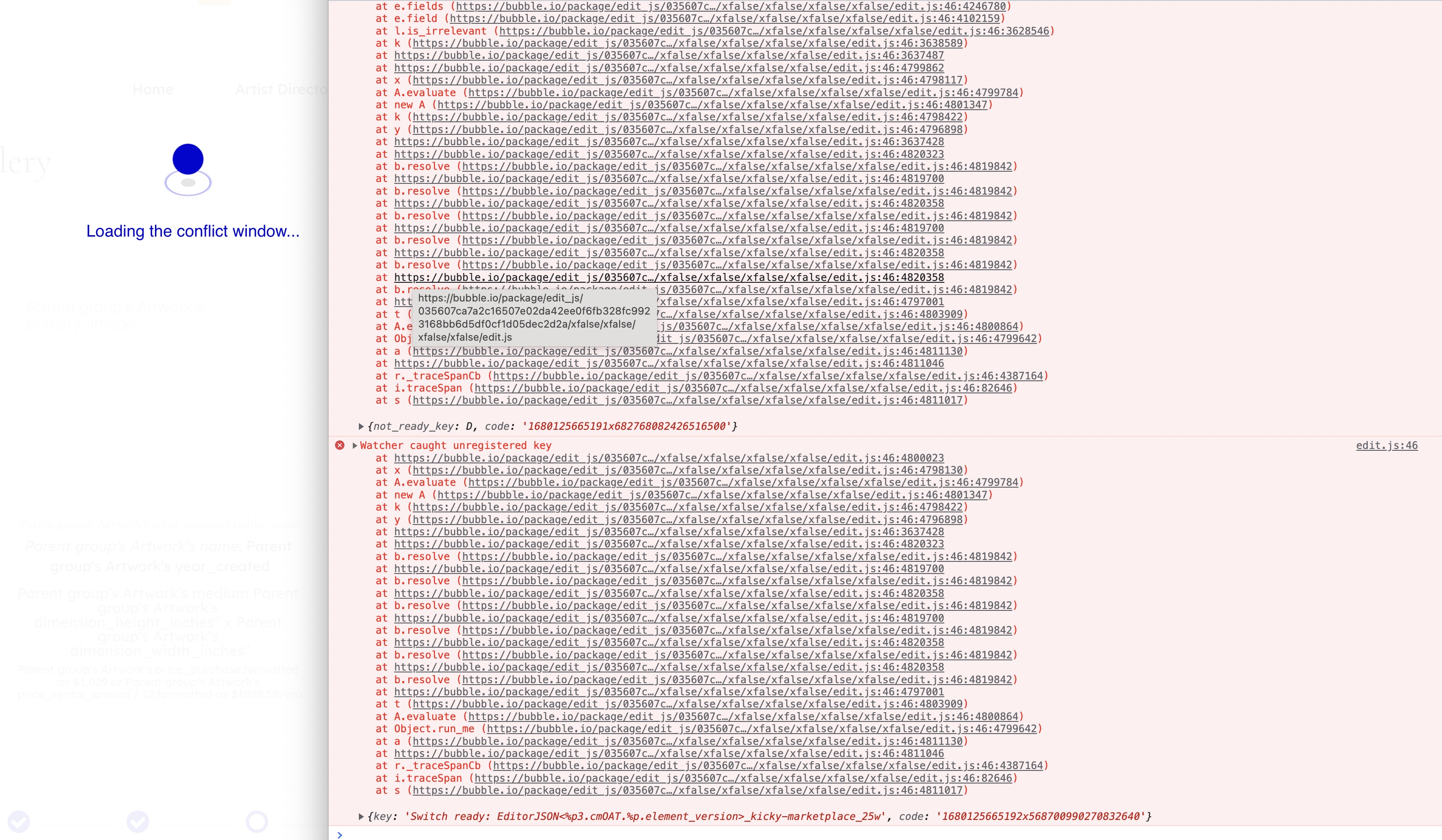
Stuck with this bug when trying to merge from live. Only way to resolve it is to use the Chrome Developer tool to hide the overlay and then click the “Cancel Merge” button.
Merge from live doesn’t work at all.



This is especially frustrating for agency plan uses developing for clients. My team develops a lot of MVP projects for clients. When we complete the handover the app goes from our agency account to their personal plan and we lose access to these key features which aren’t supported. The fact that these uses have to spend an additional $100 a month just to add a second development branch is unreasonable.
Just because it’s gone from agency to personal doesn’t strictly mean it’s for one developer. It just allows the user to launch their web app while we continue ongoing development. Regardless, you should be providing these key features to other solo developers anyway. Version control is important even if its just one additional version.
1 reply
Haven’t been able to actually test this out yet, but looks like a great improvement! Awesome to see this come to light.
Hi! At the moment, the Professional plan is only able to create one custom branch. However, this will likely change as we monitor utilization of this feature. Thank you for your feedback!
1 reply
Amazing! This is the kind of feature that takes a product to another level and makes me glad to have chosen Bubble as the no-code tool to focus on and build my career on top of.
Sorry to hear you are bumping into an issue? Have you filed a bug report yet?
And just to clarify, this only happens when using the “Sync with Live” function?
1 reply
Yep, bug report filed. Waiting for next business day on support.
Happens any time I try to merge into a particular branch.
1 reply
On the professional plan, can you not have two collaborators working on the same app? Should there not be at least two branches so each person can have their own branch? or is this the case already and the branches on the professional plan are based on login?
1 reply
This is great.
How do we deploy to live from another branch, that is not the main branch? In the old system it was possible to deploy to live from any version…it would be terrible to lose this functionality.


I don’t see any button for ‘deploy to live’…in the manual the video is for the old system.
1 reply
I can’t try it out yet (I’m on the Professional plan). Do you have to unlock it somehow? Or will this be rolled out gradually.
2 replies

Great work. Could you consider to add background red color to the indicator, when turn in to Live environment?
I often confuse to edit in Live, thinking I’m in Dev.

Fantastic work Bubble team! This is really great.
I am on the Professional plan and also confused as to how to get more than 2 branches, as it keeps asking me to upgrade as multiple branches ‘is only available to professional plan and above’. Is this a bug?
Secondly the naming of the branches link is somewhat confusing. Previously if you had a version called ‘staging’ for example, the URL would be ‘…version-staging…’
However now it is version-{random_number_letter_combo} which is not really logical.
Anyway, excited to get using this!
Deploying to Live is only possible from the Main branch to encourage a cleaner deploy pipeline through Main
3 replies
If you aren’t seeing the new version control system, there could be 2 reasons:
@nick.carroll I think it’s ok that creating new branches is only available for bigger Bubble plans.
But it would be great if at least Hotfix Branch was available in the personal plan.
Sometimes you have a big update in development and a bug appears, the Hotfix fixes that.
Thoughts?
1 reply
You can always temporarily use the larger plan, then downgrade again.
Ok it’s now visible on my interface.
I haven’t done anything. I think you just need to wait for the rollout

Hey @nick.carroll I’m on the pro plan for an app already and can’t seem to create additional branches even though I should have the ability, figured I’m not the only one so posting here instead of a bug report:

Hi! There are changes coming soon that will address this concern that you’ve surfaced. Thank you for your patience!
1 reply
Thanks!
Thank you for filing a bug report!
Thanks @nick.carroll
For my use case I just utilized the HotFix feature on the live app.
Would best practice be, after utilizing the HotFix feature and deploying to live, to make the same changes in my development versions? My assumption is that if I do not make the same changes in the development version, then once I do deploy to live from development, the changes made using the hotfix would be overridden.
1 reply
Thank you for your feedback! Our team will look into this.
After using the Hotfix feature and returning to my main development version, I was horrified to see 15 issues in the issue checker when there previously were 0.
I refreshed the page and they all went away thankfully.
Might be something to look into. I will not submit a bug report as it is non-reproducible (at least I hope)
FYI, for anybody else, you may want to make sure you use save points before playing with the new features in the event something more serious may go wrong that a page refresh wouldn’t solve.
1 reply
Yeah so once you deploy a hotfix branch to Live, all development branches will be out of sync. We have a warning in the version control side panel as well as an accelerator to syncing that branch with Live so it gets the changes that were made from the Hotfix
If you see this pop up again, do you mind checking the console to see if there are any errors?

Hi all. I haven’t updated to the new version yet. But yesterday I had problems merging from one version to another. There are several versions for development on the project. I’m trying to merge updates but nothing seems to work. I don’t know if this is related to the Bubble update. But until that moment, everything worked correctly, I merged every evening, everything worked correctly.
Today the problem remains. I wrote to support. I am writing here for information.

In fact we really only have one development version/branch now, since Main counts as a version but is kind of special and shouldn’t be used for active development…
So really this is a downgrade for tohse on the Professional plan?!
@konrad1 Read the conversation from “Introducing Bubble’s New Version Control - #42 by sites”.
It sounds like it was recorded that the Professional version will have several.
[UPDATE] Professional Plans will now have 2 custom branches, in addition to the new Main branch.
We agree that the pricing grid specifying two custom branches/versions is misleading with our recommendation to avoid developing directly in Main - so we’ve added an extra branch. Hope this helps!
If you are on a Professional plan, you will see this updated allotment immediately. If you are on the scheduled tier, you will see it tomorrow at 9a EST.
1 reply
I was excited about this announcement, until I discovered it doesn’t benefit the Personal plan whatsoever. It isn’t “version control” for anything other than the “Premium” plan, since version control at the very least allows custom branches and merges to occur, not just restoring of backups (a.k.a snapshots). I get that there needs to be some differentiation, but instead - why not consider limiting the number or depth of branches for the personal plan (heck, I’d be happy with 3 custom branches, just 1 level deep!). Forgo the approvals and multi-team version control for Personal. Something to make an MVP developers life less stressful would be great!
In lack of proper version control, I’m relegated to extended release cycles if I’m working on several features - many of which may require changes in many places. My only option is to work long hours, fight hard to rapidly iterate features (and test them!) before I can perform a single deploy. I’m relegated to rapidly trying to build several features completely, to a fully working state, before I can even consider deploying it - since the features all get tested by different users and some are more complex than others. As an MVP, there’s no way I can justify the massive uplift to another tier of plan, especially without a paying customer stream.
Very frustrated by this announcement.
1 reply
As a founder, this announcement frustrates me for exactly this reason - it really hasn’t changed anything for a solo dev like myself. Glad I’m not alone!
Hi! We are rolling out a change soon to address this concern. Thank you for your feedback!
I don’t think the personal plan had multiple versions before either, so welcome to the party
Great, it works. Could you add the same behavior to the Components panel?

Glad to see bubble shaping up as a Full fledged, software dev tool, with all these developer loved perks!

Adding my seconds to this - I think it would be nice to even have just one more branch on the personal plan

@nick.carroll
I recently delete a branch, and want to recreate a branch, which named as same as the deleted one, but I can’t with error(The branch name is already used)
Is it impossible to name a new branch even if I have already deleted ?
1 reply
We recently signed up for the Professional plan and are using the branch feature.
We are not convinced that the Professional plan has a limit of 2 branches and the new Growth plan allows up to 10.
We are disappointed with this announcement as we thought the Professional plan would automatically migrate to the Growth plan.
We would like to consider moving to the Growth plan even if we have to pay the difference, can we inquire?
1 reply
If you are on new version control, this is a bug. You should be able to use the same name for a branch as one that has been previously deleted.
Do you mind filing a bug report?
Hi! You should be able to move your app from Professional to the new Growth plan by navigating to Settings > App Plan and selecting the new Growth plan when upgrading your apps plan. Let me know if you have any issues

Not sure if this is bug.
Copied three “on page load” workflows up from Main into a Hotfix. All good.
Then synced Live back to Main.
It did not recognise the steps from Live as identical (although I have seen it do this before) and so duplicated every step.


I have 2 branches:
Do you mind sharing a bit more about how you are currently blocked? Depending on your plan, you should have at least 1 more branch for development. This branch can be created from Main or from your test branch for any development work.

Hi @nick.carroll, My entire app is built in development-2 (not the main branch). I’ve been stuck there since 2020 (Bug report #8967) because of the known version sync issues.
@nick.carroll Should I bet my life’s work that there will be no issues?
I have three years of development work without ever syncing to main.
In short, yes. There is also a very safe way to do this.
Situation 1: Your Live = development-2 (ie no open work in that branch at the moment)
Main, click “Reset to Live” to make your Main branch the same as whats in Live. You can now delete, or just sideline, the development-2 branch. You now have a clean Main to create new branches and start new development work.Situation 2: development-2 has work that does not yet exist in Live
Main, click “Reset to Live” to make your Main branch the same as whats in Live. This gives you a stable place to start the merge with development-2
development-2 to save the work that exists in development-2
Main into development-2 using the “Sync with Main” action to ensure there are no conflicts. Since Main is up to date with Live from Step 1, there shouldn’t be any conflicts.development-2 into Main to get Main up to date with development-2. Once you are confident they are the same, you can go ahead and delete or sideline development-2 & remove the safety branch you created in Step 2.Let me know if you have any questions
3 replies
@nick.carroll I’m going this route.
I think there will be conflicts. Right?
Main will look just like live. And since development-2 contains changes not yet in live, there will be conflicts here.
P.S. - I did steps 1 and 2 and it seems OK so far. Thank god…I’m scared.
1 reply
So conflicts will only arise when something has been changed in different ways in two different branches - so it should be unlikely if the last deploy was made from development-2 But if there are, you’ll have the opportunity to preview what the conflict looks like if its resolved either way to help you make the right choice
Ok @nick.carroll I followed your directions and this seems to have worked perfectly.
I’m still cautious of sync issue. However, I’m very impressed with step three which is used as a double check for syncing issues.
I’ll report back later, but if there’s no issues this update might be such a big deal. In a good way.
thanks Nick!
2 replies
@NigelG , Have you tried using a “down tree” merge to verify conflict before pushing “up tree”. It seems like a built in way to audit for sync issues.
It was Nicks recommendation (below) and seems legit.
It took me a while to understand how this audit works. This video is the best resource. The 2min mark is where it goes into the mini audit performed by bubble.
Thanks for sharing that there’s still sync issues. I had to manually go over each workflow and condition back in April of 2020 when I trusted the sync. It took me months of work to get it right…bubble helped me go over each item manually as well. This was honestly horrible…I couldn’t sleep.
I think transparency is the most important thing here. I hope others document sync issues in this forum. I think bubble should also post known issues in the docs (like they did in the past) to avoid major issues.
1 reply
Hey Nigel - have you filed a bug report for the issue you encountered merging?
1 reply
Sorry to be snarky @nick.carroll but I stopped reporting editor Bugs when you stopped fixing them.
1 reply
