
Hey folks!
Not Quite Unicorns works on some of the most complex Bubble apps out there. You might remember that almost a year ago, we released Buildprint 1.0 - the documentation platform for Bubble apps that lets you chat with your app.
Today, we’re releasing Buildprint 2.0 in alpha (the Bubble forum gets it first  )
)
Want to try it out? Connect your app for free @ https://getbuildprints.com

Buildprint 2.0 is a complete rebuild. Old Buildprint is no longer accessible.
It’s now an AI and observability platform that connects your Bubble app to any AI - Claude Code, Cursor, ChatGPT, or any MCP-compatible client - and gives you the advanced logs, alerts, and debugging tools that Bubble doesn’t. Buildprint also lets you connect your Claude/ChatGPT subscription and chat right within the web UI to get started easily.
Here’s what it does.
- Use any AI with your Bubble app
- Advanced logs and observability
- Workflow log trace explorer
- Alerts and anomaly detection
- Automatically triage and debug issues with real data
- Plan new features and identify optimisation opportunities
- Get diffs and understand changes between branches
The goal is to get people excited about Bubble again and augment Bubble with the kinds of features that scaling apps and teams need to keep growing quickly.
Use any AI with your Bubble app
Buildprint connects your AI to your Bubble app. This means your AI has full context - your database, workflows, logs, and app structure - so it can give you accurate answers instead of generic ones.
Two ways to use it:
- In your coding agent - Generate an MCP server URL and add it to Claude Code, Cursor, or Codex. Ask questions like “Why are users getting blocked at checkout?” and get answers grounded in your actual app data, logic, and logs
- Directly in Buildprint - Connect your ChatGPT or Claude subscription and chat right in Buildprint. No setup beyond linking your account.


Advanced logs and observability
Bubble’s native logs viewer is limited. You can’t run complex queries, you can’t aggregate data, and you can’t see what’s actually happening at scale.
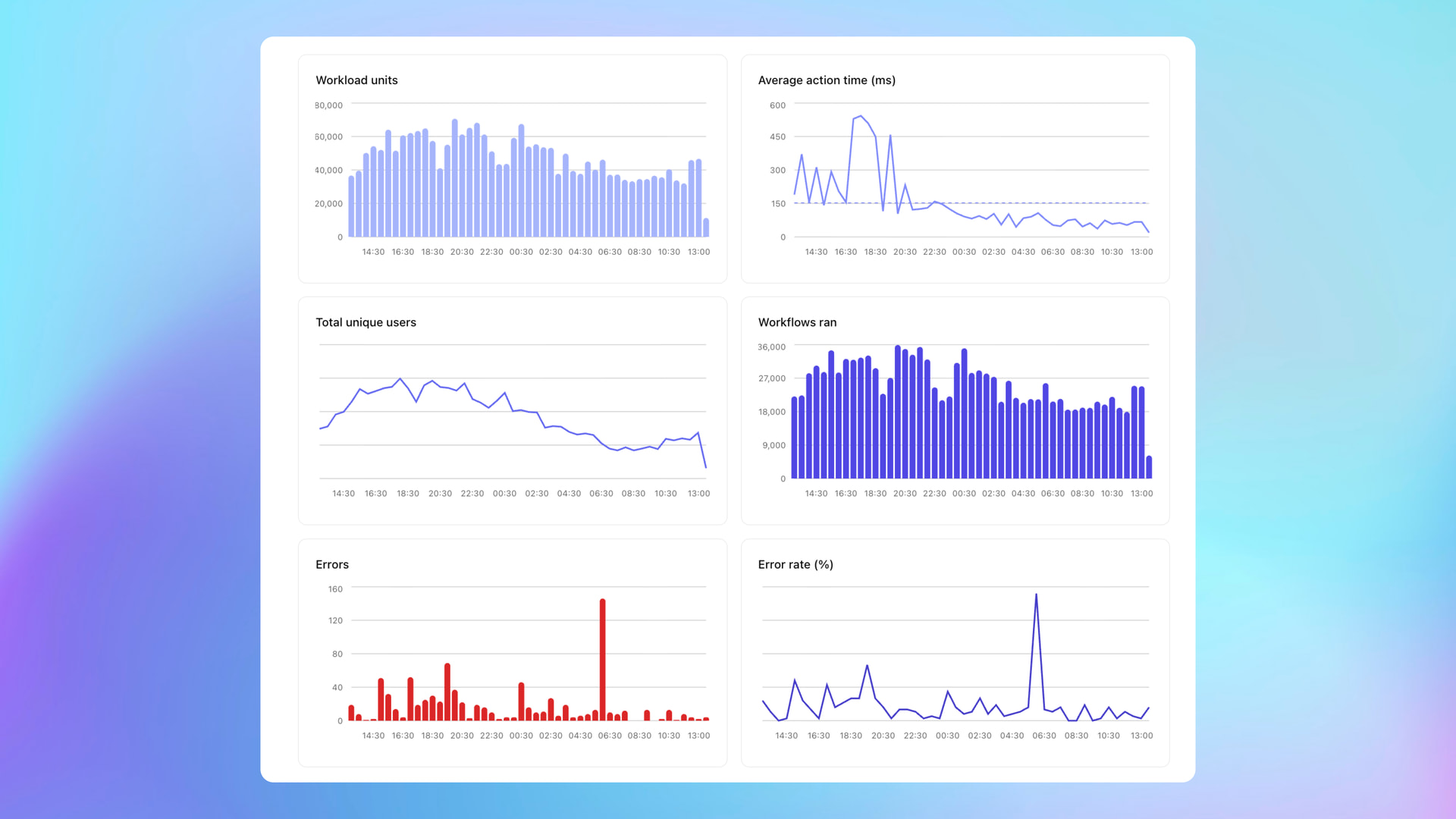
Buildprint streams your logs to a purpose-built analytics backend, giving you:
- Real-time dashboards – workflow runs, API calls, error rates, unique users, all updating live
- Advanced querying – filter by time range, user, workflow, log message, or run full advanced queries with Buildprint AI for complex analysis.
- Logs explorer - view logs, workflows, and traces in detail to accurately follow logic through your application.

Alerts and anomaly detection
Set up monitors that watch your app and notify you when something goes wrong – before your users tell you.
Three types of monitors:
- Threshold – alert when a metric crosses a value you define (e.g. error rate > 5%, workload for a given user > 5,000 in an hour)
- Event matching – alert on specific event patterns (e.g. a particular workflow fails)
Alerts are delivered via email to your team by default, or you can enable webhook forwarding for Slack, Discord, or any other tool.

Debug any issue
This is where Buildprint changes how you work. Instead of manually trawling through Bubble’s logs trying to figure out what happened, you can just ask:
- “What caused the ‘order_status’ field to change to ‘cancelled’ for user X?”
- "Why does user jane@example.com see a blank page when they load the dashboard?"
- “Show me all errors from the checkout workflow in the last 24 hours”
The AI has access to your real data and logs, so it can trace through exactly what happened – which workflow ran, what conditions were met, what data changed, and why.

Plan new features and identify opportunities
Buildprint understands your app’s structure – the database schema, workflows, pages, and how they connect. So when you’re planning a new feature, you can ask:
- “What tables and fields power the onboarding flow?”
- “Which backend workflows are unused and save to remove?”
- “How does the payment workflow connect to the user’s subscription status?”
- “What would I need to change to add a referral system?”
You get answers that are specific to your app, not generic Bubble advice.
Diffs and code review for teams
For teams that need to understand what’s changed in their app, Buildprint tracks versions and lets you compare them. This is particularly useful when:
- Multiple developers are working on the same app
- You need to review what changed before deploying to live
- Something broke and you need to identify which change caused it
To use it, ask Buildprint to explain or investigate changes in two versions.

How it works
- Sign up for free at getbuildprints.com
- Connect your Bubble app and verify ownership
- Choose your setup – use Buildprint’s built-in chat, or plug the MCP server into your preferred AI client
- Optionally enable advanced logging – stream your Bubble logs for real-time analytics and alerting
Setup takes a few minutes.
What’s coming soon?
Buildprint 2.0 is in alpha. We’re actively developing it and would love feedback from the community. If you’re working on a complex Bubble app and are frustrated with the current debugging and AI tooling, give it a try and let us know what you think.
Over the next few weeks, we’ll be adding:
- PR like interface for code reviews, understanding changes, and requesting merges
- integrations with tools like Linear so you can associate Bubble branches with specific issues and keep them in sync
- automations to programatically call Buildprint (e.g when support ticket received → kick off Buildprint agent to investigate and triage)
Agentic editing
And, most importantly, Bubble app editing. We are not going for an agent that can vibe code an app to 80%.
Instead, we’re working on the agent that lets you take your existing app from 80% to beyond.
That is the holy grail, and is something I look forward to sharing with you all very soon.
Happy to answer any questions below.


