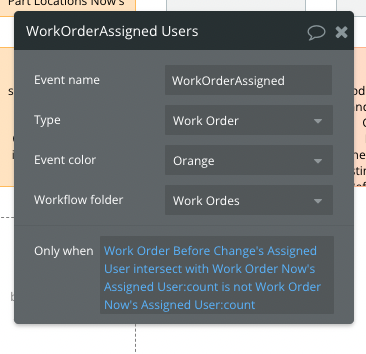
I want to activate a database trigger when 2 lists change.
Example:
John and Tom are assigned a job. The manager changes the assignment to John and Fiona. I want to use the database trigger functionality to kick off a workflow.
I am currently using the following:
I only found out recently it doesn’t work for 100% situations.
OK scenarios (changes, additions)
John & Tom → John & Fiona or John & Tom → Frank & Fiona
John → Tom
John → John & Tom
Empty → John
Where it doesn’t work (reductions)
John & Tom → John
(This returns 1 = 1)
I also looked at Merge but then the addition situation doesn’t work
Hi there, @jeffrey.j.obrien… I could be way off base (and maybe I am just biased against database triggers because the most badass CTO I’ve ever worked with hated them for some reason), but why do you need a database trigger here? I assume the process by which a manager changes a job’s assignment is well-defined, so can’t you just have a workflow that changes the assignment to the appropriate people when the manager makes the change? It seems to me like it should be super straightforward, but again, I could be (and likely am) missing something.
I just did some testing (although, admittedly, not with a database trigger), and it looks the example I made covers all of the scenarios by using the :minus list operator. Oh, and I also have the experimental parentheses feature enabled (which encloses everything before the :count operator in parentheses), so I don’t know if that would make a difference.
Give this a shot… Work Order Before Change's Assigned User:minus list Work Order Now's Assigned User:count is not empty.
Again, a similar expression appears to work in all scenarios for me, but I have it as a condition on a workflow event as opposed to using it in a database trigger.
Aw, crap… I was so focused on making sure the lists changed appropriately, I forgot to make sure the workflow didn’t run if the lists are the same… and it does run, as you pointed out. Sorry about that… I will keep playing around with it.
I have been playing around with this one pretty much since my last reply, and that’s just sad when it turns out the answer might be quite simple.
If the expression in your original post was working in all cases except for John & Tom → John, then adding an or after your expression and checking to see if the count of the first list is not equal to the count of the second list should do the trick because if the count of items in each list is not the same, then the lists can’t contain the same items.
So, in the end, I believe your expression would be…
Work Order Before Change's Assigned User intersect with Work Order Now's Assigned User:count is not Work Order Now's Assigned User:count or Work Order Before Change's Assigned User:count is not Work Order Now's Assigned User:count
I tested every scenario in my sample project (including making sure the workflow doesn’t run if the lists are the same), and it appears to work as expected.