
I have a hidden icon to clean a search box:

How to show the icon only when the box has some text?
I have a hidden icon to clean a search box:
How to show the icon only when the box has some text?
Easy. Double-click on it so that you have its properties box up. On the second tab click Conditions. Choose what the condition is, then (this is the confusing part) click show item (or something like that, going from memory).
Also you need to set that condition to be something like when input box value is not empty.
Hey @CarlosPires,
There’s a few ways to tackle this based on the interaction you’re going for.
If you’d like to have the icon hidden by default, be sure to set the ‘This element is visible on page load’ to be disabled in icon’s Appearance tab of the element’s Property Editor.
If you need to show the icon when the input is focused, you can set a condition in the Conditional tab of the icon itself to be ‘When Input A is focused’ and adjust the ‘This element is visible’ property to be checked.
If you need to show the icon when the input is not empty, you can set a condition to simply be ‘When Input A’s value is not empty’ and adjust the same ‘This element is visible’ property to be checked.
Once you can understand conditions, it unlocks the potential for meaningful interaction design. 
Thanks, @pier2design and @copilot, first, to hide the icon, I know how.
But in the second part, when I write something in the box the icon is still hidden …

Here is the app https://bubble.io/page?type=page&name=tb_contact_types&id=condolab1&tab=tabs-1
Hmm… you could try the opposite: make the X show by default but use the conditional to hide it when the value is empty. Just a shot in the dark but reversing the game has worked for me in the past.
Unfortunately I can not get there.
Because someone helped (do not know who), it is now working, as soon as it gets focus.
But it must to stay visible only when have typed the first letter …
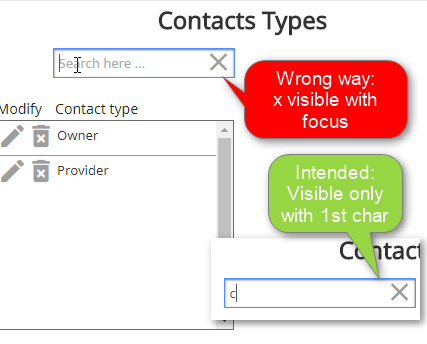
It could be one of these situations:
Shows the icon X when the searchbox;
But how to implement?
This way don´t work too:

On the Appearance tab of the properties dialog, there is a checkbox “this element is visible on page load” (or something like that - I’m going from memory). What is the state of this checkbox for your icon. It should be unchecked. This way the icon will be hidden by default and then based on your condition, when you type in the input, it will become visible.
Yes, it is correct, “This element is visible on page load” is unchecked. When the page loads the icon is hidden.
The problem is that it is visible when the box receives the cursor, without any characters. It should appear only when it has the first character.
It’s an icon to clear the content of the box, but the box still does not have any characters and the icon has already appeared to clean … nothing!
Just to be sure, I’m saying for the icon, this should be 'un-checked’.
Secondly, in your conditions, I would go with the ‘and’ option. and remove the condition with the ‘or’.
If it still doesn’t work, I would try removing the searchbox is focused part of the condition.
Sorry, I’m in a rush so I’ve only scanned your comments - sorry if I’ve missed something and suggesting things you’ve already tried.
Sorry, I meant “unchecked”.
I have tried all this and it does not work.
Thanks for your interest in helping.
For when it is possible to see here is the app: https://bubble.io/page?type=page&name=tb_contact_types&id=condolab1&tab=tabs-1
The icon is hidden.
This is probably because of what I just answered in your other thread 
The condition must react to Searchbox’s typed text, or it will not disappear until you actually return a search result.

Following this argument, the condition would be, “This icon is visible when the Search Box has typed text,” but it can not be constructed like this.
The “This Search Box” function is only shown if the selected element is the box …
Then it would have to be “This search box has text typed” … and what to do to the icon and how?
Added after seeing this threath How to create a new thing from a search box?
Hm, that screenshot is for another question …
You should still be able to find the SearchBox in the list of elements in the Icon’s conditions?

I recreated these steps again with new elements and it does not work. Does not show icon.
Did you have the opportunity to open my app?
Hi again Carlos
I just tested it myself, and you are right, it doesn’t show up, even when there’s typed text. To my knowledge, this should be working, and I suspect this might be a bug.
I would report it at https://bubble.io/bug_report and see what they say. It might be a quick fix.
Sorry for posting without actually testing it, I just assumed it would work.