Hi @mszaxaroff
Sorry for my lateness, I will release it soon.
Thank you for your patience.
I’ve coded a custom thing to convert existing img src = base64s to file URLs, but when I upload new images in the Quill editor, they’re embedded as base64s - that’s what I’m looking to change - is that possible?
Oh, I got it now.
Let me check it and its delta structure to see how it stores the embedded images. We need to use HTML or Quill Delta to store content, when we use the plain text images stored in base64 format.
Hey! Thanks for your great work on this… and regarding your answer here about streaming, I tried several ways to make this happen…but no lucky. Do you have any idea how to insert text while streaming ??
Did you find out the answer to this? Is it possible to embed images using img src URL rather than img src base64?
Thanks for the update! This was important for me! 
When we want to insert an image via URL, Quill’s delta (content) will look like this:
{"ops":[{"insert":"First Line\n\nThird Line\n\n\n"},{"insert":{"image":"https://a11cc7327bf2e336a7d1e3bfe2c366e8.cdn.bubble.io/f1692798108294x902168513112584700/Plotly%20Logo.png?_gl=1*213awx*_gcl_au*NzA1ODk1ODQuMTcwNzU3NTE3Ng..*_ga*MTc1MTIzOTUzNS4xNzA3NTc1MTc2*_ga_BFPVR2DEE2*MTcwOTgyNzQwOS4xOS4xLjE3MDk4Mjc2ODEuNi4wLjA."}},{"insert":"\n"}]}
So, you can insert the image’s URL by making changes in the delta in the database with the same format as above.
Note that you shouldn’t save it as text because in that case the image will be saved as base64.
Sample page with edit access:
Quill Content (bubbleapps.io)
Hey @mkugler2701
I hope you are doing well.
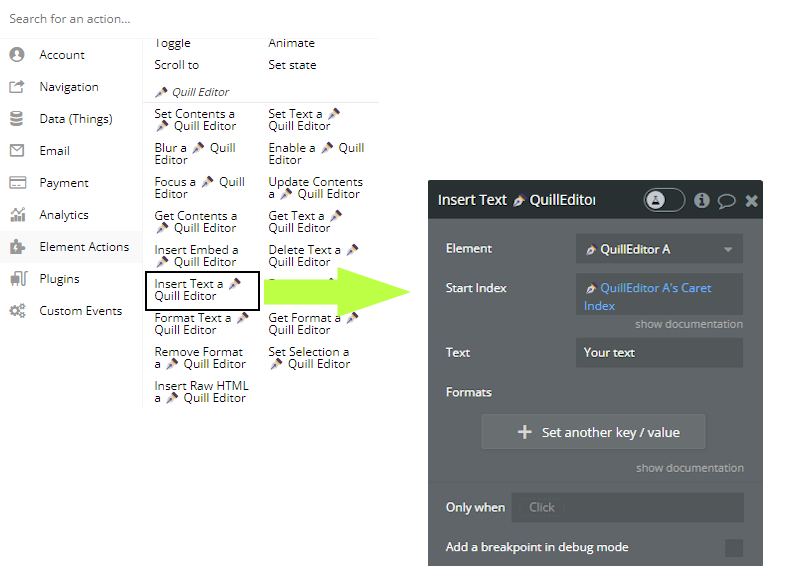
You can use the Insert Text action to inset text into the editor like this:
Thanks for your reply!!!
I tried using this plugin - OpenAI ChatGPT Real-Time Streaming Plugin | Bubble
Didn´t work… but do you think it is possible to use inside Quill editor?!
It would be GREAT if possible!!!
Thanks again…
Hey, I haven’t tried this plugin myself, but I’ve seen some people do what you want with the Quill plugin.
Maybe you can post a new topic on the forum and ask them how they used OpenAI to make it work.
But be careful, the plugin you picked is not very secure.
This Plugin saved my life, because there is no other plugin available even any premium, that offer such functionalities like inserting data dynamically, getting different types of data formats, like html, plain text and delta.
That is awesome, Again thanks for this plugin, making it for free.
But, I noticed a bug, ( Issue with inserting dynamic data more than one time continuously )
Note that I am using auto binding option, and it auto saves data each and every time when there is any change in text, which is working fine.
And Note that: I am inserting text index from { length of quill editor + 1 }
And my second request is to add functionality of Markdown.
And my another request is that can you add a functionality of displaying a group focus on cursor position, like in mention
There is an issue while selecting text, Because When I clicking on any other button or group, it unselect the selected text.
And this is the same issue with cursor position.
I want that it should always be in focus.
Hello @zamadshakil
Thank you for kind words about the Quill plugin and leaving a review. 
I will check it out. I think you are right about the issue. 
I tried to add the Markdown to the Quill but it’s not doable, but I plan to build a powerful Markdown Editor plugin.
Could you please let me know more about it? When should it be displayed? on certain words or with an action?
I don’t know if it is possible or not, but I think you can store the selected text and the cursor position as state if you need them.
You can use a MENU CONTEXT… I have an app using it and works perfectly.
Example: I type something, select the text, mouse right-click and opens the menu… than I have some options, one of them is ask GPT the select prompt…after that, the response from OPENAI is inserted after que selected text…
There is a plugin for this menu context - CONTEXT MENU PLUS
@NoCodeDataArtisan just discovered this plugin this week and absolutely love what you’ve built. We have used custom Quill.js instances in the past, and this is a much more user-friendly version of the raw code.
The one thing we would love to be able to do is listen for enter events on the quill element. We love being able to use Quill for chatbox features, and so being able to tell when the enter key has been pressed and then trigger Bubble workflows would be a dream come true. Thank you for an amazing resource!
Hello @maggie,
I trust you’re doing well.
I appreciate your suggestion for the practical feature. I’ll begin working on it shortly and will update you once it’s added to the plugin.
The event to track when a user presses the Enter key has been added as requested. Please update the plugin to the latest version and enable the ‘Enter Event’ feature on the element property editor.

Then you can use the ↲ Enter Pressed event.

We would appreciate it if you could take the time to leave a review for the plugin and share your experience with other users.
I am completely amazed by your service for this plugin. Thank you for adding this feature! Leaving a review now. Have a great weekend!
We are delighted to have satisfied you with our service. Thank you for your wonderful review of the plugin.
Should you encounter any issues or have any questions, please do not hesitate to contact us; we are always here to assist you.