
We are working on it.
A new tool will be added to the toolbar that will give you the HTML content of the editor, where you can add alts to images.
Does this method work for you?
Hey @matthewzammit 
I totally agree with you about the toolbar-less preset and we will definitely add it to the plugin. 

But as for using the editor as input, I don’t suggest it.
In any case, this plugin increases the load of the page and compared to the default bubble input, it may cause a drop in the performance of the application. I don’t have detailed information about this, but be sure to test it in various conditions before using it widely.
If you explain more about the input you need, maybe we can provide you with a small plugin to solve your challenge.
Thanks again for sharing your experience with us. 
I’m using Quill only in particular situations. And using it this way on non-critical pages.
All I’m after is a single-line input field which has the function added to it to detect when its contents changed while it is still in focus.
Then I can run workflows with it saying: When Input Text changed…
And because that is being read in real time, I can pass the contents to a state, or database, all while it is still in focus.
As expected of you, you have been attentive.
Have you searched for available plugins for this feature? I think I have seen some examples. 
If the desired sample is not available, our team will create this plugin for you at no cost.
Your feedback is highly valued and this is the least we can do for you.
I was using InstantText to read live text from an input field, however, that plugin does not seem to have the ability to trigger a workflow based on text changes in the field which is in focus.
[ input field ] → [ add text ] → [ detect change in field while still in focus ] → [ Trigger workflow ]
I understand the feature you need.
I will talk to the team to make this plugin for you.
Yeah, that would be cool)
@NoCodeDataArtisan Hi! Looks like you’ve built a dope plugin. Just installed it and started playing with it. A few questions
-
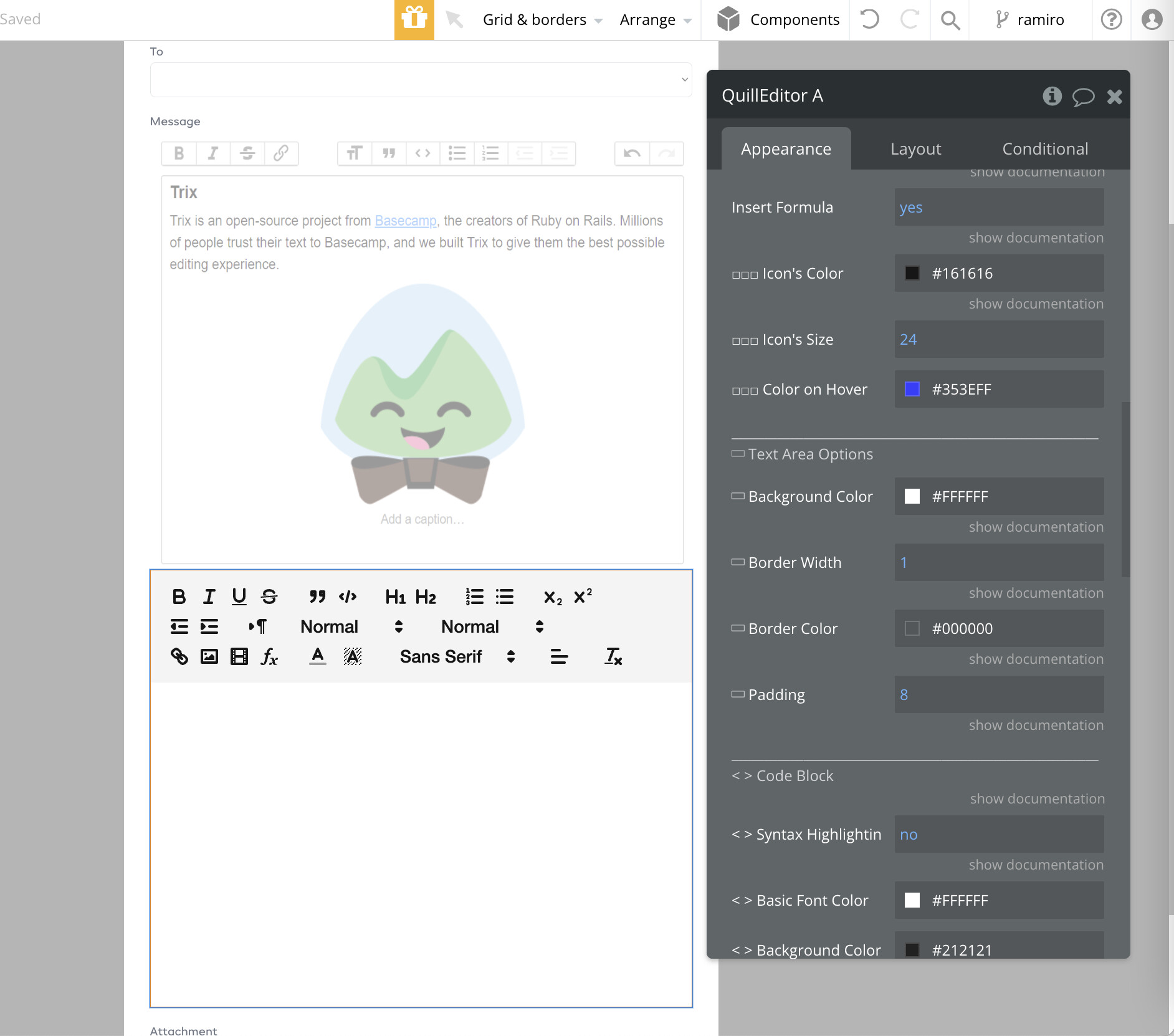
I can’t figure out how to get a border to show on the text input area. I thought I updated it properly in the settings but it’s still appearing without a border. Screenshots below
-
Is there a best practice for using this to properly format rich text/html in emails? I’m trying to use the rich postmark plugin, but when I send the emails they don’t go through at all (assuming postmark doesn’t recognize the value as text). Which of the three formatting options would I use to send rich text emails?


Hey man!
Thanks a lot, it really makes me happy to hear that you’re digging it! 
So, about the first issue, it looks like the color you picked has zero opacity, which is why the border isn’t showing up.
As for the second thing, unfortunately the plugin doesn’t have the ability to export content as HTML just yet. We actually added that feature at the request of one of our users, but it hasn’t been fully implemented yet. The image you posted is for using an editor that can handle HTML input.
I’m chatting with the team right now to get this feature added ASAP, so stay tuned for that.
Thanks again for sharing your experience with the plugin and for the rad suggestion! 
Hey @Toby1
 Good news
We were able to add the feature you wanted to the plugin quickly.
So just update the plugin and now you can use the HTML of contents straight from the editor’s state.


Plus, every time user makes changes to the text, the HTML will automatically update too.
Thanks for the suggestion to add this feature, it’s much appreciated!

Amazing! I’ll try it out tomorrow. Thanks for the quick response and work on this
@NoCodeDataArtisan worked like a charm!!! You are a boss. Thanks so much.
The only thing that seems to still be an issue is that if I add a picture to the input, it doesn’t include the image in the email. Any ideas? Not a huge deal as we can just tell them to attach images since that seems to work


Have you tried using image embedding? I guess it will work out this way.
Hello @bubbledeveloper , I hope you had a good day 
For the image’s alt feature, with the latest version of the editor, you can get the HTML of the content, make the necessary changes, and set it back to the editor. You can use this method to add alt text to images.
Please let me know the result.
Also, the HTML button has been added as a test. You can add it to the toolbar and provide the ability to edit HTML in the editor. But we are still testing it so as not to harm the performance of apps.
Hey just installed and looks great so far! Two questions:
-
I have header 3 enabled but it doesn’t show on the toolbar. Only a blank space. Also, the placeholder text is indented a bunch for some reason.

-
Is it possible to change the spacing between formatting options in the toolbar? Right now they are pretty close together when compared to others like the one here in the forum, Slack, or my previous one which used CKEditor.
Hi @NoCodeDataArtisan !
This plugin looks really promising, and it’s a really huge improvement for our app in comparison to the Rich Text editor we are using right now.
So far, I have one question that is preventing us to use it: if we already have a lot of fields saved in our database in BBCode format, is there a way we can set this text as input of the plugin?
It’d be amazing for us if we perform a smooth&transparent transition between plugins. It means by default showing the BBCode text we have in our database, but if the user changes/saves it with the new plugin, we’ll save it in Quill format. And, of course, we’ll add a condition for telling to Quill rich text editor if input is in BBCode format or Quill format.
Another possibility is to perform a migration format of our data from BBCode to Quill, that then a code migration should be developed (not sure if there’s already sth to use).
Thanks!
Hey @rod.danan
I really hope that the plugin comes in handy for you.
It looks like the reason for both questions you asked is because the toolbar icons have been made bigger. For the second question, you can increase the gap between the items by using the “Build custom toolbar” feature and inserting a Gap.
Just a friendly tip though, it might be a good idea to make the icons a bit smaller to keep everything looking balanced.
But hey, if you really need the icons to be big, no worries! Just shoot me a message and I’ll be happy to make some different settings for you.
And of course, if you have any more questions, don’t hesitate to ask! We’re always here to lend a hand. 
Thank you for your kind words about the plugin!
Currently, it’s not possible to directly input BBCode text into the plugin, but you can use HTML or Quill delta instead. However, we appreciate your suggestion and will consider adding this feature in the future. We understand that a smooth transition is important, and we’ll definitely consider adding both the BBCode input feature and the migration feature to the Quill editor.
We appreciate your feedback and thank you for considering our plugin for your app
Ok what about the placeholder text which has a bunch of horizontal padding? Anyway to fix that on your end?
Hi!
Great news!
I have a few questions.
- Did I understand correctly that I have to put a multyinput on the edit page and get the data from the plugin via getHTML?
- If I understand you correctly, my image is encoded and gives out a very large chunk of code, is this normal?
- If this is normal, should I add alt=“description of the image” at the end of this year?
- I’m not quite sure how I can save these changes to HTML, can you clarify that?

