Hello @ecomprocharly
I hope you’re doing well.
Could you please share some screenshots of the RGs and DragIt setting and how you set up workflows?
Hello @ecomprocharly
I hope you’re doing well.
Could you please share some screenshots of the RGs and DragIt setting and how you set up workflows?
Great plugin. Been using it but all of a sudden it now wont register dragging something on the first drag. It will freeze and then I will need to drag it again for it to work. Has anyone seen this before or know of the fix?
Hello @dbom009
I hope you’re doing well.
We haven’t received any reports from other users regarding this issue. Does it still persist? Could you please provide some details about the DragIt and the RG settings?
Thanks again for this great plug-in. I am having an issue figuring how to make changes to a dragged and dropped item. I am setting up a kanban with status columns. I sue the example from the plugin, but it assumes that each board has a list of tasks in it, which doesn’t work with my data structure. So, I want to make a workflow that is Dragit end grabbing → thing to change = this Dragit’s Dragbged Item. Then I want to change the status to the destination column, but can’t see how to do that… I imagine it is something simple that I am missing… help would be appreciated.
Hello @TekaTeki,
I hope you are doing well.
Would you like to change the of items only, or also modify their rank?
just the data on the item.
hi @NoCodeDataArtisan - thanks for looking into this… I used make changes to task, status = this Drag-it’s related item’s status and that seems to do the trick… thanks!
I think this works if the repeating group in each length are the same length… but what if they are different. Eg I have one column with 2 times and the next with 100… I want to drag the 200th into the one with 2… if the RG is set to 100% then the spacing of the kanban cards will be all over the place… am i missing something?
Hi @TekaTeki,
There should not be any issue with these use cases.
Could you please check this demo page:
I have a repeating group and use DragIt for sorting my lists.
What I would like to do is also have the option to drop one list item onto another. In other words, both sorting AND dropping within the same list.
I cannot seem to figure out if this is possible with DragIt, but also if it is, how to do it.
Any ideas?
Thanks.
Another question. Is it possible to detect if there is some modifier key, such as ctrl or option, pressed when dragging/dropping is either started or ending?
My best case scenario is to detect a modifier key when one item is dropped onto another (mouse up).
Thanks.
Hi @ken1
I hope you’re doing well.
I didn’t fully understand the use case well but if you need to move items between two list, you can use two RGs and two DragIt element and use this section to control sharing:
Unfortunately, the plugin doesn’t support this feature 
For the first question, I have a single repeating group. I can sort and drop a list item between two other items.
What I’m looking for is a way to also drop a list item on top of another list item. This would be used as a trigger to group the items together. Not for sorting.
For the second question, is there some way to detect a modifier key either in Bubnle native or another plugin? The idea is to drag and drop as usual and get normal sorting behavior. But if a modifier key is detected then instead of sorting (or in addition to it) I could trigger a different behavior? Like removing a list item from a group.
Thanks!
If you require these features, you need have nested RG. The inner RG will group items together while outer one will the main groups.
Just subscribed to this plugin and looks fantastic @NoCodeDataArtisan - can’t wait to embed this into my app!
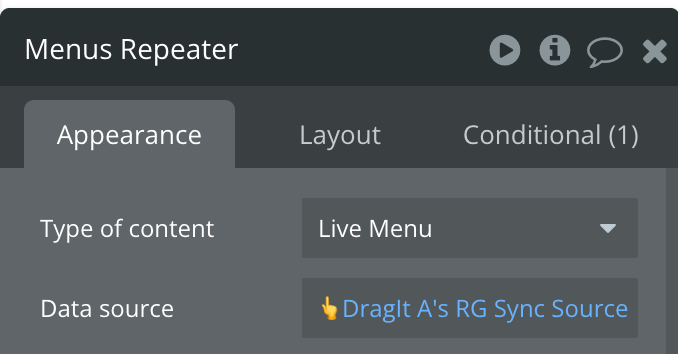
I’m a novice here and I know this is probably very simple but I just want to set the order of a data type (Live Menus) and save it to my database in the order the user leaves it in.
I can’t even save any changes to the database at the moment as I don’t understand the save workflow (I looked through the forum but there is a lot of references to lists and I just want to move around data entries)  I would like this to autosave.
Can someone help me out? Here is what I have so far:
I’m using this method to update the sort index on a thing when it’s drag and reordered - this is working really great!
I’m also looking for how I can do it when a thing is deleted from the list - this doesn’t seem to trigger a state change in the drag it element. Is there anyway that when something is deleted you could update the JSON state and trigger the ‘Sorting Updated’ action on the plugin please please please 
Hello @christopherconaghan ,
I hope you’re doing well.
Sorry for the late reply.
The best way to keep order of items is to store them in a list of things when the list is not long. For example, you can have a field on user data type as List of Live Menus and use it as the DragIt data source. In this method you can easily add or remove items from that list and save the new order just by setting Updated List of DragIt as the new list.
Please let me know if you have any questions or require further information regarding this matter.
Hello @andrew13 ,
Sorry for the late reply.
I think when you delete an item from the data source, the JSON state should be updated automatically. Could you please make sure after deleting the item the original list is updated?
Hi all,
I am super new to bubble and currently experimenting a bit with the free version. Not sure if my journey will continue. I am trying to build an app that basically loads a customer gallery, where the customer can rearrange their photosgraphs (that I as a photographer have uploaded for them) to their liking, add texts and then send it to me. I will then make a calendar out of it. So the order matters a lot.
I managed using tutorials, reading the forum, to have the photos loaded and they’re also draggable now thanks to this plugin. Now, I am totally stuck at saving the order to my database, which I guess is a super easy functionality. There is a variable called “order”. My attempts so far brought me to either have all photographs having the same “order” (e.g. when moving the third item, they all have the value “3”) which is wrong. Closest I could get was indeed having the most recent moved photograph changed its index correctly to the database, but that leads to double values (e.g. when moving a photograph to position 1, it’s value becomes “1”, which is good, but the one that was previously on position 1, still has “1”, which is not so good ;-)).
So, my simple question: How can I ensure in a simple (step by step approach) that after sorting my “order” column is populated completely, correctly and with unique values for each photo.
As I said, I watched the various tutorials and also looked into every single example project, but I am really lost, also with the different versions that have been launched in the meantime.
Looking for some help!!
Thanks
Hi. Quick question.
If I have an element that I can drag to sort in a list and I have it set so I can click anywhere to drag it, can I also use a Handle? Or do I have to choose one or the other.
My goal here is to have two different sort modes.
Is this possible?