
Hi everyone,
My name is Mike, and I’m a product manager at Bubble.
Over the past month, we’ve been collaborating with power users to get feedback on our redesigned property editor. We’re sharing this preview because the beta launch will begin to roll out in phases on December 11, 2025, and when it does, you’ll have the option to try the new experience or stick with the current property editor while you get familiar with the changes.
Why we rebuilt the property editor
The original property editor served us well when Bubble was first built, but it was becoming outdated. We rebuilt its foundation to future-proof Bubble and support the platform’s evolution by:
-
Updating the outdated tech stack to make it faster for our team to iterate and add improvements.
-
Simplifying the UX and information architecture to make building on Bubble more intuitive and easier to learn.
-
Giving it a visual refresh to align with modern design patterns and feel more approachable.
Backend changes
We updated the property editor’s foundational code to make it easier for our team to edit, debug, and refine the experience, setting the stage for faster, more reliable updates moving forward.
Specifically, we migrated the frontend to SolidJS to make it easier to edit and debug PE issues. We also updated the design system with reusable components for more consistent design patterns across the editor. Finally, we improved file and information architecture to de-tangle functionality and reduce hidden dependencies, speed up engineer onboarding, and keep the codebase organized.
A sneak peek at what’s coming
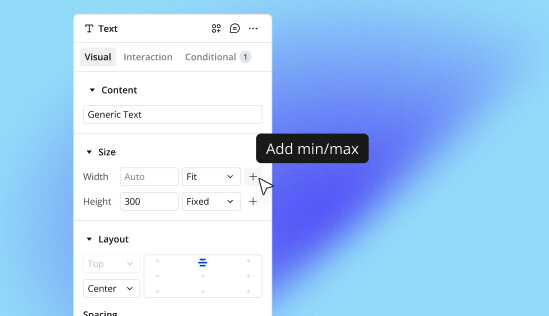
Some immediate changes you’ll notice: reorganized and renamed tabs, a cleaner and more visual UI, and a pinned property editor that can be hidden with the Esc key at any time.
Beyond the reorganization, we’re introducing better visibility of custom states and workflows directly in the property editor, so you can see what’s connected to each element without switching tabs. We’ve also addressed common points of workflow friction — for example, the ability to name conditionals and drag-and-drop conditionals.
The updated architecture also sets the foundation for future AI-powered features to help you build even faster.
Solving known issues
This rebuild has already eliminated several long-standing bugs, including issues with padding/margin values, color picker display problems, and conditional tab usability improvements.
We’ll be sharing more details as we get closer to the broader beta launch, but we wanted to give you a preview of what we’ve been working on.
When the beta rolls out, we’ll have a detailed migration guide ready that gives you a comprehensive overview of what’s changed between the old and new property editor, including exactly where to find properties in their new locations to help you get up to speed as quickly as possible.
Your feedback during the beta phase will be crucial in making sure this redesign truly improves your building experience.
Stay tuned for more updates!
— Mike