
Hi,
I added a dropdown, but on a Macbook it’s showing the native Apple’s style instead of white as in the dropdown settings. How can I remove this and just keep the background white?
Thanks!
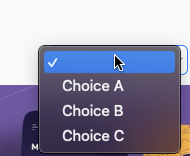
Hi,
I added a dropdown, but on a Macbook it’s showing the native Apple’s style instead of white as in the dropdown settings. How can I remove this and just keep the background white?
Thanks!
CSS on the items
-webkit-appearance: none;
-webkit-border-radius: none;
see my example: Bubble-solutions | Bubble Editor
just add this script in html element:
window.onload = function() {
var selectElements = document.getElementsByTagName(‘select’);
for (var j = 0; j < selectElements.length; j++) {
var selectElement = selectElements[j];
var selectOptions = selectElement.options;
for (var i = 0; i < selectOptions.length; i++) {
  var item = selectOptions[i];
  if (item.text.trim() === "") {
    selectElement.remove(i);
    i--;
  };
}
}
}