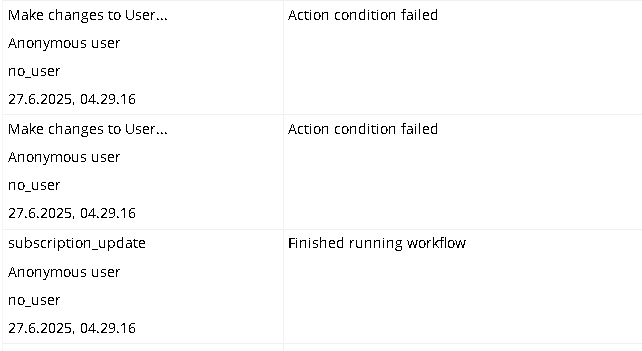
every time i run a backend workflow for stripe it has issue to identify what user it should make the change to.. the field “stripe_customer_id” is not empty and actually do match
but bubble cant recognize it..
im like thinking.. is this something to do with privacy rules?? but it cant be because in the workflow its set to ignore privacy rules..
hope someone can help me with this.. its has really been a struggle for a long time now
in the logs you see ‘action condition failed’ message which is saying the Conditional is not met. In your workflow action you have a condition with OR operator, which means one of the conditions you placed into the ONLY WHEN section of the action need to evaluate to YES. I can only imagine that is why it is failing as the conditions might not be met as you have hard coded two different product IDs, which may or may not be in your test or live stripe data.
Try removing that condition and see if the issue persists.
please read the message again.. as i write as one of the first sentences dont look at the condition failed.. that is not the issue.. its the user it cant find
The Subscribe User to a plan call is made, creating the User and subscribing them to the plan.
That triggers the webhook - but when the API WF searches for the User based on the Customer Stripe ID, it is still empty (as it hasn’t been set yet) - so no user is found.
Then, when the Subscribe User to plan action completes, you save the Customer ID on the User - but it’s too late by then, as the backend workflow has already run, and failed to find the User.
You need to do one of the following:
Either create the Customer in Stripe first, and save the Customer ID to the User before making the create subscription call (thus ensuring that the User has a Stripe Customer ID when the Backend WF actually runs).
or
Pass the User’s Unique ID into the Stripe call, and retrieve it in the request data of the webhook and use that to match the User, instead of the Customer ID.
but.. the thing is also happening in a update subscription event for instance changing subscription from yearly to monthly payment.. in the customer portal
its still cant identify the user.. and at this step the customer id should be saved on the user.. right?
and i know that the customer id gets stored on the bubble user because when they create the subscription i have a page when the customer id gets displayed after that
If you’re using a checkout session, you can pass the User ID as the client_reference_id parameter, or as a metadata value. That assumes your webhook event is a checkout session complete, as the client_reference_id is store on the checkout session object, not on any related subscription objects.
If your webhook event is a subscription event, then you can pass the User ID into the subscription object itself, as meta data, using the subscription_data.metadata object on the checkout session call.
e.g.
subsbription_data[metadata][user_id] = user's Unique ID
Then you can retrieve that User ID from the subscription object on the webhook request.
If you’re not using a checkout session, but creating the subscription directly, then you can pass the meta data directly into the call you’re using to create the subscription - then retreive it the same way
If you’re using the Bubble Stripe plugin (which it looks like you are), then I don’t believe there’s any way to do this, as the plugin’s functionality is very limited.