Hi I am new to bubble and so far have enjoyed it.
If I go to a wikipedia page about countries
I can click on the triangle and get a descending and ascending display order of that table on the same page.
Look at the red circle:

if I click the triangle again I get the opposite result, first going from A to Z then from Z to A
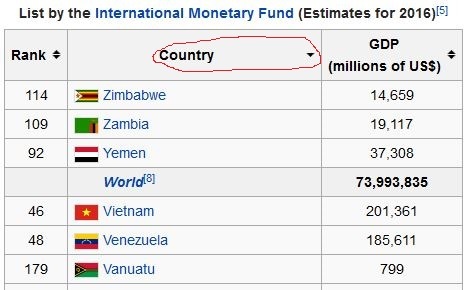
I can sort by rank, country etc.
Assuming that I have a database of Stadiums, I would like to sort it just like this example by name capacity Location etc.
I would like to click on the red dots and get the same effects as on wikipedia
I am using a repeating group to display the data. Is it convenient for this purpose?
What would be the easiest way of doing it?
I tried using radios, checkboxes, dropdowns, but I don’t get the same effect.
To summarize I want to stay on the same page when doing a sort/filter
Hi @jesus.avilagarcia  You could accomplish this by using custom states on the repeating group. Let’s say that your repeating group is automatically sorted by ABC order of the stadium name.
After it’s loaded, the user clicks a red ‘up’ arrow above the word ‘Giuseppe Meazza’. When this happens the repeating group will be sorted from Z to A order. This can be accomplished in the workflow by setting a custom state. So when that ‘up’ arrow icon is clicked --> Element Actions --> Set State, Element: [name of your repeating group]. Then here’s where you create a new custom state that you could call ‘Current View (type: text, list: no)’, and the value you could enter would be: “Z to A” (<–or any label of your choice that will help you remember what this state is doing).
Now, for this to custom state to be functional, you would navigate back to the repeating group, and set up a conditional statement like this: "when this repeating group’s Current View is “Z to A” (manually type that in), property to change --> data source, and then everything remains the same, but here’s where you would adjust the sorting function.
So, how do we do back from Z to A to A to Z? You could create another icon above the ‘Giuseppe Meazza’ word which is a red ‘down’ arrow. You could set a conditional statement on that element which is ‘this element is visible when repeating group’s Current View is “Z to A”’, and make sure the up arrow is hidden when the down arrow is visible. Then you’d set up a new workflow for the down arrow icon which would set the state of the repeating group, Current View to “A to Z”, and do almost the same process. It sounds a little tricky, but you’ll definitely get the hang of it after doing the first column!

