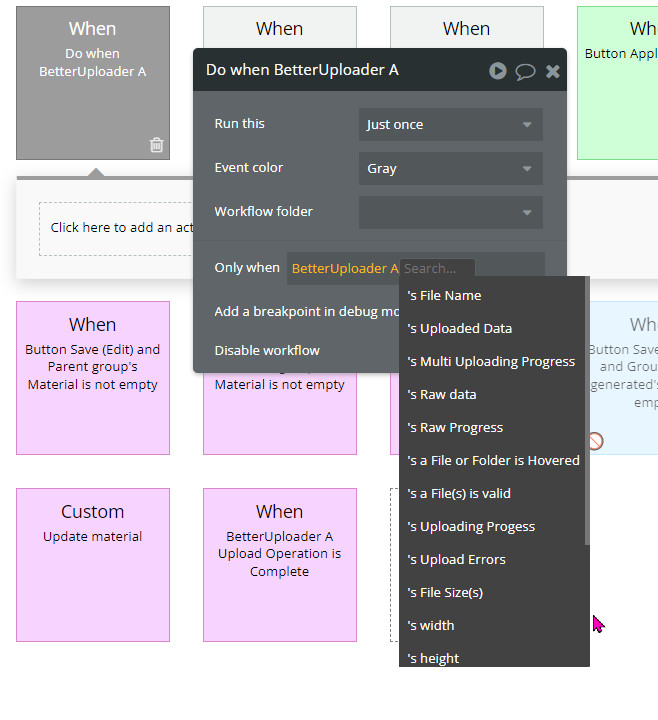
I have a condition whenever a image is staged, it appends a current date. So when I stage an image and another image (without uploading any), there should be 2 dates. But I only get one.
app
editor
According to your editor, it seems that I need to manually reset the uploader. So the plugin doesn’t automatically reset the raw progress to 0 when I stage a new image. Is there any other way for me to know when another image has been stage?
Oh I see what you’re saying, no, the plug-in doesn’t do that but I see why you’re trying to do that. I think there’s a much better way to do this.
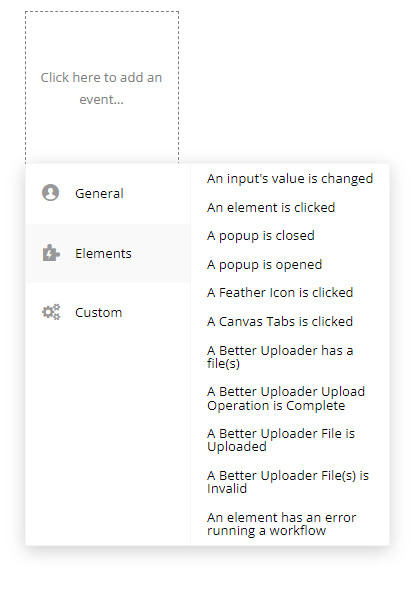
There is an event “When a file is staged” for Better Uploader. This activates every time a file is chosen in the Better Uploader. I believe this will be a lot more consistent than trying to use Raw Progress for this
I have wanted users of my app to be able to add .heic images. Your uploader has been working great. I upload the image then use another plugin to convert it to .jpg and compress it. Excellent. But all of a sudden it isn’t working. I can select .heic images, but they won’t display in my repeating group that displays the raw data.
I’ve gone back to your demo page, and it works just fine there. And I seem to have everything the same. And… it WAS working just a couple days ago.
I can then do whatever I want with those images, including convert them to .jpg, crop/rotate, and/or compress. I have been doing this on my app without a hitch for a few weeks now.
But all of a sudden, those preview images for those .heic files won’t display, or save, or edit. I have everything exactly as in your demo. And I can’t think of anything that has changed.
Does anyone have and idea what is going on? I really need this to work (like it was!). Thanks for your help…
I’m sorry that you’re facing this issue. My suggestion to you is breaking this issue down into chunks.
First, create a test page on your app. Then place an image on the page, and a better Uploader. See if you can display some raw data there. If you can’t at this point, then there’s probably a setting wrong on your Uploader.
Looks like you’re changing pages right after you upload the file. What’s happening is that you’re going to another page before the upload is done, thus the file becomes corrupted.
To fix this, upload the file in one workflow and use the “File upload process is complete event” where you’re going to run your “go to page” or any other workflows.
Sorry for the slow reply. Been busy with other stuff. And I haven’t had as much time yet to play with this as I’d like. But… I have your uploader on 3 pages on my app. It is currently not able to display .heic images using your uploader on any of them, no matter what I do.
So I created a dummy page with just the uploader and a repeating group on it. I CAN get the .heic images to display on this page. All the settings are exactly the same on this page where it does work and on my other pages where it doesn’t. So something on the pages on my app is causing this problem. It was working a couple of weeks ago just fine.
I’m trying to figure out what changed, but so far, haven’t figured it out. I’ve been trying to isolate various factors to see if I can figure out what is triggering this problem, but so far, no luck.
If you have any ideas, though, please let me know. Feeling rather desperate to get this to work. It’s exactly what I want, and the app won’t be usable in the way I have planned without this. Any ideas are more than welcome. In the meantime, I will keep poking at the problem until, hopefully, I finally figure it out. Oy!
Well it’s good that on a blank page your better uploader solution is working. As you might expect, something is probably conflicting with your solution. Some things I would check…
check the browser console if the error occurs. There might be some useful information here
make sure you’re using the new responsive engine. I am not supporting the old system.
make sure the uploader is visible when displaying the raw data. If it’s not visible, you’ll see that it probably won’t work
I’ve heard of the debug mode causing issues sometimes. Worth investigating
Hey Jonah, somehow missed your reply. But really appreciate your time. It is definitely something conflicting with the uploader. I just can’t figure out what changed from when it was working a week ago. The good news is that, if I view it on my phone, it IS working just fine. I have so many things I’m trying to get done right now, I might need to circle back in a day or two to give this another crack. But this is a reasonable list of ideas. Really appreciate it!
I still cannot get BetterUploader to do what I need. The main problem at this point is that I’m put the raw data into a repeating group. And I’d like to be able to edit the image and add a caption then upload each image independently from it’s cell in the repeating group. For example, on your demo page, you can display the images and delete the ones you don’t want before uploading.
However, when I delete an image or add a caption or upload it independently, the workflow often deletes or edits or uploads the wrong image in the list.
So, if I display 4 raw images in a repeating group and delete image number 2, sometimes, the workflow will actually delete or upload one of the other images. I have used the same workflows as in your demo page, as far as I can tell.
I was about to test the plugin out, but it’s not displaying on the page, so I can’t upload any files. It’s just a blank element
Just tried loading the page with my adblocker off and the element is working now. I have no doubt that some users will be using the application with adblockers on.
Maybe a fix would be to add an action that will toggle the uploader? This action could then be used on an element (maybe a button) so that on click it will prompt the user to select a file.
@jonah.deleseleuc
When uploading multiple files, what is the order that the files are uploaded? Is it random or are they ordered by filename or by the order of selection in the file dialog? It seems to be alphabetically most of the time, but sometimes it is not.
How about with renaming? Which one get uploaded and renamed first? It seems to be alphabetically consistently.
I am asking because during staging, I want to select one image as the main image (save its index) and then assign the main image (based on the index) to a field and assign the rest of the images to another field.
The files name are 1.png, 2.png, 3.png and 4.png with the corresponding number in the images.
In the example below, if I select number 1 (index 2) in staging, I will get the wrong image after the images are uploaded. The image for index 2 after upload will be number 2 instead of number 1.
I was wondering how the plugin orders the raw listing. If both raw listing the uploaded listing should order by the original files names (ascending), then the raw listing sometimes doesn’t order the files correctly.
I have to try a few times to reproduce the problem by selecting the files in different order initially. But it is often enough.