I’m about to pull my hair out. Since creating my Bubble.io account, I have not been able to see a preview at all. Frustration level is through the roof, halp!
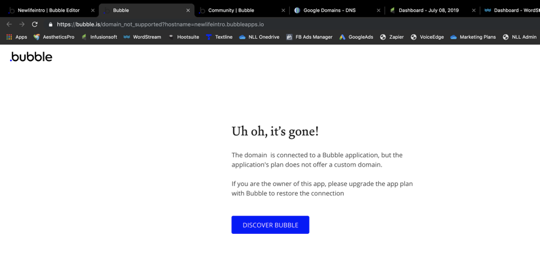
When I first started playing around with the app features, after selecting preview, i got this message:
so i thought, okay i’ll pay for a membership, signed up & paid my first month… same message. bleh.
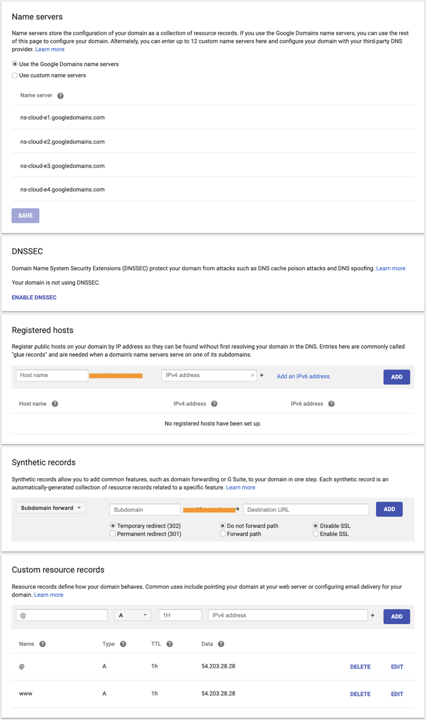
Then I’m like FINE i’ll buy a domain & use that… i get a google domain, do the DNS settings stuff per bubble rec’s (yes they’re correct, i had my IT guy double check to be sure i’m not a complete idiot lol)
I started getting this message:
waited 48 hours, same message. Bubble says it found the domain but it doesn’t point to bubble… YES IT DOESSSSSS. wah!
so THEN, because i don’t do well in frustrating situations (obviously), I bought another domain w/ GoDaddy and tried that, same exact message with the bubble error code showing.
sent a message to bubble & haven’t heard back, hoping one of you can point me in the right direction. what am i missing here?
I’ll second what @andrewgassen said, try that as well.
Looking at your DNS settings, the only thing I would try to change is your TTL from 1HR to 600sec (if possible). But I don’t think that would solve bubbles side of thinking your not connected to a subscription.
so i made a copy of the app & tried to preview… got the same UH OH message as before.
Last night, I created a whole new bubble account, on a different computer & different browser (firefox this time, chrome is my usual choice) and got the SAME MESSAGE.
I GREATLY appreciate your efforts, corresponding with support team now. fingers crossed! will update when we find a solution (hopefully) for future users w/ same issues.
Hi there, sorry to open this thread, but this exact thing is happening to me. And I am not using bubble.io anyone have a fix for this? Google domains and bubble are perfect but its showing that bubble cannot find any DNS records.
So in the interim, I just used a domain I setup for another Bubble app pre-cloudflare and I got an error at first. I then unticked the box that said accelerate with cloudfalre and Instantly the settings were accepted and it works.
But I need to use a new domain, help ?
Everything is pointing correctly but I get the same error as @aloecf









 but seems like an extreme way of fixing it.