Communication between Reusable Elements in SPA (Toolbox Plugin)

Something I’ve been noticing as I work on optimization/refactoring problems in Bubble is how badly structured most of our apps are (even in simple problems) - and that’s why I agree with the certification program of our platform.

Today, I’m gonna talk about how to make a proper communication between reusable elements in Bubble, but first I’ll start with what is usually done out there.

first image

The image above shows how the navigation is made across the app: a concatenation of multiple pairs of the type “key=value”. At first sight, it does not seem to be a bad practice at all. Some of the developers even justify with this: “The user just need to copy and paste for another user to enter the exact same page”. Is this really a win-win situation? Let’s evaluate.

Pros:

  • Less page load
  • Continuous navigation
  • Less pages to manage

Seems good, right? But, if we use Reusable Elements, we also have the same pros. So what are the counters of the “key=value” navigation?

Counters:

1. Zero maintainability: As the app grows, managing hundreds of groups, conditionals and custom states may be very confuse, which increases the difficulty for new members to understand the structure while also increases the risk of conflict between conditionals/states, ultimately leading to unexpected behavior.
2. Limited scalability: First, there’s a hard limit of 10,000 combined total of elements, events and actions on a single page. Second, if the app reachs a very high level of usage, it’s unfeasible to keep everything on the same page.
3. Security risks: If the security logic depends only on “whether the tab is hidden or not” at the front-end level, a malicious user can manipulate states or URLs to display areas that he or she should not see. This might lead to the exploiter trying to access a restricted panels, manipulate parameters, ultimately leading to exposed sensitive information.
4. Hard debugging: With many elements and groups stacked on a single page, finding where the bug is easily becomes a “maze”. Each test or change can require many clicks, looking at the conditionals, states and workflows. This leads to an increased QA effort, as there is a huge “tree” of possibilities on the same page.

These are the type of counters that we do not find when utilizing communication between reusable elements. Look at the page of this SPA project I’m currently working on:

We can see in the page link that we do not have “key=value” navigation, even when opening a page of “details” of an Object of type “Property”. What we also can see is that we have 3 reusable elements communicating between each other on the index page (unfortunately, I can not show how good the user experience is, as it could be done just in a video). So how do I do that? It’s simple.
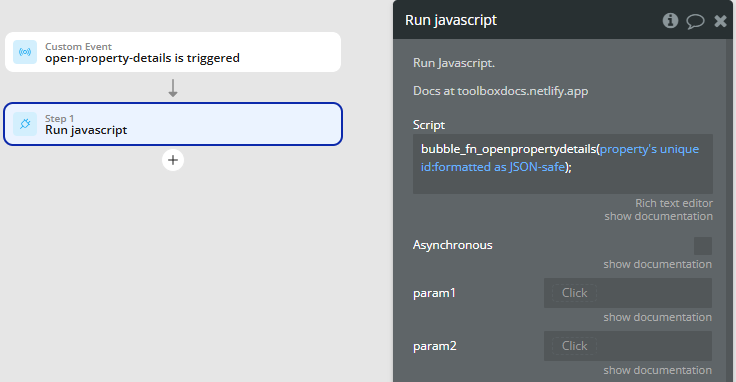
When I click on the table line of the property I want to see the details (Reusable Element 2 of the second image), I just trigger a custom event (because the same run javascript is used on another event). The custom event calls a function called “openpropertydetails”, that also sends the unique id of the current property - formatted as JSON-safe, because it automatically adds the quotation marks if I wanted to send this information via HTTP.

So, on the index page we listen to this event, like this:

And then the floating group containing the Reusable Element 3 of the second image will show up. It’s an indirect communication, but we can also do the same thing for a direct communication (which I can show on another post, but it’s quite literally the same thing if a Reusable Element A contains Reusable Element B).

We could also do the same thing for creating/updating an Object, like this:

The only difference is the use of “formatted as text” to send a null when creating an object.


This is my first post here. I’ve tried to make a brief presentation of my work while contributing for the community. I’m currently a Senior Software Developer in a Brazilian Software House, a certified Bubble developer since Feb/25, and a Developer of 3+ years of experience (I used to be a Java/Spring backend Engineer, but I’ve also worked with Angular when I was a FullStack High-Coder).

But how can I help you?

1. Bubble Architecture Audits: If you want to know if your app is built on robust, scalable foundations.
2. Complete End-to-End Development: We can work on MVP to production-ready solutions.
3. Performance & Security Optimization: Safeguard your data while speeding up load times.
4. Consulting & Team Training: Help your team create beautiful, secure, scalable and performatic apps with best practices and hands-on guidance.

I’m actively seeking international (US, EU, UK) remote opportunities. Book a 30-minute call with me here to discuss how I can help transform your Bubble project—or visit my portfolio for more details on my background and previous work. Let’s build something amazing together!

3 Likes

Couldn’t you also just use a custom event on the reuseable element?

When X is true run custom event from reuseable element.

Custom event is set to show the element and you can pass in the parameters used in the reuseable. Often I’ll use this to also set states in the reuseable.

ie a popup that allows the user to search for things and link them to the pages thing.

  1. add button to page
  2. on click run custom event from reusable pop
  3. set the current selected list and any filter params in the pop and show the pop
  4. when pop is closed trigger a state change
  5. on the page listen to the state change to then read the new selected list and write it back to the data on the page

This way the search and select pop can be used for any thing in the database and anywhere in the app and I can run the “change thing” on the page so it is specific to that thing.

The same run custom event within reuseable could be used in your example above to avoid custom JS.

2 Likes

I get your point, but I think it’s not worth to do this if the objective is communication. Your solution is valid for a subset of this problem. What do I mean by that?

Imagine your RE has 3 different use cases in different areas of your app. If that’s the case, then you’ll start to fall on the same problem: a chain of unneccessary conditionals. For example, you said “If RE is visible, do this” - but this behavior is probably expected in a singular use case. Hence, you are falling on the same trap. That’s why I prefer to use communication by listening to events.

Your solution is perfect for a specific use case: a RE of a graphic. You change the data, the type of graphic, etc. and just trigger the same custom event - but notice it’s always the same behavior - you want to deliver data visualization, so you only change the data. That’s the difference between a broader case, where you can have several behaviors, to a case in which you change the properties of the RE to get the same behavior, but with different data.

But it’s just my point of view, since your solution works anyway.

This feels like overcomplicating something that should be kept simple

2 Likes

Totally get where you’re coming from, but I actually think the “key=value” style navigation has a lot of upsides depending on how your app is built and who’s building it.

For one, it’s just easier — especially for people more in the no-code lane. Managing navigation through URL parameters is usually way simpler than juggling a bunch of custom states and conditionals. Less clicking around, less mental gymnastics.

It can also be better for UX. If I want to send someone straight to a specific article, user profile, or part of the app — boom, the URL does that instantly. You don’t get that with states alone.

And honestly, from a support/dev standpoint, it helps a ton with debugging. If a user is having an issue with a specific part of the app and sends you the link, you immediately know where they are and what they’re looking at. That’s a huge time-saver.

As for security — I’d argue if someone’s securing parts of their app just by hiding groups, that’s the real red flag. You should always have proper privacy rules in place, no matter how you’re handling navigation.

Just my take!

2 Likes

I get you, but I disagree. Here’s my take:

  1. You can not develop an app in a certain way just because it’s easier. The client is not you. The client expects something that they can’t ask you: a well-thought architecture. And this is definitely not a good architecture.
  2. Your second point is only valid when it generates value to the client. For example, AirBNB uses this “key-value” navigation in the case of booking houses/apartment. If a client A wants to show a certain house, in a certain location, for a certain number of days and etc, then it’s great for UX - but it has an use case. That is definitely not the case for an entire app. You don’t see the entire navigation of a B2B or B2C product in the style “key=value”
  3. That point was scrutinized in my post:

4. Hard debugging : With many elements and groups stacked on a single page, finding where the bug is easily becomes a “maze”. Each test or change can require many clicks, looking at the conditionals, states and workflows. This leads to an increased QA effort, as there is a huge “tree” of possibilities on the same page.”

I believe Bubble can be more valued in the Software Market if the community always make the effort of trying to extract the most out of the platform.

I am not entirely sure what problem this solution is trying to solve. But, if the question is how to make SPA easier to manage and relatively more secure, then the answer is using a a restful URL structure that maps to the groups (Pages) on the canonical page.

Query String name/value pairs in URLs to me are a bit dirty. Restful URLs are cleaner and more logical.

If the URL structure creates branches for each page, then you can lock down what appears and when. And in terms of debugging, the same applies. You know where to look in the Page structure to fix issues.

And with a nice use of folders to manage the workflows, that match the page structure, you will be away.

1 Like