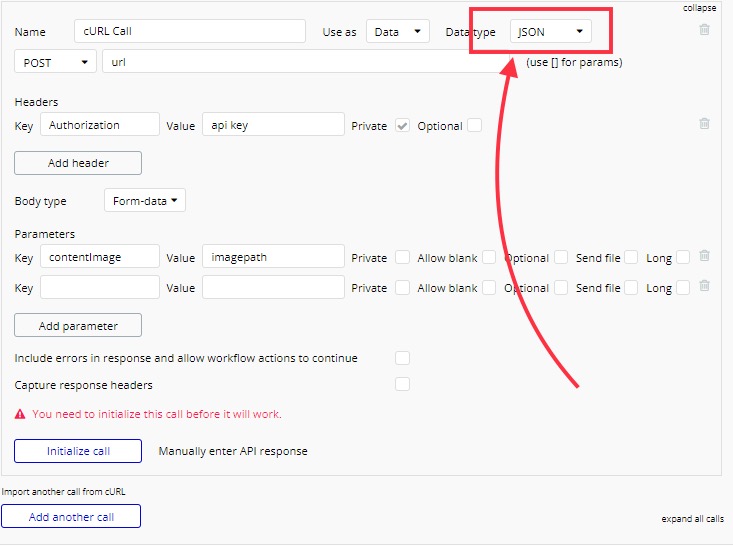
Hello everyone.
I am trying to call an API from cURL import.
The request has headers ( -H ), and body has form ( -F ) value which are ok I can find them easily.
But problem is I don’t find the place or I do not know to put the value of ( -o ) which should be made with the request. This is the output format for the request file. In this case this is an image file.
Where I can put this?
Request Example:
curl
-H ‘Authorization: API_KEY_HERE’
-F ‘contentImage=imagepath’
-o ‘image.png’
Where to put -o (output) value “image.png” in the request here?
Here is the screenshot
Thank you in advance.
at the CLI , your Curl client is asking the server for a resource whose URI corresponds to a static FILE in the server’s fs.
server side, actions are as follows
- stat file sys for file.size()
- stat file sys for file.mime.Type
- buffer the files bytes with asyncReadFile()
- include the buffered file as Body of the response
- send Response to the client
Curl client has a hook to the local fileSys
Curl implements protocol http(s)
Curl handles the buffered file , using -o parm and just writes to local file system
Bubble prod runtime does NOT implement local fileSys
Rather, it collaborates both with DB ( file uploader ) AND with AWS.S3 for storing the bytes
So, the genl PROTOCOL senario you have
- external API that is returning files / bytes with http TYPE, CONTENT-LENGTH as hints what todo re the client-side handler consuming http.
Basically, your protocol is presenting you with a cloud fileSys thingy and you need to handle that using bubble’s features for data and for files.
Not really a --no coder-- type answer. sorry for the tangent but IMO bubble needs to do a better job with this type of cloud based file exchange.
1 Like
@J805 Thank you very much for your kind reply. It doesn’t work that way. There must be a way to solve this though.
@rowntreerob Thank you very much for your kind reply. At least you told us how this works. Take care.