Apologies for the lack of updates on this matter. Over the past few months, I haven’t had the time to test the difference in WU consumption. However, the Bubble team has now added the ability to measure WU usage by the minute and improved drill-down options. This allows us to gain a clearer insight into how WU are utilized in the app. With this new feature, I can conduct quick tests on free test apps, avoiding the need for a whole week of testing to obtain meaningful results.
The Setup
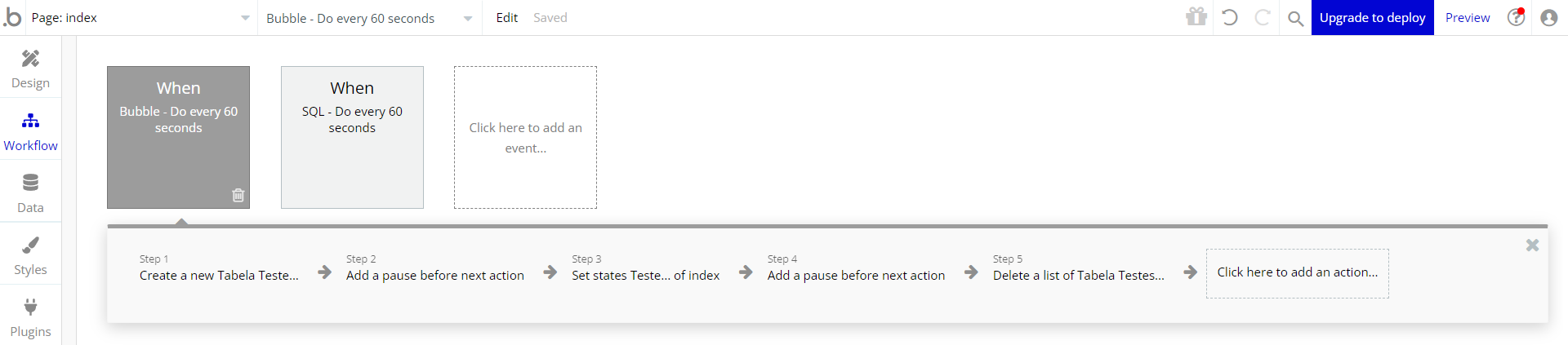
I started by creating an empty app from scratch and setting up two front-end workflows. Both workflows are set to “Do every 5 seconds,” but I adjusted their running frequency to every 60 seconds.
The first workflow, named “Bubble workflow,” contains actions related to testing the Bubble database. Meanwhile, the second workflow, named “SQL workflow,” includes actions for testing a SQL Server database.
Both databases share the same type/table, called “Tabela Teste” (Portuguese for Test Table), and the same field/column named “Teste” (Portuguese for Test).
SQL Workflow
The SQL workflow consists of the following actions:
Here’s what each step does:
-
“inserir_teste”: This action inserts a new line into the “Tabela Teste” SQL table using the “INSERT” SQL statement.
-
“Add a pause before the next action”: A one-second pause is added between actions.
-
“obter_teste”: This action performs a “SELECT” statement on the “Tabela Teste” table to retrieve a list of lines that contain the same value used in “Step 1”.
-
“Set states Teste… of index”: The first item returned by “Step 3” is obtained, and the value of the “Teste” column is saved in a custom state within the “index” element.
-
Another one-second pause, similar to “Step 2.”
-
“excluir_teste”: This action executes a “DELETE” statement on the “Tabela Teste” table to remove the lines containing the same value used in “Step 1”.
Bubble Workflow
Here are the actions set up for the Bubble workflow:
Explanation of each step:
-
“Create a new Tabela Teste…”: This action inserts a new line into the “Tabela Teste” Bubble type, using the same value that was used in “Step 1” of the SQL workflow.
-
“Add a pause before the next action”: A one-second pause is added between actions.
-
“Set states Teste… of index”: This action retrieves the list of lines from the “Tabela Teste” Bubble type that contains the same value used in “Step 1” of the SQL workflow using the “Do a search for” expression. Then, it selects the first item from the search results and saves the value of the field “Teste” in a custom state within the “index” element.
-
Another one-second pause, similar to “Step 2.”
-
“Delete a list of Tabela Testes…”: This action deletes a list of lines from the “Tabela Teste” Bubble type that contains the same value used in “Step 1” of the SQL workflow.
The Results
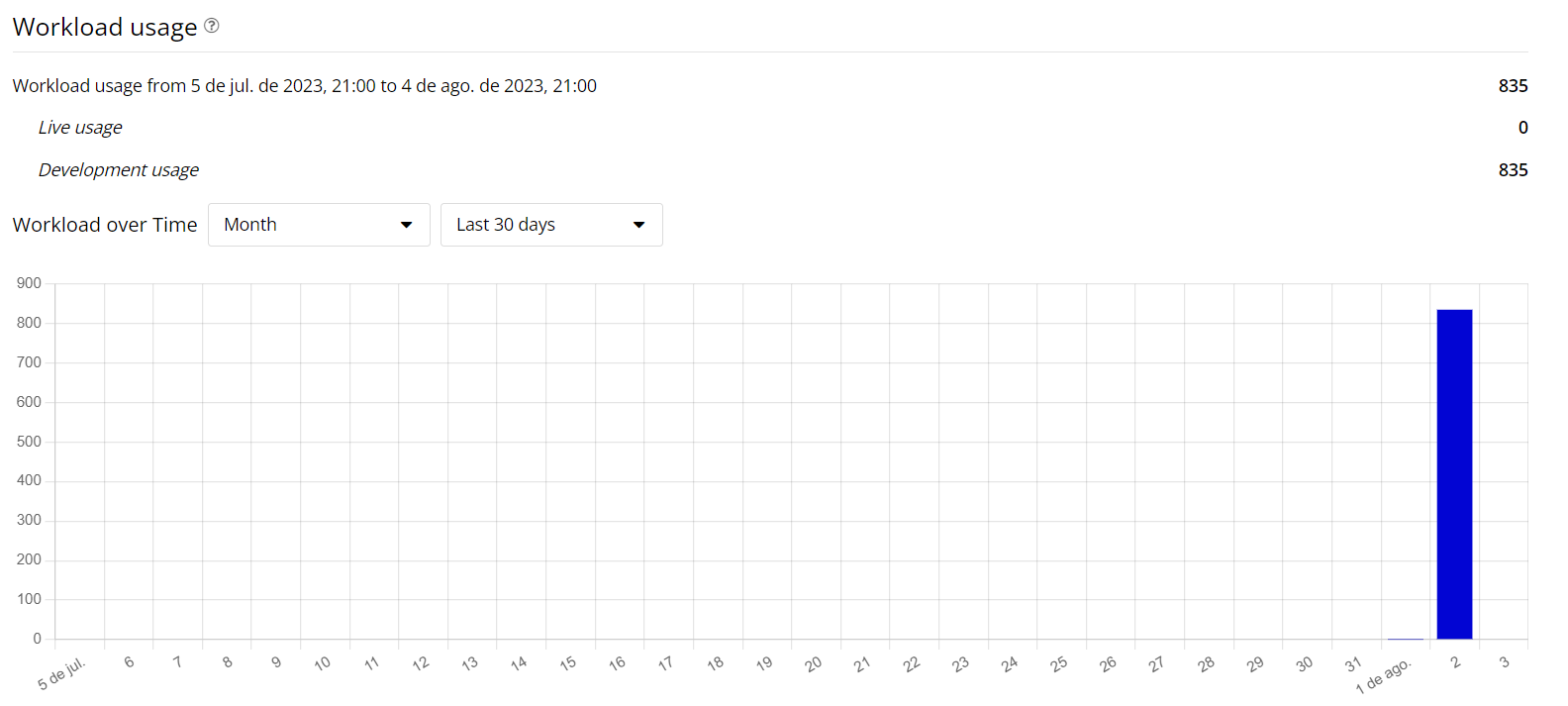
The obtained results were in line with my expectations. The SQL Connector consumes fewer WU compared to performing Bubble database operations. Below are some of the graphs available in the logs tab. However, before we delve into the details, it’s worth noting that although all the testing was conducted on 08/03/2023, Bubble displayed the results as if the testing occurred on the day before, 08/02/2023. This discrepancy is something that the Bubble team might want to investigate.
WU Usage
The graph below depicts the overall WU usage for the test app I created:
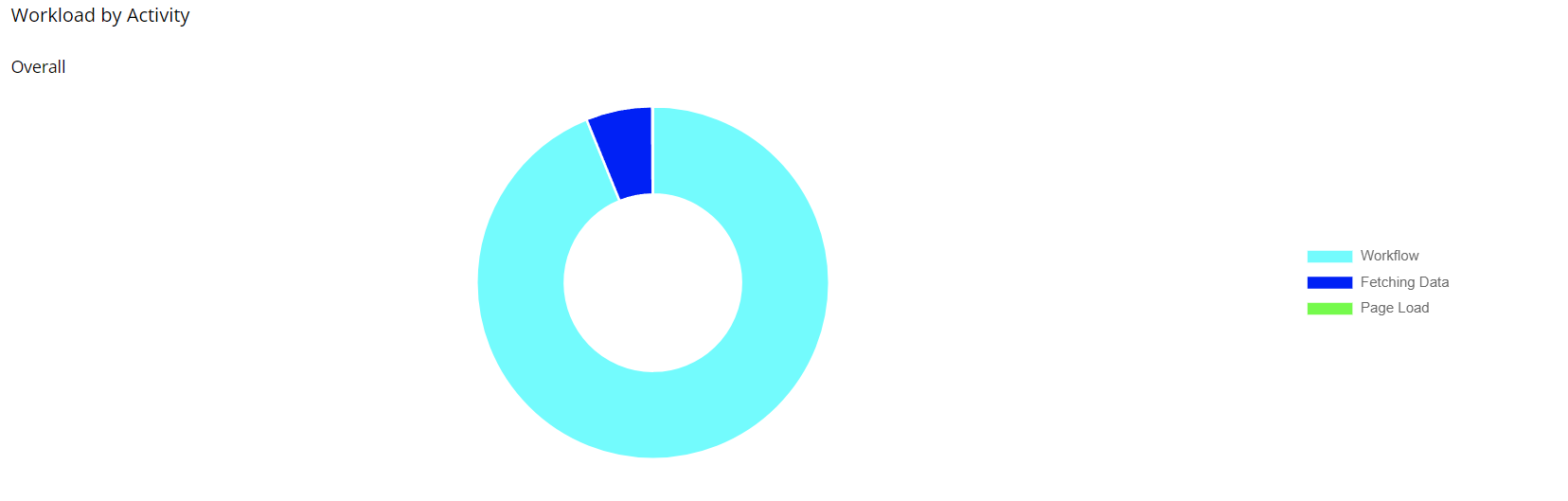
The next graph presents a Pie chart showcasing the app’s overall usage:
In the latter chart, you can observe that most of the usage belongs to the two workflows I designed, with “Fetching Data” constituting 6.09% of the total:
Upon examining that portion of the chart, it becomes apparent that the majority of the usage for the “Fetching Data” section is attributed to data searches on the Bubble database, with the remaining part related to processing data requests. When comparing the WU used for SQL Connector versus Bubble database, it’s important to consider this additional load on the Bubble database:
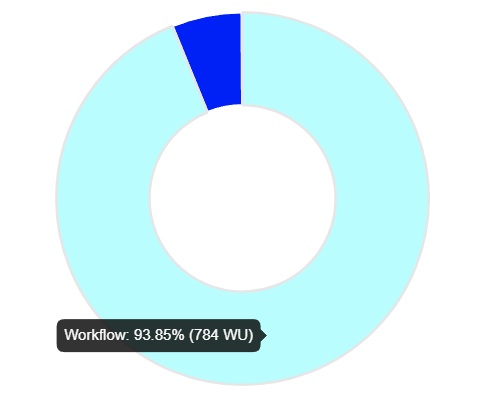
Now, revisiting the overall usage, it’s evident that the “Workflow” type accounts for approximately 93.85% of the app’s consumed WU:
Upon clicking on that section of the chart, the two workflows I created become visible. It’s noticeable that the Bubble database workflow has utilized more WU compared to the SQL workflow, disregarding the impact of “Fetching Data” usage:
WU Usage for SQL Workflow
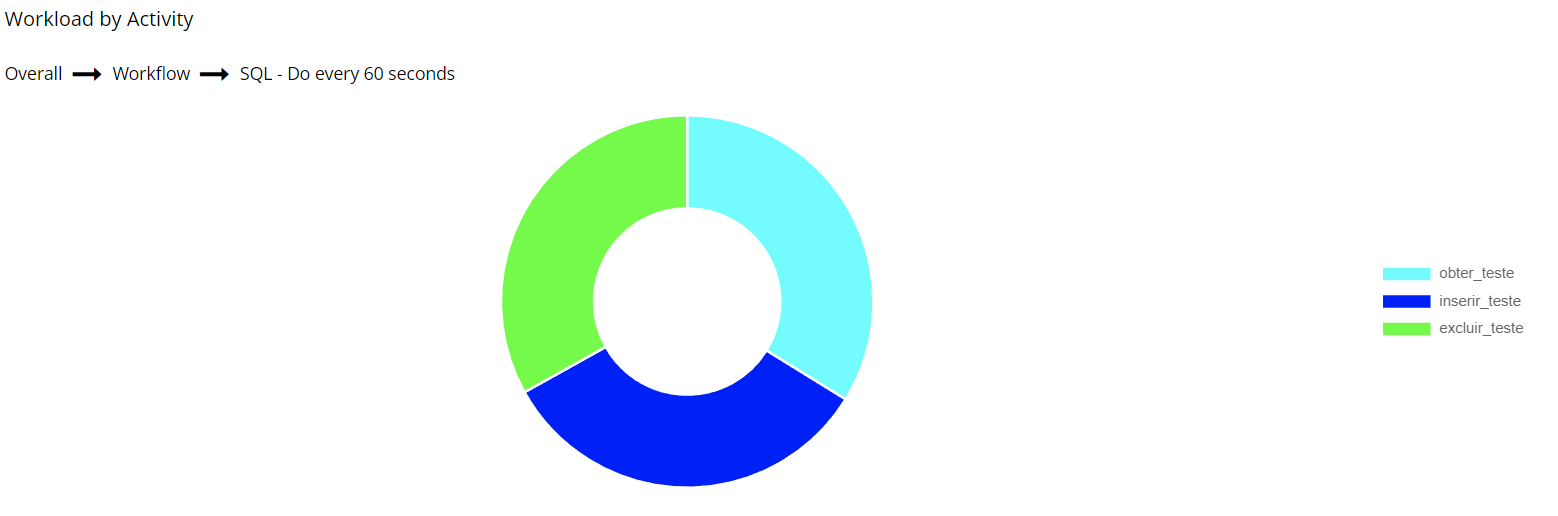
Upon analyzing the usage for the SQL workflow, we observe that the WU consumption is evenly distributed among the three actions: “obter_teste,” “inserir_teste,” and “excluir_teste.” This equal usage suggests that all these actions involve only processing requests and converting the returned values into the Bubble data structure. For Bubble, they essentially represent the same operations.
WU Usage for Bubble Workflow
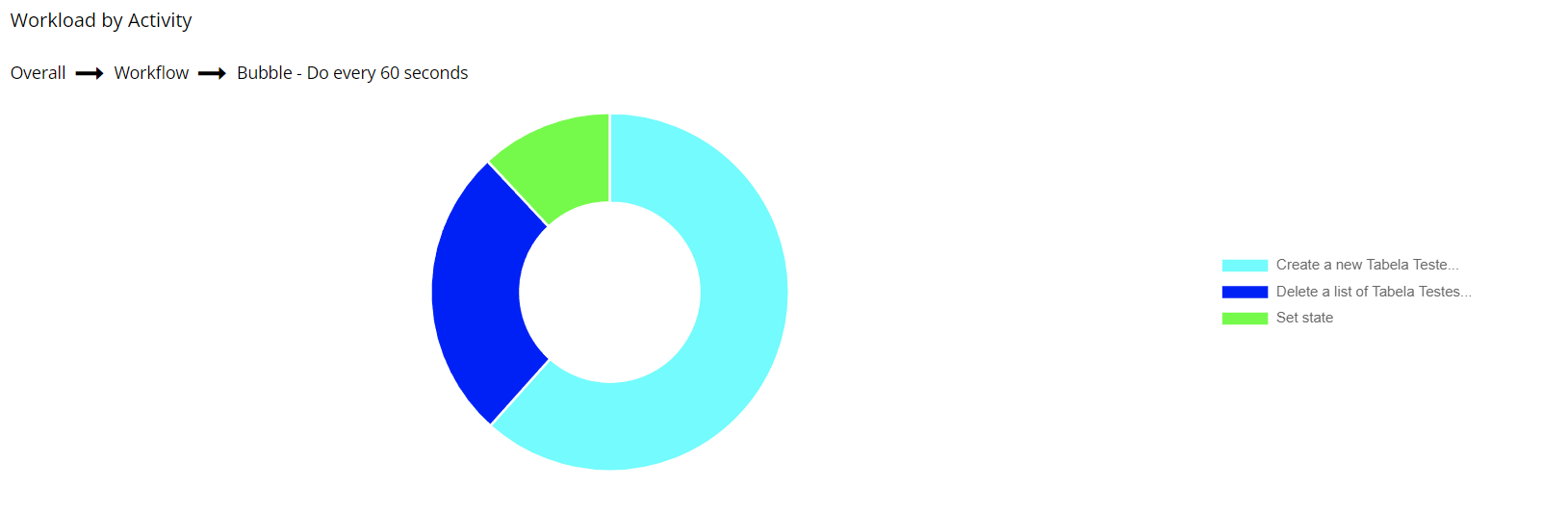
Now, shifting focus to the Bubble workflow, we notice varying WU usage across its actions. The first two actions that consume more WU involve write operations in the database. The third action, a set state action, only performs a “do a search for…” operation.
Adding the WU Usage of Each Workflow
- SQL Workflow: 347 WU (~41.56%)
- Bubble Workflow: 437 WU + 50.89 WU (from “Fetching Data”) = 487.89 WU (~58.44%)
- Total: 834.89 WU
Conclusion
After considering all the information presented, the decision between hosting a SQL database server or using Bubble’s own database depends on whether you prioritize control over WU usage or not. Below is a list of pros and cons that I have compiled based on the insights gained from this test, comparing the use of Bubble’s database versus an SQL database with SQL Connector as an app database.
Bubble Database:
-
Pros:
- Easy to configure.
- Better integration with Bubble.
- Faster.
- Offers pre-defined actions to manage database data.
-
Cons:
- Consumes more WUs overall.
- WU usage is unpredictable and varies significantly depending on the operation.
- Developers are limited to Bubble’s way of structuring and managing data and permissions.
SQL Database:
-
Pros:
- Predictable WU usage.
- Consumes fewer WUs overall.
- Allows for more customization of configuration and permissions.
- Ability to use an existing database for an app.
-
Cons:
- Requires knowledge of SQL database structuring and management.
- Requires knowledge of SQL queries.
- Additional cost to maintain an SQL database server.
- Can be insecure if not configured properly.
For individuals already familiar with configuring an SQL database or those who already have one containing user data, the SQL Connector can significantly reduce WU usage and provide more control over the data used by the Bubble app. However, for those unfamiliar with SQL databases, spending time and effort on learning how to manage one may not be worth it. In such cases, it might be better to accept higher WU usage in the app and focus on optimizing other aspects.
I would love to hear your opinions on this matter. If you have any suggestions for additional information to include in this topic, please let me know, and I will respond as soon as possible.