
@steven.harrington This update caused scheduled API workflows to not function properly and it needs to be fixed URGENTLY.
I have done tests regarding the issue and I am sharing the steps for you and other forum members to test.
-
Create 2 data types:

-
Define the fields for these types as follows:
Item’s Fields:

Item Group’s Fields:

-
Manually create one “Item Group” from the Data tab

-
Create an API workflow in the backend and add 2 parameters:

-
Add 2 actions to this API workflow:

5.1. Create a new Item

5.2. Make changes to Item Group

-
Create a test page and add a test button

-
Add a button click workflow and add the “Schedule an API Workflow on a list” action.

-
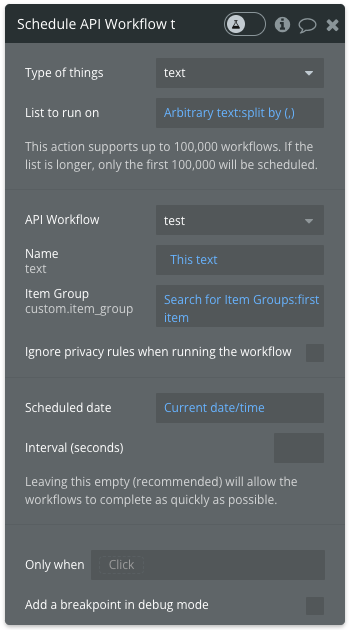
Select the API workflow we created and input the parameters as follows
8.1. I split the arbitrary text with commas to create 10 items. Alternatively, a text list can be taken in another way
8.2. Since there is only one “Item Group”, I’m selecting the “Item Group” we initially created using “Do a search for” with :first item. You can use different methods as well.


Result: In the end, there should be 10 “Items” created and all of these items should be added to the Items List of the “Item Group”.
Actual Outcome: 10 Items were created. However, only some of the items were added to the Items list of the Item Group. It behaves differently each time. Sometimes only 1 item is added, while other times 2-3 items are added to the list. It’s not functioning correctly.
The following video demonstrates this behavior more clearly:

Items:

Item Group with only 2 items:

Finally, considering that many apps rely on scheduled API workflows, I find it unacceptable that such a core function hasn’t been thoroughly tested. I hope it will be resolved soon.