
Hi everyone
After struggling for days with Google login not working on my Bubble.io mobile app, I finally found a reliable workaround. I’m posting this to help anyone building a Bubble Web App + Mobile App (Native Mobile Beta, June 2025) using a shared database.
 The Problem
I had:
• A Bubble Web App with Google login working fine.
• A Mobile App (via Native Mobile Beta) built from the same project, same DB.
But on mobile, Google login gave error 400 or just didn’t work. I tried everything: OAuth credentials for Android, SHA-1 fingerprints, App Scheme, etc. Still, nothing worked natively.
 The Workaround That Solved It
Instead of trying to make native Google login work directly in the mobile app, I used this workaround:
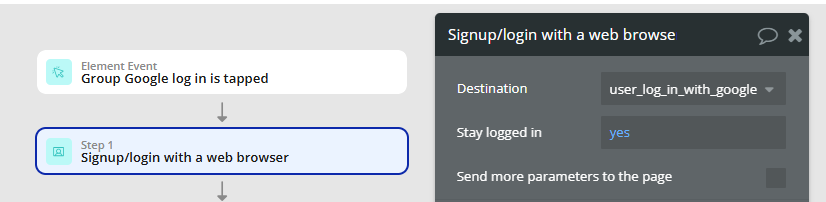
In the mobile workflow, use the action:
 “Signup/Login with a Web Browser”
 This sends the user to the web-app Google login, which works perfectly.
Once the user logs in, Bubble brings them back to the mobile app, still logged in and recognized. Seamless!
 App Scheme Confusion
In the Mobile Settings under Settings > Mobile, I tried setting the App Scheme (optional) to:
• nameofproject
• app-nameofproject
• com.nameofproject.app
• appnameofproject
None had a visible effect during login. Possibly it’s useful for deep linking or advanced OAuth, but it’s not required for the fix above.
 For this reason
If you’re:
• Using Bubble’s Native Mobile Beta (since June 2025)
• Sharing the same DB between Web and Mobile
• Already have Google login working on your web app
Except if you have the solution, don’t waste time trying to configure OAuth specifically for Android unless you’re building a native-only app. Just leverage the Web login via browser redirect.
Hope this helps someone save hours (or days) of trial and error. Happy bubbling! 
Finally, I just want to say a sincere thank you to the entire Bubble.io team and developer community. What you’ve created — especially with the Native Mobile Beta and unified Web + Mobile database — is nothing short of transformational.
Thanks to your platform, I’ve been able to bring my vision to life,
Massimo
This worked great for me, thanks so much for sharing! This issue was bugging me for a while on my launch checklist
Can you specify how you set up your workflow? Personally, I’ve tried using sign up / sign in with a web browser as well. Once the users signs in with google, the page simply refreshes.
The scheme of the app in the mobile settings does not have to be filled in! Leave it empty and you will see that everything will work
I have the google login plugin set up. I have a very limited set up, I’m using the default redirect URL: (https://… URL …/api/1.1/oauth_redirect). The checkbox is checked in the plugin setup, and this URL is entered in the google cloud platform. When the user logs in with Google, the new window doesn’t close on web preview and on bubble go it redirects the user to the bubble go home screen.
If you are using it on Android in Bubble Go it is their bug.. they are already aware of it and they will solve it. This doesn’t happen on the stores. I suggest you test it on iOS…
Hi all, first of all, @massimo thank you for posting this.
I face the same problem you were facing.
My setup is:
- working web app, with google login
- web app in prod for a while now
- client id set for web page properly
After I follow your instructions, and start the signup/login with a web browser, I again get the error: 400: redirect uri mismatch
Bubble apparently adds this param: ?on_login=1753801153326x548208896350157400
and the id is always different, so i am unable to set a static string in my redirect urls (also tried using * but that is not allowed).
Did anybody face this challenge? How did you overcome it? Thanks!
Yes! I’m facing the same issue and don’t know how to solve it 
It turned out I did not check the option to use the default redirect URL: (https://… URL …/api/1.1/oauth_redirect) in the plugin settings.
oh man I missed that too, thank you so much!!!