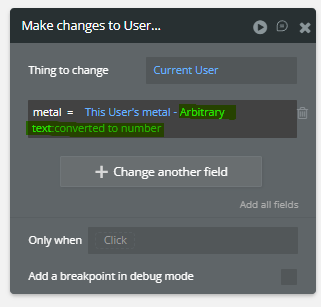
I tried to create the formula like this
This Player’s metal - (50 + (Search for Building:first item:level * 25))
Didn’t work out, but you could do it like this
I understand your issue. Actually, the order in Bubble remain important mostly when you enter a manual/literal value because theses values will not give you access to “more” options directly.
I think that using a state or arbitrary text will let you put the parenthesis at the right place because you will get a more option right after theses options (state or arbitrary-text:converted to number)
You don’t need a plugin for that, but there’s some limitation when using literal value in expression and at the beginning of expression.
I’ve tried using Bubble’s built-in parentheses builder too and ran into problems. It seems a bit buggy when the formulas get complex.
One option is the Toolbox Plugin, which gives you an Expression element where you can write formulas more directly. It’s definitely more reliable if you’re working with a lot of parentheses and complex math.
I think the parenthesis builder has some problems the way it is. It caused a bug in another area that was unrelated. Maybe it was just me…but I tried for a few hours
You was probably not part of the new “expression” composer that Bubble choose to turn off because there’s was too much bug, but the expression parenthesis got all expected feature with this new composer. Actually, it not that easy to use (but when you learn how to use it, you will not come back). However, the expression composer have a limitation with manual entered number and this is the main issue from my point of view that remain. However, but I have not tested, since there’s a new “step” to enter a litteral value and we need to click enter or select it, maybe this is now solved so more operators can now be applied after a litteral value directly, and not just after the whole expression.
AI will not help you.
And I think Bubble doesn’t really have good documentation about parenthesis.