Do you know a way to decode base64 data on client side without sending it to the bubble server?
Background: I’m building a solution where users handle sensitive information that should not be send to the bubble server. I am planning to create a json file that a user can load into the browser when opening the bubble app. My bubble database will only have random ids to identify what value it should pull from the json file. I found a plugin that allows me to open files in the user browser without sending them to bubble. However, the raw data is base64 encoded. I need to encode it and I haven’t found a plugin that lets me do this in the client browser.
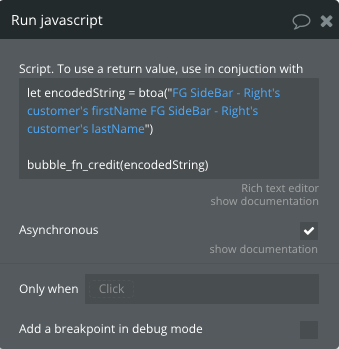
You can use the free Toolbox plugin’s run javascript action and also the Javascript to Bubble element. Here is a few screenshots of how you would set it up. In my example I am using a function “btoa” because I am encoding a string to base64 but if you are decoding then you will use “atob”.
Here is the Javascript to Bubble element. You just need to give it a suffix.
Here is the run javascript action you just need to change the btoa to atob and pass in your encoded base64 string. Then on the bottom it should be bubble_fn_yourSuffix(encodedString)
Then you can use the value by referencing the element and its value
@williamtisdale Thank you! This is the perfect solution. Works like a charm. Only thing I had to change was removing the “Asynchronous” checkmark from “Run javascript”, otherwise the value stayed empty.