
how to limit text in a repeating group to 5 words for example?
Do you really need to limit it to 5 words? …or will so many characters work?
Limiting it to word count is more complicated, that’s why I asked.
I have long listing names and I need to shorten this name to 5 words
Ok, I use this method…although what I use isn’t limited to 5 words…I changed the number of words to show you how to set it up.

You obviously need to reference what text you’re talking about…
for me it is parent group’s blog question in this case.
Then add :split by ( in the text seperator, just add a space)
Then :items until # 5
Then :join with (then click the more and just add a space)
there are also symbols, for example “-” and I don’t want the name to be limited to this symbol, but to end with the word
Not sure about that. That sounds like maybe you will need to use regex to get more involved with the exact count you want.
The method I gave will give you 5 words.
If what I gave doesn’t work, when I get time later today after work I’ll give you a regex formula, but it’s a lot more complicated.
You can also add a … if you need to by setting a condition.
In the meantime, maybe someone else can give you a formula.
Hope you get your idea to work. Good luck.
Added: I modified my original answer from the one you quoted. Not sure how the 1. List item got in there 
Ok, it’s early here and my mind wasn’t clear yet and I wasn’t thinking straight.
But, for the symbols you would use :find and replace.
So, after the ‘parent group’s blog question’ (in my example)…
you would add :find and replace. You would find every symbol you wanted to skip…and then add a space in the replace by to replace it.

Then continue with the formula.

Added: One last thing, for each symbol you want to replace, you need a seperate ‘find and replace’. So, you may need to chain 2 or 3 together. Just wanted to clarify that. Have a good rest of your day.
Regex is your friend use it
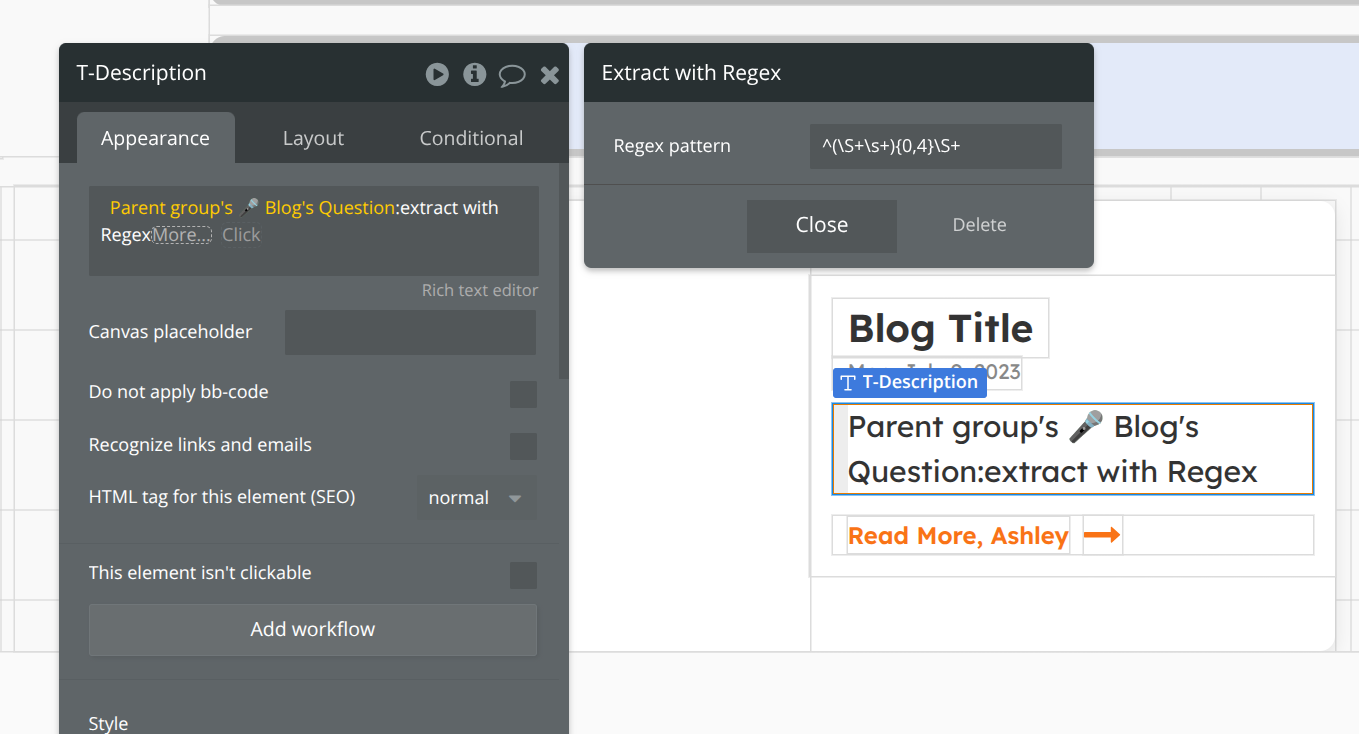
Thank you 
Glad you got it working. Sometimes is takes a few trys