How to show the result of a formula in a Text?

Hello all,

I have 3 inputs, 1 buttom and a text. I want to calculate a formula clicking the buttom, with the values in the 3 inputs and to show it in the text.

I am not able to see the workflow I must follow. I have instaled the pluging “Mathjs”, but I do not see how to use it.

Any help? Thanks in advance

Hi there, @fjplaza… one way you can go here is to use a custom state to hold the result of the formula. When the button is clicked, use a workflow to set a custom state’s value to an expression that is your formula. Then, set the text element to show the custom state, and you should be good to go.

Hope this helps.

Best…
Mike

thanks @mikeloc ,

It is easy to say but difficult to implement… What I am seeing is that the learning curve is very steepy :roll_eyes:

A custom state is a custom event? If so, How do I introduce the formula?

This is all I have got

No, a custom state is not a custom event, and yes, the learning curve is steep. Check out this documentation to start your journey into the wonderful world of custom states.

Also, if you haven’t completed Bubble’s tutorials, I would strongly suggest that you take a step back and work through them. If you don’t have a good understanding of the basics of Bubble, you are definitely going to struggle as you go forward.

To help with your learning, here is a quick example of the scenario you described.

I added a custom state to the index page like this.

I have three input elements on the page, and they all have their content format set to integer.

I have a text element on the page that is set up to show the custom state’s value.

text

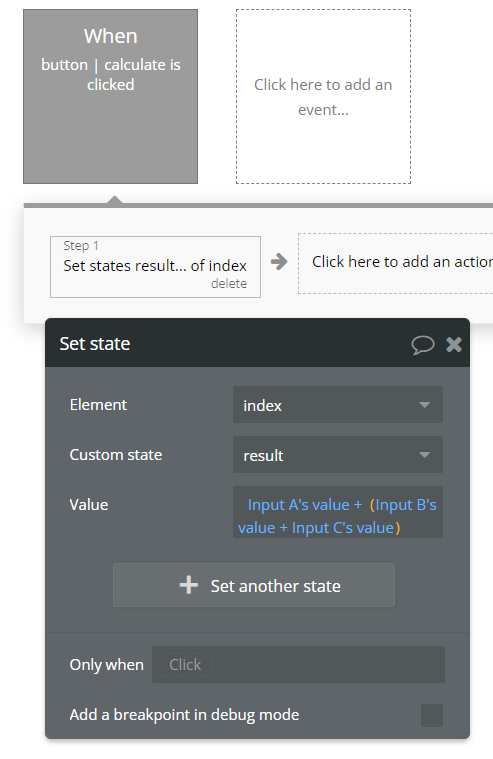
Finally, I have a button with a workflow (using the Set state workflow action) that looks like this.

1 Like

Thanks a lot @mikeloc !!! It is just what I was looking for :grinning:

This thread can be closed as solved

1 Like

This topic was automatically closed after 70 days. New replies are no longer allowed.