Eh.. I think I solved it (thanks @boston85719): How to scroll to a page position? - #5 by boston85719
Prequisite: Requires Toolbox Plugin.
Steps:
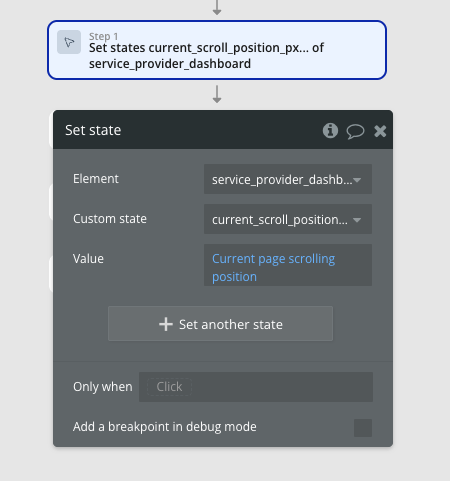
- Create a Custom State on the page (‘previous_scoll_position__px)’
- For navigation actions where you want to remember the previous scroll position, set the state as follows:
- [Optional step] Because I want to scroll to the top of the page I’m navigating to (remember it’s a single-page app so really navigation is just hiding/showing groups) In the above workflow I also have an action Run Javascript to take user to top of the page, which eliminates the animation caused in the ‘Scroll to’ Workflow. Note there is also a pause of 10ms prior.
- I have a ‘on page load’ workflow, so that when the user clicks the ‘Back’ button, it scrolls to the value set in the Custom State we created in Step 1, and set the value of in Step 2 (also has a 10ms pause before the JS). NOTE: I have conditionals on the workflow so that I only run it when specific params are in URL