zenter
August 8, 2020, 1:13am
42
josh:
In June, we had almost completed an overhaul of the code that powers the Input element, which should lead to increased reliability, and better behavior on Android. We temporarily put this work on pause in July for resourcing reasons, but we plan to resume it this week and expect it to roll out shortly.
Exciting! Will this fix the issues with focus management when an input has currency or thousands separators? Super frustrating and meant a pretty significant rebuild of my app when I realized I couldn’t work around it.
My bug report that never got a response:
Hey got a weird one here. Most of the input field types I’m using are working great, but when I make it a currency or percentage input things get goofy.
If I type an input into a field, then tab into a percentage/number field I see focus for a split second and then it’s removed.
When I tab into it or click it a second time it takes focus no problem.
When I tab into it or click into it without making any changes to another field there’s no problem.
Anything I can do to fix that or is it just …
Other reports:
I have a form that tabs correctly unless I format the input as currency or select the Show thousands separator option.
With Show thousands separator selected the cursor simply disappears when I hit tab:
[image]
With Show thousands separator not selected the cursor tabs properly through to the next field:
[image]
I’m certain I’ve run into this before, just never did enough trouble shooting to figure out why it wasn’t tabbi…
Hello,
I have seen a previous post about this many months ago, but nothing recently nor a solution. When I have inputs that have a comma separating 000’s, the tab order stops and you need to click to the next input manually. Now I can make another textbox to show a $ symbol, but I can’t split up an input and toss in a comma to make it look like a reasonable number.
This seems like a clear bug that should be relatively easy to fix. Can someone update me on a work around or a confirmation that t…
I’ve been stressing myself out on this for the last hour or so, so I figure perhaps maybe one of you could have some better insight.
Situation:
I have a popup with a bunch of input sections on it, which are all in a group top to bottom. Tab works just fine for 8/9 of the inputs to move to the next one in order.
The issue is after the 4th input the tab key will move the focus to the background (main page behind the pop-up) and will start scrolling through the available text options which I hav…
sudsy
August 9, 2020, 3:28pm
43
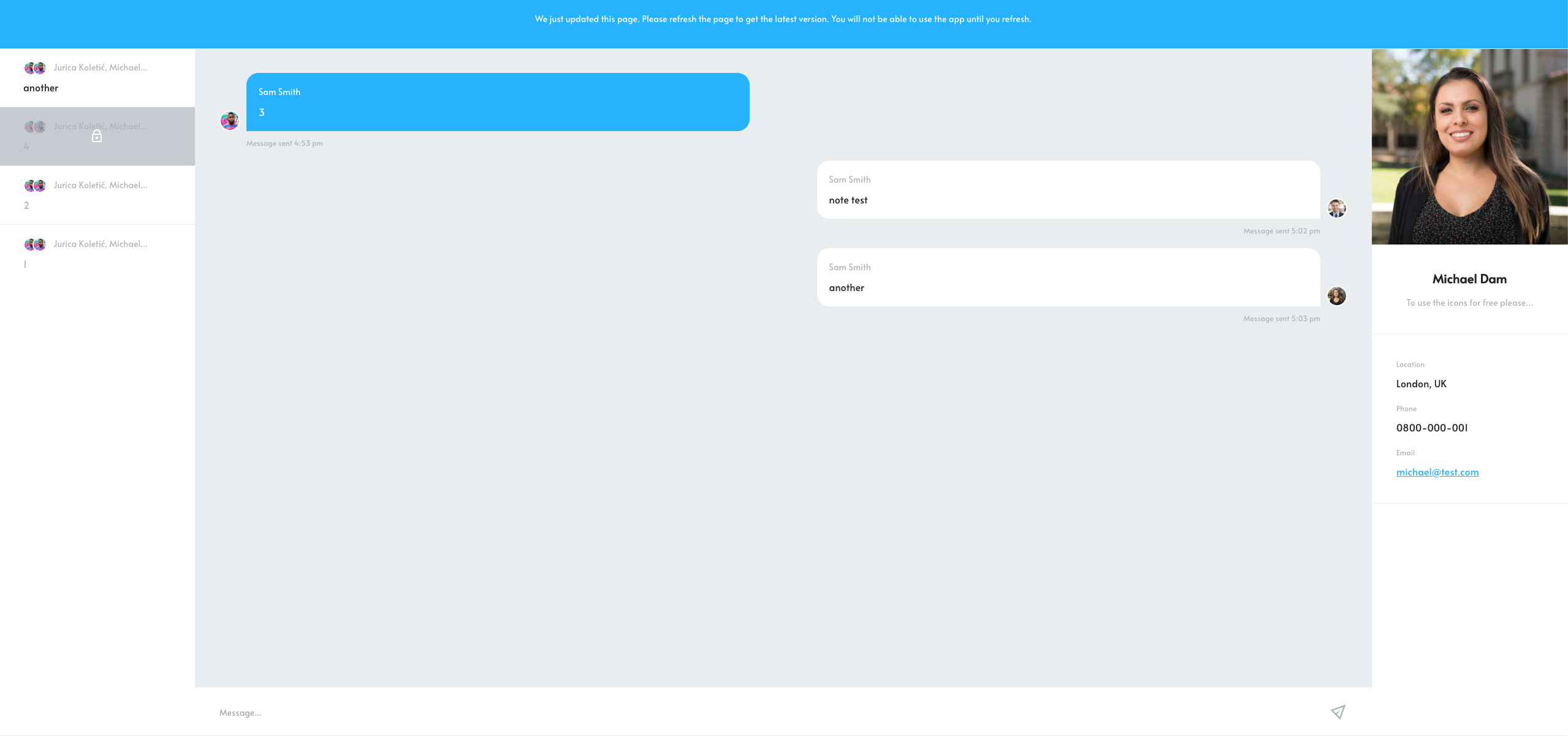
As an interim measure, is there any chance we could be given control over:
The wording of that message .The color of the bar .The color of the text .
That would at least give us some control over the UX so that it’s more consistent and/or appropriate for the app we’re developing.
Ok, given @rukevweb ’s and @nomorecode ’s reponses, there are obviously settings and/or work-arounds to achieve each of the things above. That’s great!
I believe the wording of the message is changeable in the language settings of your Bubble app.
sudsy
August 9, 2020, 3:46pm
45
I didn’t realize that. Thanks! It makes sense that it would be, but I never checked.
You can manipulate it @sudsy as seen here
sudsy
August 9, 2020, 4:08pm
47
Nice! Did you just use custom CSS/JS, or is there another app setting that I’ve overlooked?
And/or mate… but for simplicity I just pull the CSS tag on this occasion:
Custom 1
.bad-revision {
    padding: 30px 0 30px 0;
    font-family: "-System","Roboto",Verdana;
    font-size: 16px;
    background-color: #0E6EFD;
    font-weight: 400;
    color: #fff;
    position: fixed;
    text-align: center;
    top: 0px;
    width: 100%;
    z-index: 20000;
    line-height: 1;
    cursor: pointer;
}
Custom 2
.bad-revision {
    margin: 20px;
    padding: 30px 0 30px 0;
    font-family: "-System","Roboto",Verdana;
    font-size: 16px;
    background-color: #0E6EFD;
    font-weight: 400;
    color: #fff;
    position: fixed;
    text-align: center;
    top: 0px;
    width: 100%;
    z-index: 20000;
    line-height: 1;
    cursor: pointer;
    border-radius: 10px;
}
Custom 3 -pseudo /class
.bad-revision {#6610F2 ;#fff ;
.bad-revision:before {
Obv you can adapt this to your colors, font, styling etc… enjoy
This looks like a great solution in the meantime, thanks
sudsy
August 9, 2020, 4:43pm
50
Thanks, @nomorecode . That’s what I suspected. It’s not exactly a no-code solution, but it works.
Never one content with the status quo, however, I’d like to make an even more ambitious request that would provide even greater flexibility…
Is there any chance Bubble could simply fire an event instead of showing that message at the top of the page?
That way, we could handle the situation in a completely customized and app-specific manner (even if such handling was restricted to client-side workflows). If no event handler is defined, the current behavior would be the default.
(Ah well, it’s worth a shot…
I suppose you could do this using a “An element had an error running a workflow” workflow, as Bubble diagnoses page updates as “errors”, which is why they’re in the languages tab. The code for this “error” is BAD_REVISION.
quo was just a hackly ex. If you know flex and svgs then you can go crazy lol
sudsy
August 9, 2020, 4:51pm
53
Understood.
Going crazy is easy. Preserving sanity is what I’m after.
Not tried it yet mate but will explore further
I also think there are plugins for this that allow you to replace the banner with images
sudsy
August 9, 2020, 5:10pm
57
Not everything in the languages tab represents an error. Those are simply UI strings - some of which are error messages.
In any event (no pun intended), a Bubble native solution requiring no code and providing more flexibility would be welcome.
Now that would be too easy and make us all equal
josh:
We’re kicking off work next week on exact-match database searching. Currently, when you build an operator that checks if “Current User’s text contains Some Text”, we do a precise match on “Some Text”, whereas if you do a “Search for Users where text contains Some Text”, we use Postgre’s full-text-search implementation that does fuzzy matching rather than looking for that exact phrase. This is confusing and often not what the app developer wants, so we’re building out the option of doing precise matching in searches (we’ll keep the old full-text-search functionality for people who want the fuzzy matching, but we’ll rename it to avoid confusion).
Thanks for the update @josh !
Regarding search logic - I’m wondering if there is any progress or plans to address this long awaited request to allow for “partial word searches”. Basically when my users search “pro”, I would like results containing the word “product” to show up. Right now there will be no results unless my users finish typing the whole word (which most users don’t do if they see no results) . Is this related to what you’re referring to as “fuzzy match”?
More context in this post: Searching Repeating Group with Wildcard - #23 by nomads32n
cal
August 10, 2020, 8:48pm
61
Hi @zenter ,
We recently released the code improvement last week, and I just booted up a test app and could not reproduce the issues in the linked threads - could you please confirm if the issue still exists? Thank you.




 ”;
”;

 )
)


