
@seanhoots Any change you can add initial content/default time to the time dropper? There is no way for the dropper initial time to be set dynamically at present. For example by loading date from a database.
Thanks!
@seanhoots Any change you can add initial content/default time to the time dropper? There is no way for the dropper initial time to be set dynamically at present. For example by loading date from a database.
Thanks!
I’m using the Time dropper on mobile and I noticed that when selecting it, It triggers two time droppers. I tested it in desktop view and there was no issue. See below…
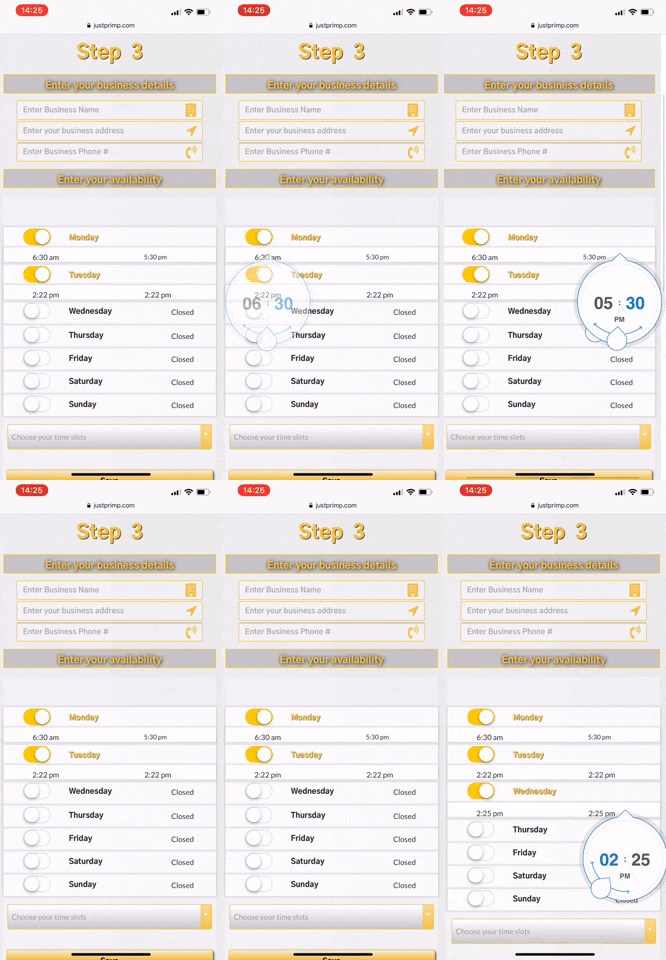
Not sure I see which point two timers are triggered. Please send send me message with the link to the page so i can test on my end.
I encountered a problem with Air Date/Time Picker
So I decided to try Air Date/Time Droppers to see if they work as intended.
The date dropper shows up as expected,
but when anything is clicked on the dropper, it allows the Group Focus element to close.

The same thing happens with the time dropper, hanging out while the Group Focus is closed.
The AirTime Dropper works great with the exception that I cannot find a way to reset the time to the current time. There is a checkbox for this but it is not doing what I would think it would do and reset the time value to the current time. Using bubble’s reset relevant inputs does nothing. When I open a subsequent record the time displayed is the last time I set the dropper to. It would be really helpful if you could reset the value of the element to the current time or implement an initial content option.
Is there a way to make use of this plugin to store information in the database or to retrieve and manipulate information from the database…or perhaps a way to set a custom state when the date has been selected?
I just figured this…
@klaas.vanhoeck @jamie @callen.hedglen
If you want to create a workflow using this plugin, it needs to be done using a condition in your workflow
I set mine up like this
I set my condition on the workflow as I did because the user should not be choosing a date that is earlier than the current date, so the plugin takes care of that part, but to get the condition on the workflow I needed to show if they change the date from the current; which is my initial date on the dropper, then the only dates available to choose are later than the current date.
So the condition shows the date in the dropper > current date ( ie: the date in the dropper is after todays date )…that basically signals that the date has been changed, and a workflow should be triggered.
I just set it up to change the custom state on my page as I am using the custom states to store input data before saving all to the database.
Hi @seanhoots,
I have just installed your beautiful Date Dropper plugin. Thank for make it available to all of us 
On a test page I added a button and a workflow that makes a very simple “create a new thing” to save the date value on a field.

But there is an issue when I run the workflow in debug mode. Bubble says:
The plugin Air Date/Time Dropper / element Air DateDropper threw the following error: UnexpectedError Expected a date, but got a object (original data: null) at L (https://dhtiece9044ep.cloudfront.net/package/run_debug_js/9301c31754fad724a7fdfd6d80a9d4d36de1897376cdabec7624331232d45fc6/xfalse/x5:13:576627) at Object.JS_to_bubble (https://dhtiece9044ep.cloudfront.net/package/run_debug_js/9301c31754fad724a7fdfd6d80a9d4d36de1897376cdabec7624331232d45fc6/xfalse/x5:13:601403) (please report this to the plugin author)
Can you please let me know if it’s something that I should worry about ? Many Thanks
~ On mobile the Date picker position is locked at the bottom and I’m unable to see the bottom of the picker with the check mark, which is the most important part. Any suggestions on how to fix this?
Was there a fix for this behaviour? I am getting a similar issue on iOS.
I think this post might help
I think this issue has been raised before, maybe several times. Read through the other posts and see if it was mentioned and if there was a response or solution…from what I vaguely remember from reading all posts on this thread was that it was an issue brought up before, but not sure if there was ever a response or solution presented.
Hello,
First, thanks @seanhoots for this beautiful plugin. But I have some issues with the hour’s value in the 24h clock. For midday, it’s wrote 0 hours.

It works perfectly for any other hour.

Do you have any idea?
@seanhoots I hope you are well. I’m using your time dropper and I would like to know if you can allow it to have initial content or a placeholder feature? I’m using it for the purpose of showing a user’s availability. As of now, it defaults to current time with no options to show a dynamic value. Thanks for the great plugin.
Is there possibility to get plugin in Finnish and with date format dd.mm.yyyy?
Love the picker! Thank you!. Just one issue I noticed.
It seems like the Date Dropper ignores the Initial Date field. Doesn’t matter what I set it like, it always defaults to current date/time. 
+1 on this - I have encountered the same. Is there any fix for that?
Plugin looks and works great, but this little detail may be disqualifying for use in my production case. 
@seanhoots are you still managing this plugin?
Help!
This is a great plugin - its just a shame the initial hours and minutes cannot be set for the AirTimeDropper element. Maybe one day 
Cheers


