[NEW PLUGIN] Generate deep nested JSON from thing(s)

Thanks a lot for creating this plugin! Works really well with sending data to Sendgrid. This is probably more a Sendgrid question, but maybe someone here knows:

How do you send a “single” variable to Sendgrid together with a list OR how do you extract the value from a list only once in Sengrid?

I am using this plugin to generate the JSON for a list of orders. However, I do not need to show the “order id” at every single line. I just want to show this one time in the text above the list.

An example of the output would be helpful.

You can setup a ‘blacklist’ using the configuration JSON in the plugin settings to hide outputs you do not want. See the example app. However, unless this is a data security issue, I don’t think this should matter when sending data to sendgrid? You can simply not call on those values when constructing your sendgrid template

Yes, works perfect with whitelisting only the variables I want - and in general constructing the JSON output (thanks to your plugin).

My question is more how to extract the information from my JSON output and use it in Sendgrid.

I’ll give an example:

My JSON output looks like this:

{ “order”:[
{
“qty_number”: 3,
“dato_delivery_txt_text”: “tuesday, 1. juli”,
“price_number”: 25,
“price_total_number”: 75,
“product_custom_produkt”: {
“aktiv_boolean”: true,
“_type”: “custom.produkt”,
“productname”: “Product1”
},
“Created By”: “1623746624596x968352755566776600”,
“Created Date”: “2021-06-24T13:54:19.699Z”,
“Modified Date”: “2021-06-25T10:00:29.229Z”,
“_id”: “1624542857618x215131357568827400”,
“_type”: “custom.kurv_items”
},
{
“qty_number”: 2,
“dato_delivery_txt_text”: “tuesday, 1. juli”,
“price_number”: 50,
“price_total_number”: 100,
“product_custom_produkt”: {
“aktiv_boolean”: true,
“_type”: “custom.produkt”,
“productname”: “Product 2”
},
“Created By”: “1623746624596x968352755566776600”,
“Created Date”: “2021-06-24T13:54:19.699Z”,
“Modified Date”: “2021-06-25T10:00:29.229Z”,
“_id”: “1624542857618x215131357568827400”,
“_type”: “custom.kurv_items”
}
] }

In Sendgrid, I loop over the list with the following:

{{#each order}}
{{this.product_custom_produkt.productname}}: {{this.qty_number}} pcs. of {{this.price_number}} USD = {{this.price_total_number}} USD
{{/each}}

Works perfectly and I get an output saying:

Product 1: 3 pcs. of 25 USD = 75 USD
Product 2: 2 pcs. of 50 USD = 100 USD

BUT… I would like to also extract some of the more general information and put in the email. For instance the delivery date which is always the same across all products. Here I do not want to create a list, but just use it as a “single” value.

"Hey!

Thanks for your order.

Your items will be delivered {{dato_delivery_txt_text}} //which I expect to be tuesday, 1. juli, which it isn’t, but instead just blank.

You have bought the following items:

{{#each order}}
{{this.product_custom_produkt.productname}}: {{this.qty_number}} pcs. of {{this.price_number}} USD = {{this.price_total_number}} USD
{{/each}} // which I expect to be the list of orders, which it correctly is

Thank you, bye.
"

So question is: how do I get the {{dato_delivery_txt_text}} to correctly show tuesday, 1. juli?

This has to do with how you’ve organized your data inside your bubble database.

You’ve edited the JSON manually here and essentially reclassified the bubble type kur_itemsto be called order inside your JSON. dateto_delivery_txt_text belongs to each kur_items. So sendgrid sees multiple dateto_delivery_txt_text (for each kur_items you have) . Therefore in sendgrid would need to display that text inside of the {{#each order}} loop. Presumably the delivery date is the same for all orders?

In which case you can could create a new bubble type called order and put your delivery date, and each of your customer’s kur_items inside of it. This is pretty typical of how a shopping cart checkout would be created in bubble (or any relational database). There are probably a dozen tutorials on how to construct this.

This is exactly why I created JSONest BTW. I had an order with a list of multiple items inside it and needed a way to display the nested data for send grid.

Be aware that JSONst requires that ‘kur_items’ be stored as a ‘list of kur_items’ inside type ‘order’ . Eachkur_items cannot, on their own, have a type of related order.

One potential shortcut (rather than introducing a new datatype) would be to take the first kur_items:first item:dato_delivery_txt and manually put that in your JSON

"first_dato_delivery_txt" : "tuesday, 1. juli",
"order":[
       // list of kur_items
       ]`

Thanks a lot for your detailed answer.

I have actually created the data structure like you suggest here (with a Card having a List of Items in it). The JSON was just to simplify it, but I guess that just caused more confusion - sorry for that!

But your answer still helped and triggered finding the right solution!

Thanks for the plugin - it’s solved a big problem for me.

Any ideas how I could speed up the things(s) to JSON workflow action.? I’m retrieving about 75 rows and it’s taking around 14 seconds to load.

My data source is a list of things retrieved with a search.

Thanks
Matt

This (mostly) depends on how many lookups JSONest has to do. Say you have 75 things and each one of those things itself has 75 related things and each one of those things has 75 related things and so on… you can see how it quickly becomes a major problem in terms of ‘compute’ required. i.e. It is an exponential issue. Just for fun with a lookup depth of only 3, JSONest would need to perform 421,875 queries for the example above (75^3)

Some things to try to speed things up:

  • reduce the depth of recursion (i.e. only go one or two layers deep. vs 5)
  • eliminate related things you don’t want JSONest to expand and search through. If you only need to expand a few related things, but have many more which JSONest needlessly looking up and expanding, you can setup a blacklist using the config JSON to eliminate those from your lookup.
  • try breaking up your list into smaller chunks and scheduling simultaneous workflows to do the work.
  • consider reorganizing how you store your data in your db. Sometimes, if you only need a few pieces of data from a related thing you can simply store the value in two places to avoid another lookup (which costs time) Of course depending on the needs/design of your app this may or may not be a mortal sin to do.

Good luck

1 Like

I’m noticing that certain boolean feels are not showing up in my JSON. Other boolean fields show up but a specific one doesn’t. Any idea on why?

Is the issue that the field doesn’t show at all? or does it disappear once you apply some modifications to the field in JSONest?

JSONest relies on a Javascript function called getObjectById()which returns the field name and values for all fields inside a thing. One very subtle, but very critical, thing to know about this function is the way it works with bubble things and the fields inside those things. When you define a field name for the first time bubble saves that field name in snake_case_format in the back end. However, if you ever rename the field inside the editor, it will not change in the back end

For example:
if you start off by calling your boolean field “is a member”, bubble then saves the name of your field as something like “is_a_member_boolean” in the backend’. This is what JSONest will pick up. However, if you change “is a member” to “has membership” in the editor, the original name of “is_a_member_boolean” will still be used in the back end for the values stored in “has membership” (and subsequently this will be used in JSONest). Oftentimes renaming a field in the editor (especially if it is dramatically different) can cause confusion and so its always good to check that when troubleshooting ‘missing’ fields.
Let me know

I’m having the same issue. Did you ever figure this out?

Thank you for your plugin @jon2 !

Is there anyway to pass a list of things directly from an API call to Jsonator?

I tried to do this but looks like I have done it incorrectly and the result keeps showing ‘null’

If you have editor control over the API connector (as in this isn’t an api call from a prebuilt paid plug-in), you can set the return data type to ‘plain text’ and the connector will return plain unparsed text.

You can also use a 3rd party plug-in such as “HTTP tools” to achieve the same plaintext response, although this requires more knowledge of how HTTP responses work.

1 Like

Thanks @jon2, changing to ‘plain text’ works! However, I would also need to extract the field names of the API response. Is there any easy way to do this rather than using regex?

json

Two ways to parse data that I know of:

  • JSON machine / JSON machine pro
  • Toolbox (javascript)

The only solution I’m aware of to solve this is to always set a value of 0 into your thing. Otherwise, its going to require bubble to change the way their custom server-side Javascript functions work. JSONest utilizes getObjectById()to get a thing’s data from. If your thing has a null (blank) value in a field, then bubble doesn’t return that field to JSONest–full stop. You must set some value in the field to guarantee it will be returned. You can:

  • create a bulk workflow action and update all blank field values in existing things to be 0.
  • set a default value of 0 in your thing under the ‘data types’ tab for newly created things
2 Likes

@jon2 Fantastic plugins, this is a problem that pops up often.

One thing I am attempting to address is how I use whitelisting with nested objects. I can’t seem to figure this syntax out. If I added nested object fields to the configuration at the same level as the parent fields, the nested fields do not get published.

I did attempt to also add the nested object field to the configuration but that didn’t work either. Seems like I am missing something. Any help would be greatly appreciated.

have you taken a look at the example app? I believe this is demonstrated in a somewhat simple way there

I’m running into some weird issues with this plugin - it could be me, but the behaviour is strangely consistent.

I have a table of data that I’m pulling records out of - for the most part, this works fine, except for the USER column - I will only get user info, if there is only one entry for the user in the table - if there is more than one, the fisrt time the user appears in the data, I get the user field, but it’s empty, then all other entries ignore the user field completely, as though it does not exist.

This is consistent behaviour if I add and remove entries to the table.

You can see this in action here: Xig | Bubble Editor

You’ve got a lot of users with similar-sounding emails and names ‘steph’ ‘stephan’ ‘steve stevens’ which makes this somewhat difficult to troubleshoot when cross-referencing with your DB lol.

Here’s the output from your example.

[
          {
                    "course": "Something reallyl long that takes up a few words",
                    "level": "Graduate Certificate",
                    "institute": "A big wordy institute, probably somewhere that's overseeas",
                    "user": {
                              "name": "Stephan Oberton"
                    }
          },
          {
                    "course": "Workplace Leadership",
                    "level": "Graduate Diploma",
                    "institute": "Stott's Colleges",
                    "user": {}
          },
          {
                    "course": "Engineering (Mechanical)",
                    "level": "Bachelor Degree",
                    "institute": "Royal Melbourne Institute of Technology (RMIT)"
          },
          {
                    "course": "Agricultural Sciences",
                    "level": "Bachelor Degree (Honours)",
                    "institute": "Royal Melbourne Institute of Technology (RMIT)"
          },
          {
                    "course": "Agricultural Sciences",
                    "level": "Associate Degree",
                    "institute": "Academy of Information Technology",
                    "user": null
          },
          {
                    "course": "Agricultural Sciences",
                    "level": "Bachelor Degree (Honours)",
                    "institute": "Acknowledge Education",
                    "user": {
                              "name": "Steph Maynard"
                    }
          },
          {
                    "course": "Adolescent Health and Wellbeing",
                    "level": "Certificate",
                    "institute": "Acknowledge Education"
          }
]

]

  • One of the users has been deleted, which explains user:null value

  • Stephan Oberton and Steph Maynard seem to be correct. Which explains your finding of one user returns the correct value

  • Having several different Qualifications things referencing the same user thing Steve Stevens and failing in this way … that is certainly more puzzling.

I would try:

  • Running this without any customization JSON
  • temporarily turning off all privacy rules for the user and the Qualifications even if it looks like they are set correctly.
  • Try multiples of a different user
    • is it Steve Stevens that is the issue or all users?
  • Creating a dummy type (not a user) and try putting the same type in multiple Qualifications and see if this happens again, but with a different type.
    • In other words, is it looking up the user that is failing or is it looking up any thing multiple times that is failing?
    • try using the same thing for all Qualifications, then try adding in a 2nd thing, does the behavior change?

Not to put the cart before the horse, but I’m concerned that bubble might be failing to return a result from the database when the plugin repeatedly queries the same user thing over and over–in this case 4+ times in a row. This isn’t behavior I’ve seen before, but there is a first time for everything.

It could be a bug, in which case we can reach out to bubble support, however their support for plugin developers is pretty poor in my experience and so I wouldn’t expect to see this get resolved in a timely manner, but things are changing so who knows.

I could try to modify the plugin to account for this new quirky behavior with the db lookup, but I’m not inclined to do so if this is bad behavior on bubble’s part, should things change again in the future and cause my fix to break something else. In any case, more information is needed to troubleshoot.

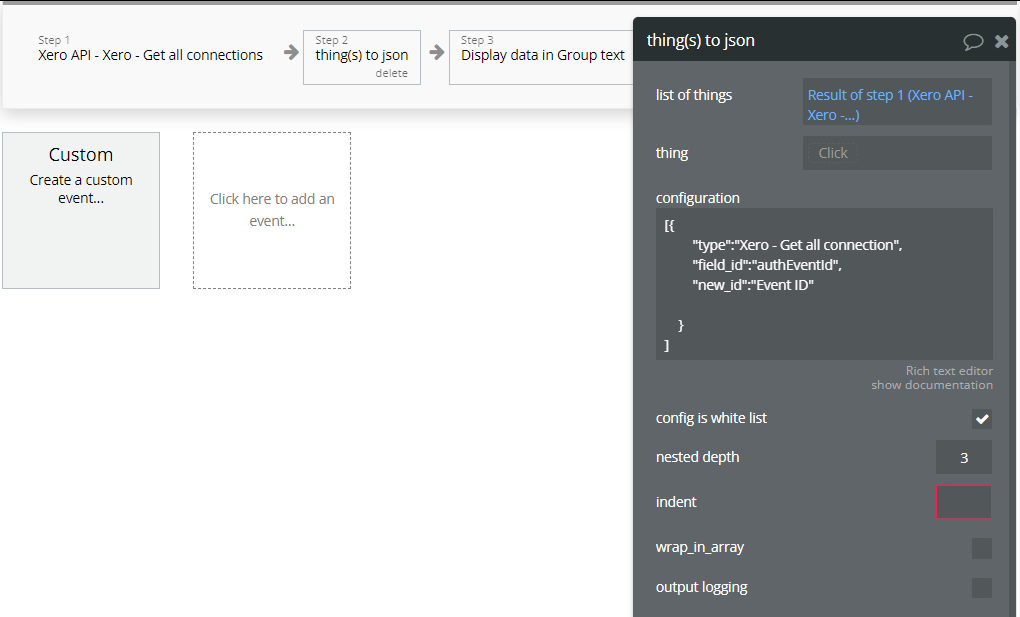
Thanks Jon - especially for the speedy response!

Sorry, yes, the names in my database do make it quite difficult to debug (espcially when you’re not used to them!)

  • I have run without customisation, the issue seems to have changed slightly - instead of "user": {} for the first entry of a repeated user, I actually get the user. All subsequent entries of that user are missing the user field (although it’s a lot harder to debug with all the extra fields - some of which are long text)
  • I dumped all my privacy settings, and the issue was consistent - no change in behaviour.
  • If I change which user has multiple entries, the behaviour is consistent. As in the new user with multiple entries will now not show up (i.e. the behaviour is not tied to a particular user)
  • I added a second thing to the Qualifications thing (like User) and the behaviour was the same for the new thing (i.e. where there were duplicates of the same thing, it was missing for that entry) , therefore it’s not tied to the User thing.

I would not be inclined to change your plugin to to meet bad Bubble behaviour - you don’t want that kinda of tech debt that could break if Bubble fix their code. Although, given there was a slight change in behavour without the customisations, there could be something in your code that’s causing the issue.

It might be worth comparing against other JSON tools, but yours was the only one I found that could return any decent nested JSON, so it’s difficult on my side to find one to compare results with. Nevertheless, I’ll see if I can find something that works and come back with something to help with the triage.

Was also digging into your code (which I don’t know much about), but could this at line 392 be your culprit?

// Duplicate reference found, discard key
if (cache.includes(value)) return;  

I have also taken some code from another plugin, fixed it to get nested values, and added it to the page - this version gets everything.

Cheers
Simon