Let’s be honest: setting up Google Cloud Console billing, managing API keys, and worrying about “per-load” costs just to show a map on your app is a headache.
And if you try to load 2,000 markers on the native map? It crawls.
I built GeoMaster to fix this. It’s a high-performance mapping engine based on Leaflet.js and OpenStreetMap. It’s blazing fast, beautiful, and best of all: Zero API Keys required.
I’ve released two editions to suit different needs:
GeoMaster - Pro Edition (The Analyst)
This isn’t just a map; it’s a GIS (Geographic Information System) tool. It is designed for Logistics, Real Estate, and Delivery apps that need interaction, not just viewing.
Pro Exclusive Features:
Drawing Tools (Geofencing): Users can draw Polygons, Rectangles, and Lines directly on the map. The plugin outputs the GeoJSON, perfect for saving “Delivery Zones” or “Service Areas” to your DB.
Heatmaps: Instantly visualize data density (e.g., “Where are my sales concentrated?”). It automatically overrides markers to render a smooth heat gradient.
Draggable Markers: Need to correct a bad address? Just drag the pin to the right house, and the plugin returns the new precise Coordinates.
Smart Context Menu: Forget basic popups. The Pro version includes a “Right-Click style” menu with “See Details”, “Delete”, and “Close” buttons that trigger your workflows.
Multi-Style & Navigation: Switch between Satellite, Dark Mode, Light Mode, and Standard views. Includes a “Locate Me” button to find the user.
Free Geocoding: Type an address (“Times Square, NY”) and fly there instantly without touching Google’s Geocoding API.
We’ve just pushed a massive update to GeoMaster (V2)! We focused heavily on stability and “production-readiness” for this release, moving away from fragile features and doubling down on what works reliably.
What’s New in V2?
Stable Coordinate Navigation: We revamped the routing engine. It now relies strictly on coordinates for 100% accuracy.
Note: To ensure stability, we have disabled “text editing” inside the routing popup. To change a route, simply trigger the action with new coordinates or click a new point on the map. No more typos breaking your app!
Geofencing Engine: A new standalone action Check Inside Polygon. It uses mathematical algorithms (Ray Casting) to check if a point is inside a GeoJSON shape. It’s super fast and doesn’t even need the map to be rendered to work!
GeoJSON Loader: Easily load complex shapes and boundaries directly onto the map with a dedicated action.
Mapbox & OSRM Support: While the plugin works with the free OSRM demo server, we added full support for your own Mapbox API Key. We highly recommend using Mapbox for high-volume apps to ensure instant route calculations without timeouts.
Update now and let us know what you think! Happy mapping!
I love getting feedback from the community, and today I’m pushing a highly requested update to GeoMaster PRO based on your suggestions (huge shoutout to Matīss for the amazing ideas!).
Here is what’s new in the latest version:
Dynamic Marker Icons (List Support) You requested it, and it’s here! You can now pass a list of images to customize each map pin individually. Building a directory with different pin categories (e.g., food, gas stations, hotels)? Now you can easily display unique icons for each location on the same map! If a location is missing an icon, it gracefully falls back to your default map pin.
“Silent” Map Clicks (Disable Hardcoded Popups) Want to build your own custom Bubble popups when a user clicks on the map? Now you can! I added a simple checkbox to disable the default “Navigate / Save” map popup. When disabled, clicking the map instantly captures the coordinates and triggers the A Map is Clicked workflow event silently. Total freedom for your custom UI!
Cleaner Editor UI I also took the time to organize the plugin element fields into beautiful, easy-to-read categories (Data, Styling, Interactivity, Routing). Setting up your maps is now faster and cleaner than ever.
Simply head over to your plugins tab and upgrade to the latest version to get these new powers!
Let me know what you guys think, and keep the feature requests coming! Happy building!
Hi,
I wanted to use your Free Plugin but Map cannot be displayed on my Bubble page preview !
Thanks for your help if it’s possible ! I need to replace Google Map !!!
Hello and thank you for your feedback! I’m guessing you are using “Fit Height To Content”? If yes the problem is solved, i launched an update for the plugin and you can use that option. If not i will need more information.
Thank you so much for your questions and for using GeoMaster! Your desired result makes perfect sense.
To answer your questions:
1. The Zoom issue & Making the map fixed/not zoomable: You are completely right: Zoom 7 should show the country/region. The reason your map is zooming all the way into the roundabout (Zoom 18) is because of the “Auto-Centering” feature. When the map sees only 1 marker, it tries to zoom in as much as possible to fit it on the screen, overriding your Zoom 7. This exact level of control is why we built GeoMaster Pro! The Pro version already has advanced settings built-in for this exact scenario:
It has an “Auto Fit Bounds” option (you can uncheck it so the map strictly obeys your Initial Zoom 7).
It has an “Interactive Map” option (you can uncheck it to completely lock the map, making it fixed and not zoomable/draggable by the user).
2. Calculate longitude and latitude from a city name? You actually don’t need a plugin to do this; Bubble does it natively! Whenever you have an address or city name (like “Paris, France”), you can tell Bubble to extract the coordinates automatically. Just use the expression: Your Input's value: extracted Geographic Address's Latitude (and the same for Longitude). You can then feed those extracted numbers directly into GeoMaster!
3. Clicking on a marker will redirect you to the associated page? Absolutely! GeoMaster Pro communicates perfectly with Bubble Workflows to achieve this. Here is how you do it in the Pro version:
Go to the Workflow Tab in Bubble.
Add a new event: Elements > A GeoMaster Pro's Marker is clicked.
Add an action: Navigation > Go to page...
In the ‘Data to send’ field, use this expression: Search for YourDataType :item # GeoMaster Pro's clicked_marker_index. (Because the plugin returns the exact index number of the marker you clicked, Bubble knows exactly which item from your database list to open!)
Let me know if you have any other questions. If you need that fixed map and strict zoom control, I highly recommend checking out the Pro version!
Hi Tiago,
Thanks a lot for your answer.
I will probably pay for the Geomaster Pro plugin in order to implement the redirection to the associated page and the fixed map.
Have a nice day !
Yann
Building location-based apps in Bubble just got a whole lot faster. Based on amazing feedback from our community, I’m excited to release GeoMaster Pro V3!
The focus of this update was to remove the “friction” of building complex maps. We are moving away from messy parallel lists and bringing in native Bubble power.
Key V3 Highlights:
Native Geographic Addresses: You can now pass a list of addresses directly to the plugin. No more “Extract Latitude/Longitude” workflows!
Unique ID Tracking: Map markers are now linked to your data. When a user clicks a marker, the plugin exposes its Unique ID, making your “Display Data in Group” actions instant.
Zero-WU Radius Filtering: Want to show only pins within 10 miles of the user? Use our new client-side action. It filters markers in milliseconds with zero server cost!
US & International Support: We’ve added a native unit switcher. Calculate distances and filter by radius using either Kilometers or Miles.
Instant Distance States: As soon as a user clicks a marker, the plugin calculates the straight-line distance from their current GPS position.
Whether you are building a delivery app, a real estate portal, or a local directory, V3 is designed to make your development cleaner and your app faster.
Thanks to everyone who provided feedback for this version! Happy building!
If you are building a Real Estate marketplace, a delivery/logistics app, or a directory, you know that standard maps can sometimes feel a bit… boring.
Today, I’m thrilled to announce GeoMaster (Pro) V4: The UX Update! We’ve focused entirely on giving your apps that premium, interactive “Airbnb” or “Uber” feel.
Here is what is new in V4:
Permanent Labels: Show prices or names directly above the pins without requiring a click! Just pass a list of texts and they render beautifully.
Animate Markers (Bounce & Pulse): Connect your Repeating Group to the map. When a user clicks a card in your RG, make the exact map pin “Bounce” or emit a radar “Pulse”.
Multi-Stop Routing: Pass a list of 5, 10, or 20 addresses and the map will generate a complete journey! Perfect for logistics.
Alternative Routes: Expose distances and durations for alternative routes directly into Bubble states.
Polished UI: The routing interface is now completely custom, collapsible, and includes a handy “Open Route in Google Maps” button.
Stop settling for basic maps and start building immersive geographic experiences!
Today, I am incredibly proud to announce GeoMaster (Pro) V5.0! We have transformed the plugin into a true Location Intelligence Engine.
Here is what is new in the V5 powerhouse:
Live Tracking & Proximity Radar Turn on Live Tracking and define a Proximity Radius (e.g., 50 meters). The map will now silently track the user in the background. The exact millisecond they get within 50 meters of any marker on your map, it triggers a User Entered Proximity event in Bubble! Perfect for auto check-ins or unlocking content when users arrive at a destination.
Active Geofencing (Point-in-Polygon) We built a highly optimized Ray-Casting algorithm directly into the GPS receiver. Draw a polygon on the map (or load a city’s GeoJSON), and as the user walks around with their phone, GeoMaster will trigger Entered Geofence and Exited Geofence workflows.
Dynamic Radius Overlay (60fps) Want to let users filter restaurants with a slider? Instead of aggressively re-rendering the whole map, use our new Draw Dynamic Radius action. It draws a beautiful, glass-like circle that fluidly grows and shrinks at 60fps as the user drags a Bubble Slider!
Global Unit System (The Math Fix) Tired of converting meters to miles in your workflows? We added a Master Dropdown: Metric vs Imperial. Set it once, and all routes, proximity radiuses, and straight-line distances will automatically output perfect kilometers or miles!
If you are building apps that require serious geolocation automation without draining the user’s battery, V5 is ready for you.
Let me know what you guys think of this new automation layer! Drop your questions and use-cases below.
No API keys, zero per-load costs, and 5000 markers without the map freezing up — this is exactly what Bubble developers needed. The geofencing engine with Ray Casting is a genuinely smart addition for delivery zone apps. For anyone building lead gen or service area tools, pairing something like this with Phonexa for tracking inbound calls by region makes a lot of sense. Solid plugin overall.
I’m releasing the Beta version of GeoMaster Mobile!
While our Web version handles heavy lifting, I built this specifically to conquer the quirks of React Native WebViews. It uses Leaflet under the hood but is heavily optimized for mobile rendering.
What makes it special for Mobile?
Buttery “Fly-To” Camera: No more jarring jumps. The map smoothly drones across the world to your coordinates.
Hardware-Accelerated Bounce Animations: Highlight a pin with a CSS-optimized bounce that doesn’t jitter or break your map’s coordinate system.
Native “Locate Me” UI: A built-in, Google Maps-style crosshair button that seamlessly connects to Bubble’s native OS location requests to drop the classic “Blue Dot”.
Dynamic Data Matching: Feeds directly from Bubble lists, outputting the exact clicked_marker_index so your Repeating Groups and Maps stay in perfect sync.
Beta Notice:This is V1! It’s fast and stable for displaying markers, but it does not yet include the advanced Web features like Drawing Polygons, Checking Point-in-Polygon, or Routing. Those are on the roadmap as we figure out the best mobile UX for them.
Try it out, put it in your mobile apps, and let me know how it feels on your physical devices! Feedback, bug reports, and feature requests are very welcome below.


 GeoMaster - Pro Edition (The Analyst)
 Pro Exclusive Features:
 Drawing Tools (Geofencing): Users can draw Polygons, Rectangles, and Lines directly on the map. The plugin outputs the GeoJSON, perfect for saving “Delivery Zones” or “Service Areas” to your DB.
 Heatmaps: Instantly visualize data density (e.g., “Where are my sales concentrated?”). It automatically overrides markers to render a smooth heat gradient.
 Draggable Markers: Need to correct a bad address? Just drag the pin to the right house, and the plugin returns the new precise Coordinates.
 Smart Context Menu: Forget basic popups. The Pro version includes a “Right-Click style” menu with “See Details”, “Delete”, and “Close” buttons that trigger your workflows.
 Multi-Style & Navigation: Switch between Satellite, Dark Mode, Light Mode, and Standard views. Includes a “Locate Me” button to find the user.
 Free Geocoding: Type an address (“Times Square, NY”) and fly there instantly without touching Google’s Geocoding API.
 Get the Pro Version here: PRO VERSION
 GeoMaster - Free Edition (The Viewer)
 Custom Branding: Upload your own custom images/logos for the map pins.
 Speed: Optimized to receive “Lists of Numbers” directly, avoiding Bubble’s slow data loading processes.
 100% Free: No monthly fees, no hidden costs.
 Geofencing Engine: A new standalone action Check Inside Polygon. It uses mathematical algorithms (Ray Casting) to check if a point is inside a GeoJSON shape. It’s super fast and doesn’t even need the map to be rendered to work!
 GeoJSON Loader: Easily load complex shapes and boundaries directly onto the map with a dedicated action.
 Mapbox & OSRM Support: While the plugin works with the free OSRM demo server, we added full support for your own Mapbox API Key. We highly recommend using Mapbox for high-volume apps to ensure instant route calculations without timeouts.
 food,
food,  gas stations,
  hotels)? Now you can easily display unique icons for each location on the same map! If a location is missing an icon, it gracefully falls back to your default map pin.
 Cleaner Editor UI I also took the time to organize the plugin element fields into beautiful, easy-to-read categories (Data, Styling, Interactivity, Routing). Setting up your maps is now faster and cleaner than ever.

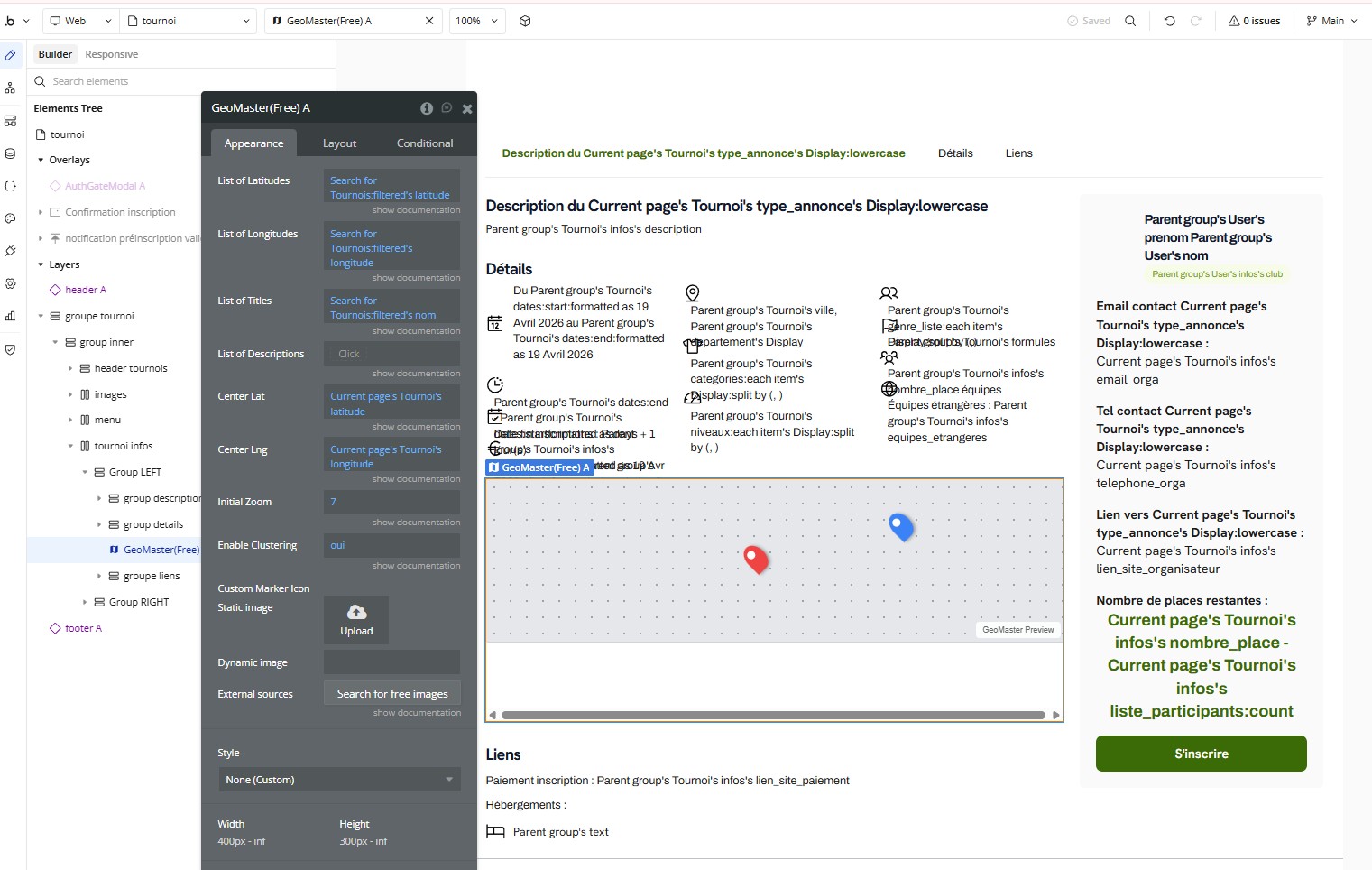


 Native Geographic Addresses: You can now pass a list of addresses directly to the plugin. No more “Extract Latitude/Longitude” workflows!


 We’ve focused entirely on giving your apps that premium, interactive “Airbnb” or “Uber” feel.
 Permanent Labels: Show prices or names directly above the pins without requiring a click! Just pass a list of texts and they render beautifully.
 Multi-Stop Routing: Pass a list of 5, 10, or 20 addresses and the map will generate a complete journey! Perfect for logistics.
 Alternative Routes: Expose distances and durations for alternative routes directly into Bubble states.
 We have transformed the plugin into a true Location Intelligence Engine.
 Live Tracking & Proximity Radar Turn on Live Tracking and define a Proximity Radius (e.g., 50 meters). The map will now silently track the user in the background. The exact millisecond they get within 50 meters of any marker on your map, it triggers a User Entered Proximity event in Bubble! Perfect for auto check-ins or unlocking content when users arrive at a destination.
 Active Geofencing (Point-in-Polygon) We built a highly optimized Ray-Casting algorithm directly into the GPS receiver. Draw a polygon on the map (or load a city’s GeoJSON), and as the user walks around with their phone, GeoMaster will trigger Entered Geofence and Exited Geofence workflows.
 Dynamic Radius Overlay (60fps) Want to let users filter restaurants with a slider? Instead of aggressively re-rendering the whole map, use our new Draw Dynamic Radius action. It draws a beautiful, glass-like circle that fluidly grows and shrinks at 60fps as the user drags a Bubble Slider!
 Global Unit System (The Math Fix) Tired of converting meters to miles in your workflows? We added a Master Dropdown: Metric vs Imperial. Set it once, and all routes, proximity radiuses, and straight-line distances will automatically output perfect kilometers or miles!
 Beta Notice: This is V1! It’s fast and stable for displaying markers, but it does not yet include the advanced Web features like Drawing Polygons, Checking Point-in-Polygon, or Routing. Those are on the roadmap as we figure out the best mobile UX for them.


