Hi @zach8 thanks for moving the post over from the other thread
If you only add 1 Catalog Id per line item object, this should fix your issue, for example, change ‘ZZPS5OQCHMFNPBG3IK7NZVV2, 63BDRR76WVKGUIS2Q3KZQVMG’ to only ‘ZZPS5OQCHMFNPBG3IK7NZVV2’
and then a separate line item object will need to be created using the Create Catalog Line Item workflow action for ‘63BDRR76WVKGUIS2Q3KZQVMG’.
Here is the documentation, let me know if this solves your issue or if you need further assistance.
This seems to be contradictory to the documentation. The documentation suggests I can pass a list of text-based line items. Are you saying I can pass a list of text-based items, but I can’t pass a list of Product IDs?
Hi @zach8 , i’ll have a look at updating the documentation as I can understand if it’s not as clear as I’d hoped.
When you use the Create Catalog Line Item workflow action, it creates some text (a Line Item Object) used in the Create Order Payment Link workflow action to create the Square Order Checkout.
Line Item Object example:{"catalog_object_id":"RG5NSHJCVJKUP7AAIQ5LJP53","quantity":"2"}
Each Line Item Object is 1 product (using 1 Catalog ID) and its quantity in the checkout. For example, 1 line item could be: 3 x Pizza.
To add multiple line items to the checkout you need to use the Create Catalog Line Item workflow action to generate the Line Item Object for each product. You can then add these Line Item Objects to a List of texts in your app and add this list into the Create Order Payment Link workflow action’s Line Item’s List field.
For example, you would use the Create Catalog Line Item 3 times (once for each product) to generate your checkout line items as follows:
In our example checkout, when you add an item to the basket it uses the Create Catalog Line Item workflow action and adds this to the BasketList as a new item in the list.
Hey @phill.dev thanks for your previous reply. I haven’t had an opportunity to work on it yet.
But I’m working on a site for a friend, I’m trying to implement the Square checkout, and I’m getting the following error trying to generate a payment link from a single catalog id:
Plugin action Square Checkout V2 - Create Order Payment Link error:
TypeError: Cannot read property ‘url’ of undefined
at eval (eval at build_function (/var/task/index.js:86:21), :101:53)
at /var/task/index.js:349:23
at run_fn (/var/task/u.js:594:18)
I checked the logs and that error is repeated in the logs.
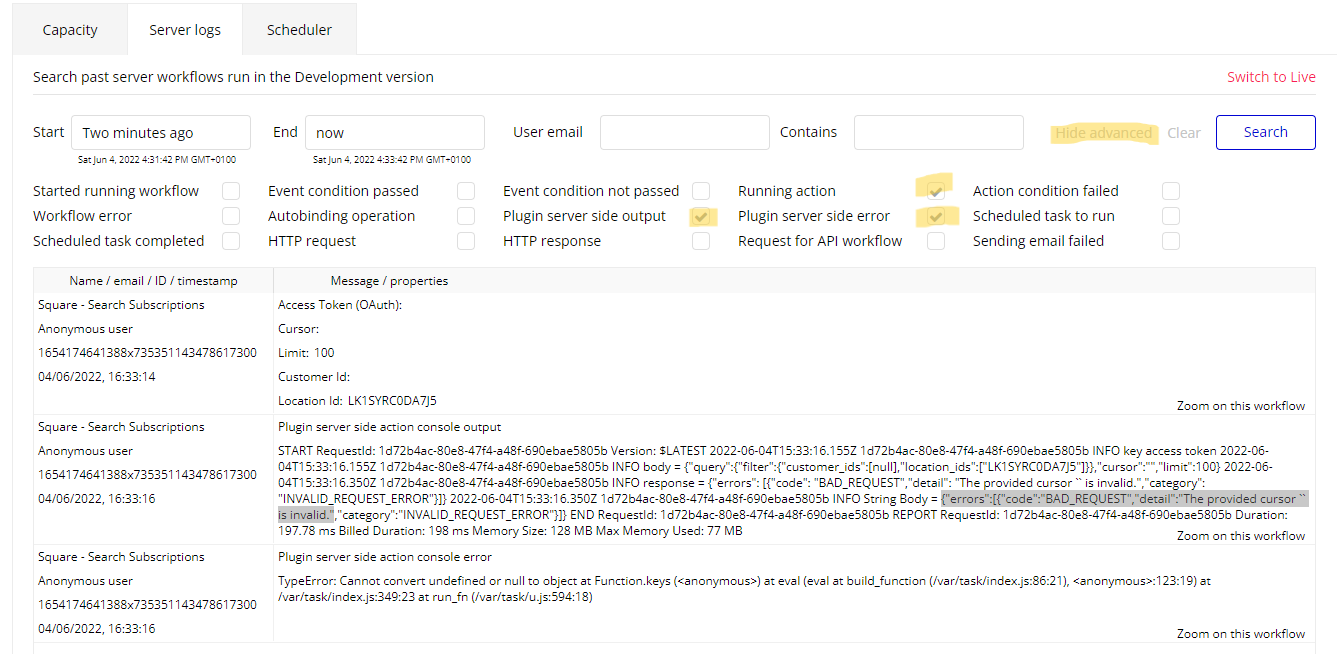
When I shared the image from my server logs earlier it was with the above parameters selected. I just went back and double-checked, and the error is indeed the same. Here is the log with the preceding step where the plugin successfully creates the order, and it seems to create the payment link. It seems like something goes wrong when Bubble tries to use the link in the workflow. Granted I have no idea really.
@phill.dev FWIW, I’m now having the same issue on my site. The quick payment link was working before, but now when I try to use it, it produces the same error that I was seeing on the other site.
Hi @zach8 apologies for the slow response, I cannot see the plugin server side action output in your screenshot. If you share this error i’ll be able to help.
Could you also please let me know which API version you are using in the Square Developer Dashboard?
That is helpful, however I’m having a hard time finding in Square where I can put the private key. I don’t see anywhere in Square for that! In POSTMAN I can add a header with Authorization - Bearer <key>.
We’ve been continuing to improve the Square checkout plugin and have just released a minor change to improve the plugin’s error handling which was a pain point for many users.
If there is an error with the plugin, for example, an incorrect currency code, it will show in the app’s server logs as well as now highlight the error within the browser.
For example, for £ the currency code is GBP and not GB, so the plugin has thrown the following error in the browser:
I hope this will be useful for those using the Square Checkout plugin, please let us know if you encounter any issues.
Hi Phil
I am getting a different plugin error to the ones above. Any ideas what I might have done wrong?
I am on a dummy test page literally trying to send one quick payment into the gateway to try to work out how to make this work.
Richard
OK I had both production and non-production endpoints in my plugin settings, and one of them had an extra slash on the end of the endpoint https://endpointblah.com/ <---- that slash was bad.
Sandbox I think doesn’t like my production location so I’ll have to read up on that in the square docs.
I’m now getting a payment page.
Thanks for showing me the server output - I found what I needed from there.