
Hi Bubblers,
As you may know, Bubble’s official Slack plugin doesn’t offer the option to post files. The only workaround to date is a custom three-step API connector call per file (get an upload URL, POST the bytes, finalize).
My dev partner and I built this plugin to hopefully save you a few hours of configuration, and so multi-file uploads land as one Slack message with one notification instead of a loop posting each file separately.
It is intended as a companion to the official Slack plugin.
Post any file to Slack. Up to 10 files at once, ~100 MB combined, with caption, in a specific channel or thread. Thread chaining for unbounded batches and private file hosting.
- Demo page (with an illustrated configuration tutorial)
- Full user documentation
- Plugin page
It has two actions:
- Upload a Single File: post one file in a specific Slack channel (and, if needed, a specific thread).
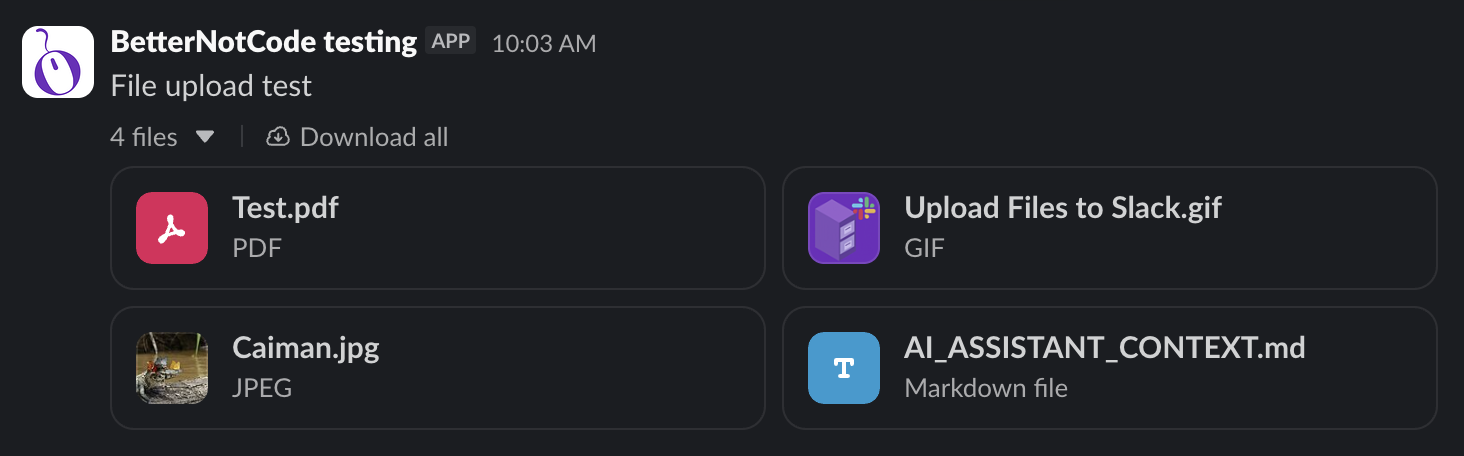
- Upload Multiple Files: post one Slack message with 2 to 10 attachments.
The result looks like that:
Full features list
- Multi-file batching in one Slack message: up to 10 files appear as one grouped message under a single caption (takes ~1 WU per call regardless of file count).
- Sequential Upload Mode for larger batches: handles batches up to ~100 MB combined instead of the 25 MB default. You get the same Slack-side result (one message with N attachments), one buffer at a time in memory.
- Thread chaining for unbounded batches: each call returns the
message_tsof the Slack message it posted. Pass it as the next call’s Thread Timestamp and the new batch lands as a thread reply. Chain as many calls as you need to post more than 10 files/100 MB in total. - Per-user private file hosting via DM channels: pass a direct-message channel ID (starts with
D...) instead of a team channel ID, and the files are hosted in Slack but visible only to that user. - Filename auto-correction: the plugin trims whitespace, strips control characters and path separators, collapses repeated underscores, and truncates to 255 characters while preserving the extension. UTF-8 names with accents and emojis are kept as-is (every correction is logged).
What you can configure
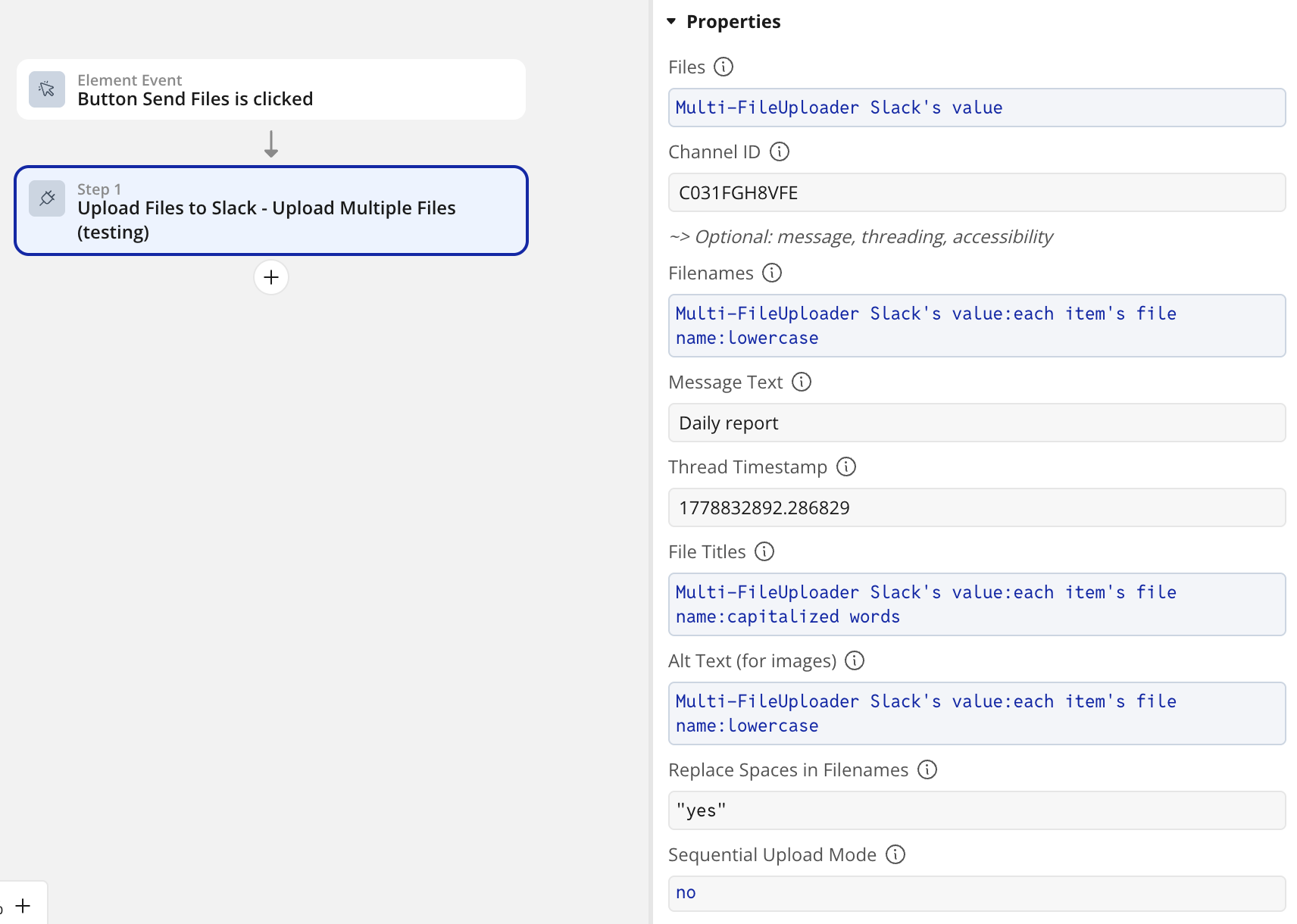
| Option | What it does |
|---|---|
| Caption | A message above the file(s) using Slack’s mrkdwn formatting and emojis |
| Thread reply | Pass a Thread Timestamp to post inside an existing thread |
| Title and alt text (per file) | Override the displayed title; add screen-reader descriptions for accessibility (WCAG, ADA, Section 508, European Accessibility Act) |
| Sequential Upload Mode | Toggle to handle batches up to ~100 MB combined |
| Filename auto-correction | Plugin-side; you can also force space-to-underscore |
| Returned values | file_id, file_permalink, message_ts, error_code, error_message, plus failed_filenames and success_count / failure_count for the multi-file action. |
We recommend Bubble’s free Multi-File Uploader - Dropzone plugin if the files to slack come from your end users.
You can branch on error_code to recover gracefully in your workflow: retry on ratelimited, alert an admin on storage_limit_reached, drop the channel ID from a user record on channel_not_found, retry only the failed files on partial_success.
Reliability
- Inputs pre-validated: Channel IDs are checked against the expected format before any network call. User tokens (
xoxp-) and webhook URLs are rejected with a clear explanation. Bot tokens (xoxb-) and rotated tokens (xoxe.xoxb-) are both accepted. - Slack errors translated to human language: every Slack error code is explained in a paragraph that says what went wrong, what was received, and where in Slack or Bubble to go to fix it. Covers
invalid_auth,missing_scope,channel_not_found,not_in_channel,is_archived,ratelimited,storage_limit_reached,thread_not_found,file_size_limit_exceeded,file_uploads_disabled,alt_txt_too_large,msg_too_long. - Combined-size pre-check: the plugin reads each file’s
Content-Lengthbefore downloading and rejects oversized batches immediately. - Partial-success handling in Sequential mode: if one file fails, the others are still posted. The action returns
error_code = partial_success, with the surviving files infile_idsand the failed names infailed_filenames. - Auto-retry on Slack rate limits: the plugin uses the official Slack SDK, which retries 429 responses honoring the
Retry-Afterheader. Multi-file batches count as one call, so grouping is a real rate-limit advantage. - Structured logs: every error is logged with the
[Upload Files to Slack]prefix.
Feedback welcome
If you notice a bug, a weird interaction with another plugin, or there is a specific business case you would like the plugin to cover, please reach out. We react quickly!