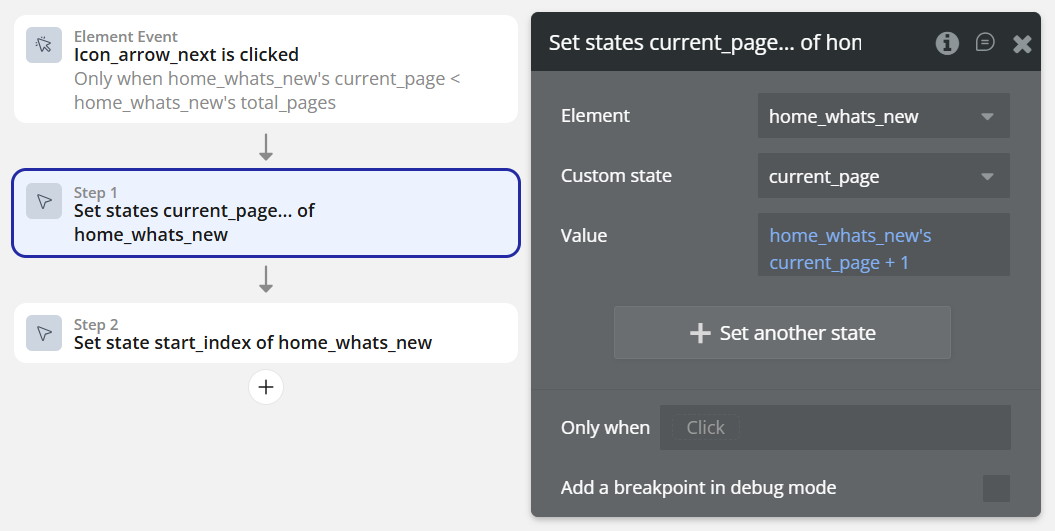
I’m trying to implement a paginated “What’s New” page for my app. The page should allow users to filter posts by Year and/or Month, and then display the results in a Repeating Group with pagination (6 items per page). Instead, the Repeating Group always shows the same first 6 items, even when navigating to the next page.
I’ve tried many different approaches and adjusted various settings, but I still feel lost and can’t pinpoint what’s causing the issue. I’m not sure how to fix this, so I would greatly appreciate any advice or guidance from anyone who has experienced something similar.
UI
On home_whats_new page, two dropdowns for Year and Month, a Repeating Group for posts, and Previous/Next buttons with a “Page X of Y” display.
Observation
When dropdowns are empty, “Page X of Y” updates correctly, but the Repeating Group still shows the first 6 items on all pages.
The “Page X of Y” display updates correctly according to the selected Year and/or Month, as well as when using the Previous/Next buttons.
Setup
UI
On home_whats_new page, two dropdowns for Year and Month, a Repeating Group for posts, and Previous/Next buttons with a “Page X of Y” display.
Hey, you dont need to do all these things, With Repeating Group we have pagination option, if you make the RG, static number of rown let say 6, then you can use workflow to so next page for reapetign group,
Like in one of my app i want to show only 10 item :
Hey @Baloshi69, thanks so much for the quick response. The reason I didn’t use the native pagination option is because I wanted to adapt the layout to different screen sizes. On mobile, I show 1 row with 2 items (so 3 rows total to make 6). On larger screens, I show 3 items per row (so 2 rows to make 6). Because of that, I set my own page size at 6.
It seems this design choice is what’s making everything more complicated. The next/previous setup you suggested looks so clean and straightforward. I really love that approach.
Do you know if it’s possible to achieve this kind of responsive layout while still using the native pagination option?
@WMD sorry i coudn’t saw your previous reply, but its good that you found the soluiton, if you ever stuck do ping me here or in linkedin or through whatsapp,
i would love to help, you can find my contact in my portfolio site,