Hello Bubblers,
I want to introduce our plugin ReactFlow: Node-based Graph/Diagram. It enables to create quite impressive and interactive flow (node-based) diagrams - similar diagrams to the ones in the workflow automation tools as n8n, Zapier or Make.
I must say it was quite challenging to make it highly interactive with Bubble because ReactFlow library is quite complex and we wanted to make it as much customizable as possible. But I think we have managed it quite well and we already got some nice feedbacks from our users (thank you!).
What we are most proud of about this plugin:
- custom nodes templates - this feature enables Bubblers to define nodes layouts with HTM syntax that is similar to JSX/React (but no need to use it if you are ok with the default layout)
- auto-layout - automatically organize node positions to minimize edge crossings and optimize spacing between nodes
- it elegantly loads nodes and edges data from bubble database
- documentation - we also spent a lot of effort on a documentation - either in the plugin page or help of the plugin fields. We hope that event the more complex features will be clear for you to understand
We will be happy for any feedback and insights!
Some examples:
We’ve recently introduced new states selected nodes IDs and selected edges IDs. These are useful if you want to show users information from node or nodes they’ve selected.
Also we added demo of custom node templates with images:
Open in demo
hay can you make a guide please of the type of node that is a group that stores node? i cant figure it out
Hello, thank you for reaching out!
Do you mean something like this? Sub Flow - React Flow
We will have a look at it and let you know.
Thank You!! and i face some more issues and i want to know if there is solutions for this  thank you !
- adding node on edge drop
- **Preventing Cycles
- Context Menu
4.what type of nodes i can make {image uploader/node with input/node with buttons}..
Thank You!!!
We have just introduced 2 new features:
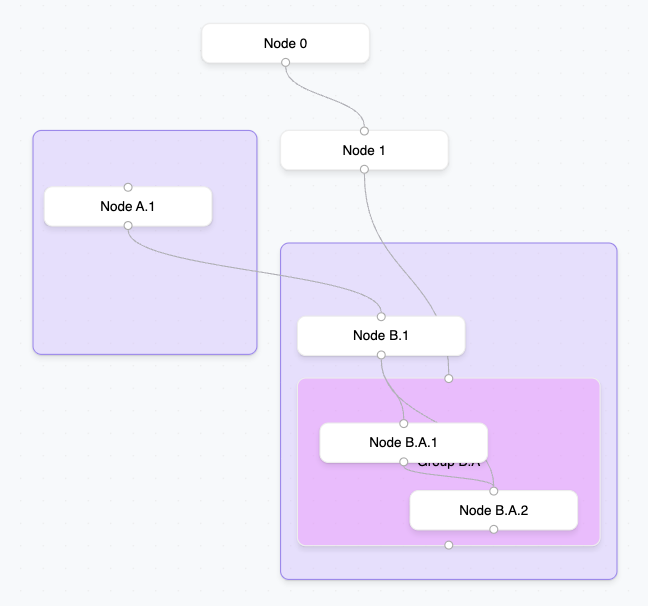
1. Subflows & Grouping
Rendering nested graphs and grouping of nodes as shown in the following screenshot:
Demo
2. Add Node On Edge Drop
Introduced a new event and state so you can create a new node when you drop the connection line on the canvas.
Demo (in Bubble-database-ready plugin section)
@yakir78111
Regarding the other requested features:
- Preventing Cycles - this could be quite tricky to prevent from plugin side of view. I suggest to handle this in you workflows logic when adding new edge.
- Context Menu - this is also quite tricky because of integrating well with Bubble. Do you have idea how it should work so it is not super-complicated from developer point of view? Workaround is to show context about the selected node or edge next to the canvas - does that work for you?
- You can currently define custom node templates that can include inputs or buttons. But we do not have currently support reading such values or clicks - because this is tricky to do while keeping the plugin not too complicated for developers. You could probably access inputs values or button clicks using external Javascript, but we did not try it yet.
Hope it helps and reach out if any more questions.
Hello! We have just launched comprehensive plugin documentation! Hope, it helps easily setup the plugin and get most out of it.
Hey, happy to have found this plugin, but I was wondering if i can utilize it if my backend is all in Xano? When bubble changed their pricing model I migrated to xano so none of my data types exist in bubble anymore.
Hey, thanks for the question! Yes, you can use it even if your backend is fully on Xano. While we haven’t specifically tested that setup, here’s how you can approach it:
- You can fetch your node and edge data from Xano using API calls and pass it into the Load nodes and edges action.
- To save changes like position updates or new connections back to Xano, you can either use the exposed plugin states and events (as seen in demo) or use the Export to JSON action and send the result via API to your Xano backend.
- The only current requirement is that you still need to select Bubble data types for “Node data type” and “Edge data type” in the element properties- even if you’re not using them for the actual data. You can simply create dummy/empty types in Bubble for this purpose.
If you need more guidance or find that a certain action is missing for your use case, just let us know. I’d be happy to expand support based on your feedback.
Hello, how are you? I need help of a specialist on this plugin. I have small budget, but i just need help to setup simple graph.
I have Property as main data type and i want to display Property as a Parent element and Energy Meters as child elevements.
I will pay and thank you but please help