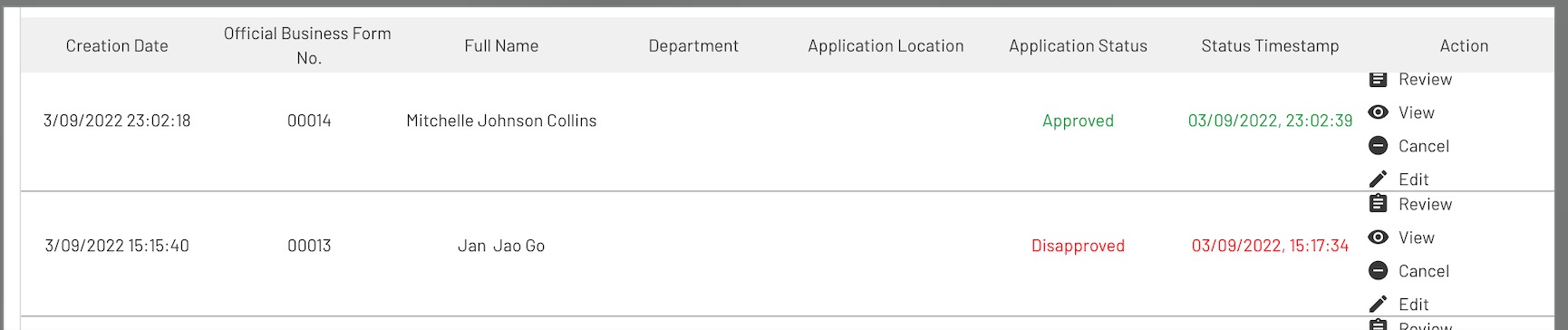
I have a repeating group that displays data about time-off applied of all employees. Since the RG is available/displayed to all users (super admin, manager, user), I am figuring out a way where a user can see only the time-off applied based on his user role, and department.
For example:
-
A sales manager w/ a manager user role can only see time-offs applied by all users under the sales department.
-
A sales employee w/ a user role can only see his/her time-off applied.
Hi there, @janernestgo… can you share some details about your set up? If it was me, I would likely be using option sets for the roles and departments… is that what you are doing? What does the data type look like where you are saving the time off records?
Best…
Mike
Hi @mikeloc
In this example, I am showing our Official Business function, wherein employees have conduct outside office premises, they have to submit official business forms (but this time it’s online). So,
basically, I have a repeating group that shows all applied and approved/disapproved official business of people/employees. I want to be able to set the privacy of data based on 1) department and 2) user role. Please note that user role and department are under USER data type, whilst I have a separate Official Business data type
So for example if a user is only at user level, and he’s under operations department. Supervisors and managers can only see their subordinates.
Kindly note that my datatype for official business contains these, and will contain all official business from all departments and users:
Does a user create their own things in the official business data type? If so and if I understand everything correctly (which could easily not be the case), I think these privacy rules might do the trick for managers and users.
Hi @mikeloc Yes. When they submit a new official business. There is creation of new data in the ‘Official Business’ data type.
So the goal here is that super admins can view all data in the RG, but a manager from sales department would only be able to see submitted official business forms from his/her subordinates who are working under sales department, and not from others. How I understand it is that privacy is only for hiding elements, not really the data inside them.
How are you defining the relationship between a manager and their subordinates?
By department and user roles (e.g. User, Supervisor, “Manager”, and Super Admin). These are both under User Data Type.
I understand that, but that doesn’t explain how the app knows that certain employees report to a specific manager. How is that relationship being defined?
Oh, I see. How we want this to work is that any manager/ supervisor as long as the manager/supervisor is under the same department as the user.
I assume you are setting the department field on the official business data type to the department of the user who is creating the thing within that data type, right? If so, then I believe what I originally showed you should work (shown again below with the addition of the super admin role) because the manager’s department will be the same as the department on all of the things in the official business data type that were created by users in the manager’s department.
@mikeloc The department of the user ir manager were already setup in a different function.
Whenever an official business is created, all the app has to do is pull the department and role of the user from the User Data Type.
I’m not sure what that means because a thing in the official business data type doesn’t have a role. Anyway, I laid out privacy rules that I think could work… I assume you tried them and they’re not working for you?
This allows both user and manager only to see information according to their department? and/or user role?
Not exactly the same expression as the role and department are option set. But let me explore this one out.
and This official business's department is This official business's department?
I’m not sure what you are trying to accomplish there, but that doesn’t make sense.
Trying to figure out why it’s showing this error.
It’s showing an error because that expression doesn’t mean anything… and this official business’s department is what? I have no idea why you can’t use the rules I posted earlier (or something very similar).
I tried using the expression for the Manager User, still showing the error.
For the official business from the user, the expression is accepted and looks fine.
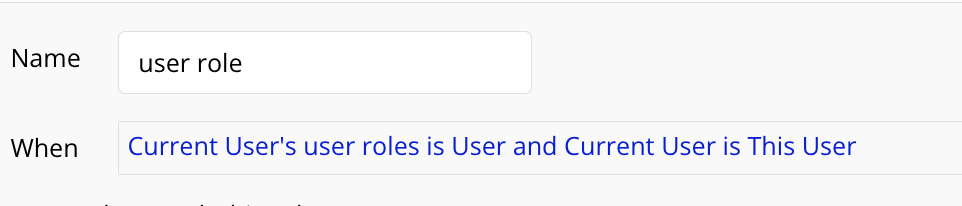
For the user, since it is only to see his/her own data, I can use this expression?:
I’m not sure why you created the rule in the third screenshot because the rule in the second screenshot seems like it should take care of things for the User role.
About the first screenshot, what type of field is current department on the User data type?
If you want to give me access (privately) to your editor, I can take a look under the hood, and I’m sure we can get this figured out.
3rd one was supposed to hide information to user role that are not meant for him/her to see on a manager/supervisor/super admin level.
@mikeloc Got the expressions right! Thanks for your help! So basically, now user role and department are filtering the privacy. Managers, and supervisors can see all employees/ users under their own department. But users can only see their own created official business forms.