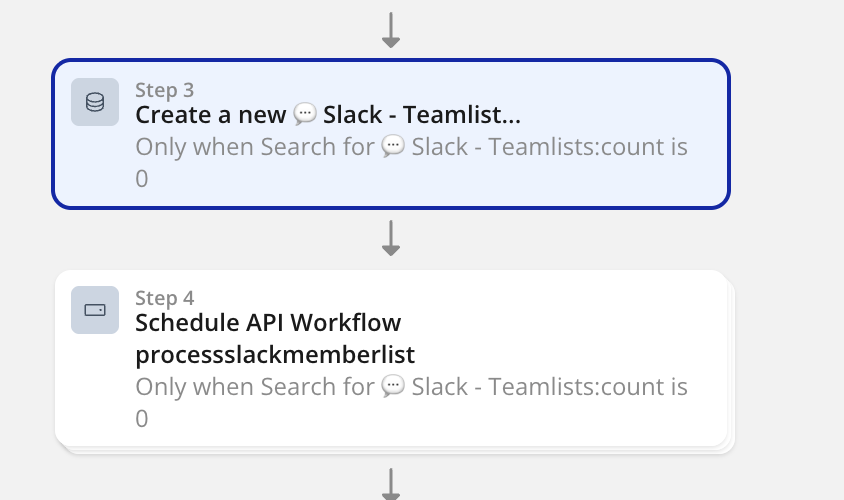
I was troubleshooting an issue and I came across a workflow that has 2 steps that conditionally trigger based an item existing or not* and the first step creates the item. Does that mean that sometimes step 2 will trigger sometimes will not? Best is to put these in a fetch or create type of custom workflow, right?
Thanks, Petter! That clarifies a ton! That whole chapter should live in the editor. Actually the editor should represent that instead of “lying” to me with arrows and step#, it should just have it fan out into multiple actions unless the actions fall into the sequential buckets you outlined
In theory, if you create a dependency on a previous step in a workflow, it should respect that previous step, but everything else without the dependency will be triggered at the same time.
If we move them to a custom event, the actions inside the custom event will run at the same time, but the outer workflow will wait for the custom event to finish before continuing.
The “mental model” that you should have is still that things run in sequence. Technically there are certain circumstances where consecutive “create a thing” or “make changes to a thing” actions can run in a single block, all at once
Bubble only does this if the actions change different things and don’t depend (in any of their properties) on the other changes in the batch
so you should not be able to notice when this does or doesn’t happen except that things will finish faster and you won’t (even if you watch closely) see a gap between the first change and the rest
if you get a different end result than if all the changes ran in sequence, that’s a bug that should be reported – but to my knowledge it’s not common. In your example, it’s not a bug, but a “miscommunication”; Bubble doesn’t know that Step 2 relies on Step 1. Technically it should “randomly” fail (since it’s a matter of database timing), but in reality I’d expect it to fail pretty consistently.
The underlying challenge is not really that things don’t run in sequence, but that 1) Database operations by nature have a delay, and 2) Bubble can’t always tell that two operations are connected. For example, if you Create a thing in Step 1, and then Search for things of the same data type in Step 2, the database may not have had time to update (and the search may be using a cached version to speed things up), and it’s not obvious that Step 2 needs the update to be finished. That’s why Result of step 2 is the safer choice — it tells Bubble that Step 2 relies on Step 1.
The debugger also adds some extra confusion, but it’s not a bug per se. When you pause a workflow, Bubble doesn’t stop server-side operations that have already started. This means you can still see changes happening, which is confusing but doesn’t actually come from things running out of order — it comes from Bubble running two copies of the workflow:
the server-side copy is secure, is the one that makes changes to data in the DB, and runs to completion no matter what you do in the debugger (once you start it, it won’t be interrupted)
the client-side copy only controls what you sees on that page; it lets your changes get reflected instantly, without waiting for the network, before the server finalizes them. the debugger can pause and resume this copy of the workflow.
But, Bubble also has real time updates, so the client web page also sees changes made by the server (eventually), even when their local copy of the workflow is paused. So if you pause a workflow that changes data on the client, you don’t stop the data from being changed on the server, and the page will see the result of the change (via real time update) even if you leave the workflow paused.