Thanks @mishav for this plugin. I should be missing something very basic but I can’t deal with decimal number with the JS module. This extremely simple script
with Quantity being a decimal format :
I’ve been using the ListItemExpression inside the plugin to compose arrays from a repeating group for quite sometime now, and today is the first error i ran into.
Every time that i add something to the list, this pop up shows, it started a couple hours ago, since this is the only third party plugin i use on the page, i think it can be something that changed maybe? i dont know.
I ended up using “true” and "false as text variables rather than as boolean values and this worked. Not the ideal solution but still works. Let me know if that helps or if you find a way to make it work with booleans
I am using the javascript to obtain the referring website and im having challenges doing it. Im using this java script then creating data base entries obtaining data from that referring link the java script bring in.
I’m using the plugin and the element JavascriptToBubble, and I am getting a weird behavior with “window.addEventListener”.
I am using the function and it seems like there is a race condition on the response of the javascript to Bubble element. I am running an action that should change the URL parameter when I get a specific message and it looks like because there are several messages coming very fast the javascript to bubble element is not running the flow.
Thank you very much for such an amazing plugin @mishav
I am trying to run 3 javascript workflows, they have async functions inside and I have put await statements to make the code synchronous and each individual block works exactly as desired but, the next workflow doesn’t wait for the previous one to finish executing. I tried disable the asynchrounous option but it still does the same. Can someone please help me with this @mishav .
Thanks
Hey @mishav & the rest of the gang. First, wanted to thank you TONS for an amazing plugin ! Have an API that requires sending a zero byte (0x00) and was able to achieve it using Toolbox Expression of \0 with result of text. Need to do the same in API Workflows and trying to achieve it using Toolbox Server Script ‘\0’ for data and “data” for Node script. Doesn’t work. I’ve tried several variations of the data (\0 \0 ‘\0’ etc.) but no luck. Any help is greatly appreciated! TIA.
@mishav How to push value from JS in Bubble Workflow to HTML element?
I need to get image url from Bubble DB and use it as source. I trigger function and get the url, then how to use it inside my HTML block on front.
Amazing plugin the Toolbox one, extremely useful. I´ve a question though:
I´ve managed to create and download a PDF in JavaScript but there is no way I´m able to upload the created PDF to Bubble´s database. Any recommendation on this one?
I have a repeating group with two cells shown. There is a button in cell #2. When that button is pressed I would like it to make changes to a database thing with values from cell #1. I’m not an expert in Javascript, however, could these tools easily help me make this happen?
Hi, I’m trying to convert a list that is “grouped by” to a JSON format using the List Item Expression but it returns nothing when I add “grouped by” to my list which is used as a data source for the List Item Expression. It does work as expected without “grouped by”. Any idea how to overcome this challenge?
Hi All,
I am trying to get the mouse Y coordinates when I click on a RE reference and use that to show and transform a group focus to above or below the reference element depending on the Y coordinates.
But I cant get the value back to the “javascript to bubble” element
Using the run java script function:
I want to return the value back to the Javascript to bubble element
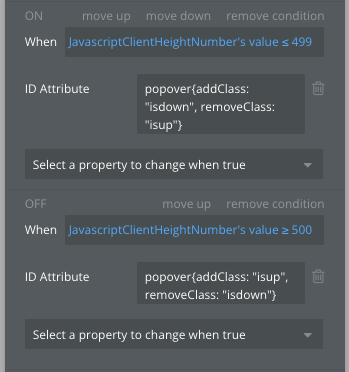
Use the value of the above element to add and remove classes from a group focus
But as I said above the script is not returning the clientY back to the element
@mishav Hi
seems ItemExperssion can not access to fieldtypes that declared in option sets
Experssion field(“field1”,“field2”) return nothing when field1 is optionset types insted of database types


 ! Have an API that requires sending a zero byte (0x00) and was able to achieve it using Toolbox Expression of