Hello,
In a nutshell, I have a webapp that is an online English proficiency test.
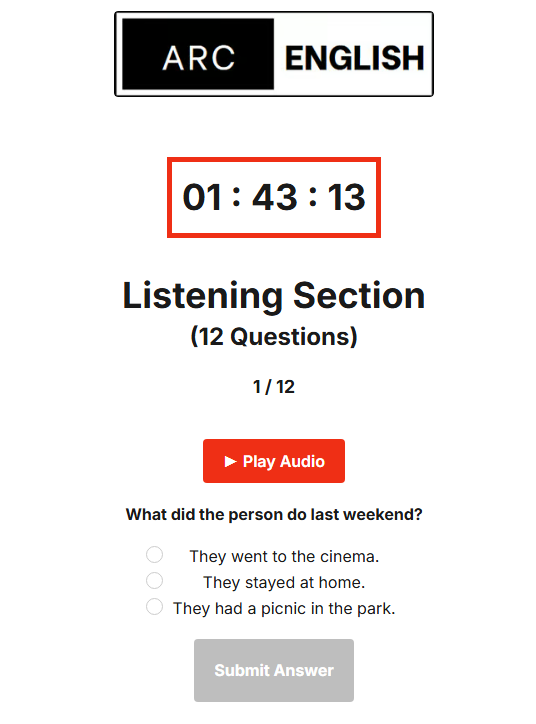
There is a listening section on the English test that plays MP3 audio files corresponding to multiple-choice questions.
Every time a test taker presses the play audio button with the following workflow:
This error continues to come up:
The audio player plugin is the one provided by ZeroQode (Custom Audio Player), it is configured as such (accessing a database with uploaded mp3 files for each audio question):
Any idea why this error keeps coming up & how can I resolve this issue?
Very simply put, it’s so that the test taker can: a) press the play audio button > b) the audio player plugin plays the mp3 file that i manually uploaded into the database for the respective question.
Any help would be greatly appreciated, thank you!
Hello @arcenglish123,
Thank you for providing the detailed screenshots and description of the issue with the Custom Audio Player plugin.
Let’s break down the issue:
- Error Message Breakdown:
- The error message you’re seeing is
TypeError: Cannot read properties of undefined (reading 'play').
- This likely indicates that the plugin is not receiving the expected file data or cannot find the correct audio source.
- Steps to Investigate and Resolve:
- Check Database Configuration: Ensure that each audio question entry in your database has a properly uploaded MP3 file associated with it. This file should be linked correctly to the respective question in your database (based on the entry in the ‘Audio Prompt’ field).
- Correct Workflow Setup: Verify that the workflow that triggers the audio playback is correctly configured. Specifically, ensure that the dynamic data (MP3 file) for each question is being passed correctly when the user clicks the play button.
- Element Reference: Double-check that you’re referencing the correct element (
ZQ Audio Player Listening) in your workflow and that it’s properly linked to the dynamic audio file you’re trying to play.
- Error Handling: If possible, add some error handling or logging to see if the audio file path or the player element is getting correctly populated before the play action is triggered.
- Possible Debugging Steps:
- Test whether the audio is playable directly from the database by manually entering the MP3 URL into the player and clicking play.
- Ensure that the “Audio Prompt” field in your database is correctly pulling the MP3 file.
If the issue persists, I would recommend checking whether the audio player element is properly initialized and if any other dynamic fields or data sources are involved in the issue.
If you’d like to provide more details about the setup or share specific configurations, I’d be happy to assist further!
Best regards,
Support Team
Browse all Zeroqode Plugins for Bubble

Hello,
I tried double checking and troubleshooting with your instructions. I continue to get the same error.
Simply put, the webapp is an English test.
There is a listening section on the English test.
Everytime a test taker presses the play audio button with the following workflow:
This error comes up:
The audio player plugin is the one provided by ZeroQode, it is configured as such (accessing a database with uploaded mp3 files for each audio question):
Any idea why this error is coming up? How can I resolve this issue?
Please advise, thanks
Hi @arcenglish123,
Thanks for the update.
To avoid repeating earlier steps and make sure we’re looking at the right thing, could you please share the results of your testing? This will help us confirm what actually happened on your side:
- Did a minimal test page (1 Custom Audio Player + hard-coded MP3 URL + Play button) work? If yes, please share the page URL; if no, what error did you see?
- In the Bubble Debugger right before the Play action, what value do you see for the player’s MP3 File expression? A screenshot or the resolved URL would be perfect.
• If the field is a file, please also provide the result of :file URL.
• If it’s text, please confirm it’s a full https://...mp3 URL (not just a filename).
- Is the player visible on page load, or shown right before Play? If the latter, did adding a 300–500 ms Pause change anything?
- Do you have multiple Custom Audio Player elements on the page? Please confirm the exact element name targeted in the Play action.
- Your current plugin version, plus one example Question record ID and the exact value stored in its Audio Prompt field.
- Any console errors besides “Cannot read properties of undefined (reading ‘play’)”.
If you can also share a read-only editor link, we’ll review the setup directly and try to pinpoint the issue faster.
Regards,
Support Team
Browse all Zeroqode Plugins for Bubble
Hello, please refer to my comments below in red:
-
Did a minimal test page (1 Custom Audio Player + hard-coded MP3 URL + Play button) work? If yes, please share the page URL; if no, what error did you see? it did not work, the same error came up when pressing the play button.
-
In the Bubble Debugger right before the Play action, what value do you see for the player’s MP3 File expression? A screenshot or the resolved URL would be perfect.
• If the field is a file, please also provide the result of :file URL.
• If it’s text, please confirm it’s a full https://...mp3 URL (not just a filename).

-
Is the player visible on page load, or shown right before Play? If the latter, did adding a 300–500 ms Pause change anything? it is not visible upon page load, not sure how to add a 300-500ms pause.
-
Do you have multiple Custom Audio Player elements on the page? Please confirm the exact element name targeted in the Play action. the element in the button workflow is titled “ZQ Audio Player Listening”, which corresponds to the audio player. There is one other ZQ audio player for a different section of the page.
-
Your current plugin version, plus one example Question record ID and the exact value stored in its Audio Prompt field.
Unique ID: 1754866297894x959403783187250200
![image.png]()
- Any console errors besides “Cannot read properties of undefined (reading ‘play’)”. I’m not sure.
If you can also share a read-only editor link, we’ll review the setup directly and try to pinpoint the issue faster. here is the link:https://bubble.io/page?id=arc-english-level-test&tab=Settings&name=english_test&type=page&view_id=1760641966913x648501866781639700&subtab=General
Hi there @arcenglish123, 
Thanks for the editor link - a couple of quick findings and next steps:
- We couldn’t interact with the player in read-only (even after completing all 24 answers). Could you please share a minimal test page where the player is visible and playable right away (1 player + Play button)? That’ll let us verify the instance/timing without the quiz logic getting in the way.
- We noticed your source is set via Dynamic link (see your screenshot). That can pass a value that isn’t a clean audio file URL/format, which often leads to the
"undefined (reading 'play')" error. Please try this simple binding instead:
- In the MP3 File field, set:
Parent group's Question's Audio Prompt:file URL
(If the field is text, ensure it’s a full https://...mp3 URL. Avoid using Dynamic link here.)
- For a quick sanity check, test with a hardcoded https mp3 in MP3 File and a single Play button.
For reference, here’s our demo editor with the simple player setup you can mirror:
Once you share the test page link (or temporarily make the player visible on page load on your current page), we’ll retest immediately.
Alternatively, you can also invite support@zeroqode.com as a collaborator.
Regards,
Support Team
Browse all Zeroqode Plugins for Bubble
- We couldn’t interact with the player in read-only (even after completing all 24 answers). Could you please share a minimal test page where the player is visible and playable right away (1 player + Play button)? That’ll let us verify the instance/timing without the quiz logic getting in the way. I created the test page with a static mp3 file, it works normally when tested.
- We noticed your source is set via Dynamic link (see your screenshot). That can pass a value that isn’t a clean audio file URL/format, which often leads to the
"undefined (reading 'play')" error. Please try this simple binding instead:
- In the MP3 File field, set:
Parent group's Question's Audio Prompt:file URL
(If the field is text, ensure it’s a full https://...mp3 URL. Avoid using Dynamic link here. I don’t understand, am I supposed to use the dynamic link field with “Parent group's Question's Audio Prompt:file URL” or not? And in my data I actually uploaded the raw MP3 files from my downloaded files on my computer, the URL is as it was downloaded.
- For a quick sanity check, test with a hardcoded https mp3 in MP3 File and a single Play button. I tested this, this works fine.
For reference, here’s our demo editor with the simple player setup you can mirror:
Bubble
Build stuff without code and launch a startup without a tech-cofounder! Bubble is a visual programing language. Instead of typing code, use a visual editor to build applications.
Once you share the test page link (or temporarily make the player visible on page load on your current page), we’ll retest immediately.
Alternatively, you can also invite support@zeroqode.com as a collaborator. I invited this email to collaborate.
If you could help me find a solution as soon as possible, it would be immensely appreciated. As this is quite time sensitive and it is delaying a launch.
Thank you for your help!
Hi there, @arcenglish123
Thanks for sharing the test page. We duplicated your main “english test” page as zq_audio_test and set up the player the correct way.
Because your Audio Prompt is a file type, the correct binding is:
- On list/search pages:
Search for Questions:first item's Audio Prompt
- On the quiz page (inside a group/RG):
Parent group's Question's Audio Prompt
(Please avoid the Dynamic link input for this - it’s not meant for media sources.)
A small heads-up on scope: we provide general product support (bug checks, guidance, examples), but we don’t offer full development/configuration services. Thanks for understanding.
As a data tip, you may find it easier to maintain audio by creating a separate AudioClip data type (file, title/slug, etc.) and linking it to each Question.
Please proceed with configuring your page the same way as zq_audio_test.
If some other quesytions appear after following the suggestions above - we’re happy to help
Best regards,
Support Team
Browse all Zeroqode Plugins for Bubble
*The problem has been resolved, just deleted the previous inquiries I made. Please disregard, thanks
Hi @arcenglish123
Great to hear it’s resolved - thanks for the update!
If anything else pops up, feel free to reach out anytime.
Regards,
Support Team
Browse all Zeroqode Plugins for Bubble