
Hi @eli is there any way to export the special characters like “é”, “è”, etc. and to be able to read them in the csv file?
Yes, you can use the CVS Creator element. Use the action ‘Send JSON to CSV Creator’ and the element will trigger an event ‘CSV Creator has created your file’ when the file is created.
It all works exactly like the create CSV from JSON just with the added ability to access the file as well.
2 Likes
For those struggling to create CSV files without headers, this JSON structure using square brackets will work:

2 Likes
Hey @eli,
A few questions I can’t figure out.
-
It is possible to create a second independent list that is next to the first list. Currently, when I create a second list from a completely separate dataset, the file does not include it.

-
In this response, you displayed how create columns dynamically.
1T - CSV Creator 3.0 - #132 by eli
Blockquote
{
    "column 1":"column 1 value",
    "column 2":"column 2 value",
    Some list:format as text
}
This list would then be formatted as
"new column":"new column value"
Blockquote
In this example, is it possible to have the “new column value” refer to the item from the original top level list? The reason I’m asking is because I’m trying to create a matrix/table where I have a list going down in the first column, and list going horizontally in the first row, and then the database fields in the second list would reference both lists to show the correct item.
It seems like @pierre6 was also trying to accomplish this.
Thanks for your help!
Hi @eli - I’ve now been using your CSV creator plugin for several months and I need to say it works like a charm, thank you!
I saw that you added an error handling functionality. In order to test this functionality, I purposely malformed the JSON in the “create CSV from JSON” action in order to artificially create an error by adding a double quote (before the Date field) as in
{
"“Date”:“10/10/2023”,
“Type”: “invoice”
etc.
}
I then added a step to send myself an email if this "“create CSV from JSON” returned an error. The email was not triggered. I looked at the server log and it read “Workflow error - CSV Creator error: the parameter contents cannot be empty”
Any idea why the “create CSV from JSON” step did not return an error?
Thanks!
Eli:
Appreciate all the work done on the plugin, and all the dedication you’ve devoted to it.
Perhaps I’m missing something but how does one sort the results?
I’ve tried sorting in the RG, sorting in the search, but the results are not sorted.
Any advice at all would be deeply appreciated.
I have setup a backend workflow to create a CSV file from JSON and then create a Base64 file from this output, and store the Result of CSV Creator - New File from Base64 it in a file field of a table.
I am then trying to send the file’s URL to the user in an email action as shown in the screenshot (references the file URL from the DB table). Has anyone run into an issue with the URL that is returned having a strange format? This is what is printed in the email:

“File URL” from the email:

Note that this is in fact linked to the right file when it is clicked. I would like to be able to print out the actual URL of the file instead of the text shown here
@42.decaen I’ll do some testing here. That should have triggered the ‘returned an error’ state.
1 Like
@lawyerphilippines Are you loading the CSV into excel? Keep in mind that regardless how the CSV is created it can be auto sorted when opened into a spreadsheet application.
1 Like
@arbitraryy The url returns from Bubble is a text without the leading ‘https:’. To make this link work you need to add the ‘https:’ before the expression and then use find & replace to find double quotes " and replace them with nothing. That should solve your issue.
1 Like
That worked  Thanks for the reply!
1 Like
Running into error. Keep getting a code error alert.

My setup is super simple, am I doing something wrong here? I put my json into a json validator and everything is okay.
Edit: Got it to work, you must absolutely format your json with a tab character and not two spaces
1 Like
I can’t seem to get a nested list to export in a CSV. I’m outputting a user list and each user may belong to one or more groups. The file only shows the first item in the list, not all of them.

if I try to format that as text, I get an error that it should be a list, not text:

You have to use the Create CSV from JSON element if you want to export a nested list.
ok, I’ve tried a couple things and can’t get it to work:
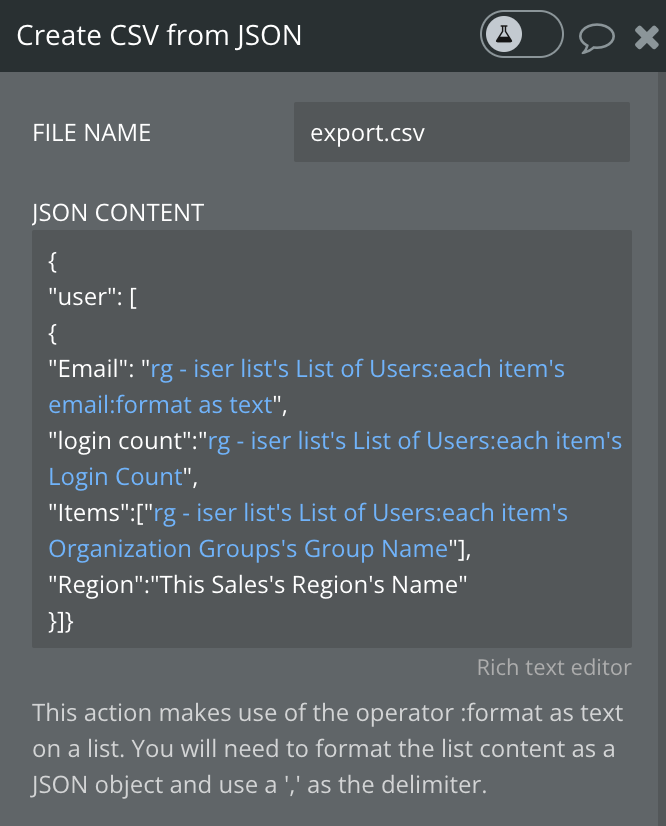
^^^ this just outputs an [object Object] line in the CSV

^^ this outputs everything in the same row, delimited by commas.
The way you have it set with a single object should export to a single row. It’s saying here’s one row and for each column here’s a list of texts to show.
You need to nest this object inside the rg - iser lists's List of Users: format as text so that it’s a list of objects. Each object will be a new row. Then for your values, for example email, will be "Email":"This users email"


Remove all the {"user":[]}. You don’t need that.
1 Like
ah, ok thanks, that worked.
1 Like
Boom!