
I just figured it out

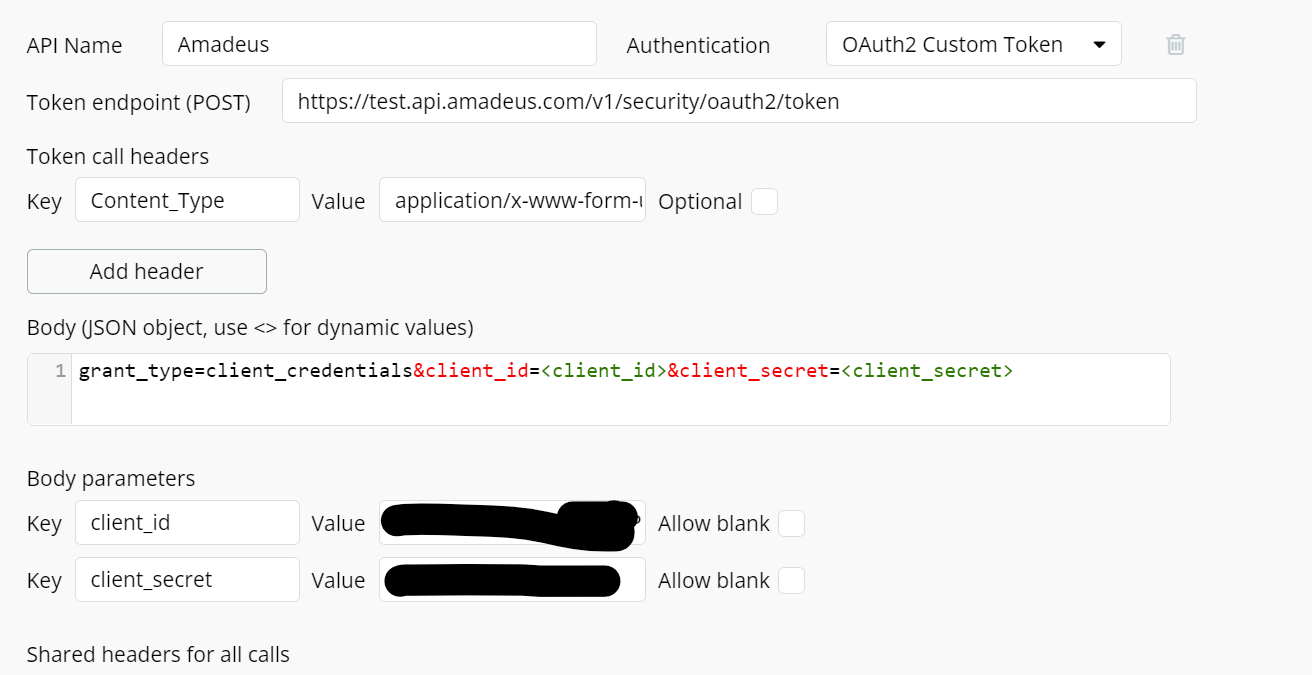
You don’t need to do it in a API Call if you don’t need to dynamically fill the client ID and secret. If your auth with your own account, you should use Custom oAuth2 token.
How would that work?
Exactly like you did in your screenshot, but in custom token section.
After, just add a simple call for testing like:
https://test.api.amadeus.com/v2/reference-data/urls/checkin-links?airline=IB
As a get request
Ahhhhh I see! Learned something new. To be honest, I never used bubbles many oauth options, always built my own all the way out. With this particular case, custom oauth would be cleaner as you wouldn’t have to nest actions
Exactly. Let Bubble manager the auth token for you 
1 Like
Thank you guys for figuring out, I still cant figure out how to pass the token onto a different call. Do either of you know how this is done?
It keeps saying the header name is undefined?
Can you share the error you get?
If you use the Bubble custom auth, you don’t need to pass the token manually. Bubble will include it automaticall to each call.
Pretty sure the error is related to something else.


This kind of error happen when you added one in the past, deleted it after. Sometimes it’s create a bug and the call is corrupted.
Try to create a new fresh API Call.
Be sure also you don’t have any empty shared headers or something like that
OK I will do so now. Ty!

Oh wait just saw, I will add grant type
Actually grant_type is included in my oauth custom token. I tried to add it to the call but it still doesn’t work
Same response
Just figured it out: I had ‘content_type’ and it should be ‘content-type’
Thank you guys so much for the help!!
1 Like