Automated tests of a Bubble app -- my learnings

In reference to this thread: Which automated testing tool is best to use with Bubble?


I’ve been slowly building a test suite for an app using Playwright. My take so far.

The Good

Playwright is Robust

It hasn’t (yet?) flaked out on me saying that there was some browser compatibility.

Great documentation

Clear, concise, helpful, and with lots of good examples.

AI knows Playwright

Claude 3.7 and ChatGPT 4.1 have been very good at giving me suggestions, uncovering features that I had not yet found.

Visual Test Summary

Very nice to see the results at the end and – if a test fails – it points me to the line that it fails.

Writing Tests Uses a Different Part of My Brain :brain:

That mindspace helps me really understand what the hell is going on with the user and the Bubble app in tiny little steps. Also, it helps highlight how much time the user spends waiting for one thing or another.


The Bad Not so Good

Looooong tests

It’s best to have 1 big test with lots of different assertions inside of it because of Bubble’s heavy/slow page loads.
For instance, I’ve got a test that checks if 4 different popups show up. Ideally, I would break them into 4 different test(). But when I do that each test has to load the Bubble app, wait for elements to fully load, and then run the tests.

To avoid that long waiting, I just put all the tests in a single test() and it goes much faster, but I loose the granularity.

It is verbose…

Just to test if clicking a button shows a popup. The amount of awaits can be distracting.

  // Create department popup
  const createDeptButton = page.locator("button", {
    hasText: /Create Department/,
  });
  const createDeptPopup = page.locator("div.Popup.baThaHaI");

  await expect(createDeptButton).toBeVisible();

  await createDeptButton.click();
  await expect(createDeptPopup).toBeVisible();

  await page.keyboard.press("Escape");
  await expect(createDeptPopup).not.toBeVisible();

Wishlist

  • is there a visual builder?
  • is there a way “save” the app state so that I can restart from there?

A demo

9 Likes

I can’t wait to start applying solid e2e testing to my Bubble apps, especially for regression testing.

I have previously investigated Preflight in order not to touch code / deployments for testing, but I will definitely give a go to Playwright or Selenium at some point.

Thanks for the contribution!

1 Like

Nice. Though I don’t intend to kill the joy of testing every button in my apps. Why would I want to lose countless hours of fun and laughter?

FYI: Playwright just released a handy MCP server.

Hey @rico.trevisan this looks cool. Have you checked out Browser-Use?

It’s got playwright under the hood but controlled by LLM. You can give the LLM an instruction like “Sign-up to for an account and tell me if you see any problems” and it will give it a go.

I haven’t tried that, but I did try OpenAI’s Operator. I decided against it because I want the tests to be very mechanical, just find the items, click on them, check if stuff loads, etc.. I didn’t want any variability.

1 Like

There’s a visual builder plugin for VSCode.
(but I don’t use VSCode nor any of its forks so…)

Some more learnings / random notes

Grabbing elements

There’s almost no need to add ids to Bubble elements because Bubble already adds unique identifiers to each Bubble element.

I locate using it. I always put it in a variable so that it’s more explicit, future-me knows what the hell the element was.

const groupFocus = page.locator(".baUqaTc0");
await expect(groupFocus).toBeVisible();

Exception is popups. Popups create a grayout behind it with the same ID, so you have to be more specific.

const confirmationPopup = page.locator(".Popup.baUuqaQ0");
await expect(confirmationPopup).toBeVisible({ timeout: 2000 });

Repeating Group items

Each repeating group will have the “.group-item” class to each child element. It’s a good idea to add a timeout to wait for the RG to load.

// grab the rg You don't need the RepeatingGroup, but it makes it more explicit
const membersList = page.locator(".RepeatingGroup.baUoaPu");

// give it a timeout for it to load
await expect(membersList).toBeVisible({ timeout: 2000 });

// grab all the rg's rows
const memberItems = membersList.locator(".group-item");

// you can count the rows
await expect(memberItems).toHaveCount(1);
console.log("There's one member");

Classes added Bubble

  • Reusables: CustomElement
  • Repeating Groups: RepeatingGroup
  • items in a repeating group: group-item

Set up / clean up

Setting up / tearing down

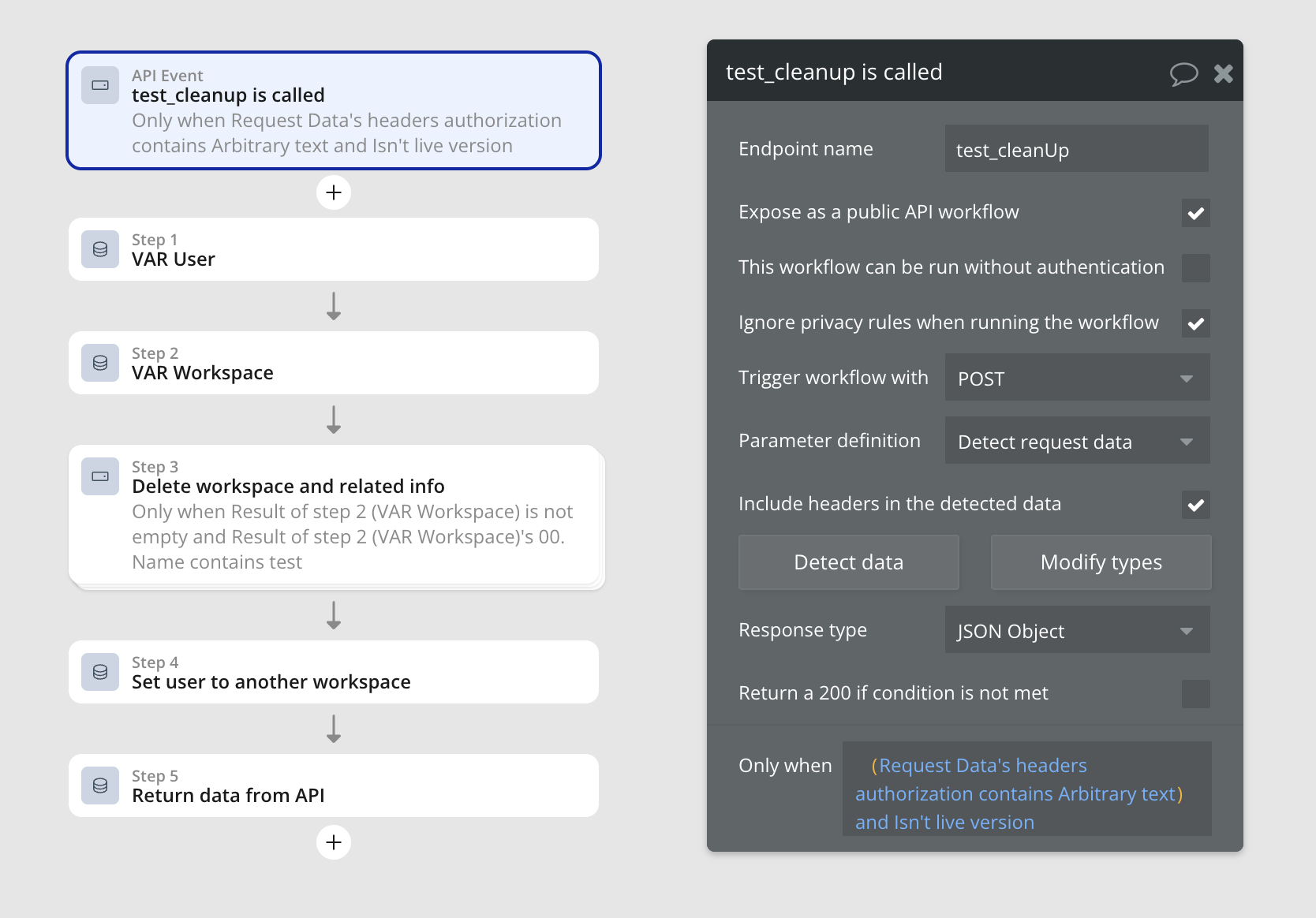
In one of my tests I test if I can create a Workspace in my app. I perform a bunch of tests and then I clean up that workspace via a backend workflow

Creating backend workflows

  • Generate a key on settings/API API Tokens
  • In backend workflows, create a folder “Testing endpoints”
  • create a new workflow
    • check “expose as…”
    • check “ignore privacy…”
    • make it a POST
    • parameters “detect request data”
    • check “include headers…”
    • initialize, grab that url
      • hit that endpoint
        • add header: Authorization: 'Bearer ${TOKEN_YOU_CREATED}
        • by sending the needed data in the body and
    • put a “only when” condition like “Request Data’s headers authorization contains TOKEN_YOU_CREATED”
  • perform the operations you need in that workflow

Example

5 Likes

Writing code for automated testing. Code to Bubble to Code to Bubble…
Man…I’d rather click buttons and fill inputs for hours on end…

A keyboard is a mouse with waaay more buttons. You can even mouse around with it: https://mouseless.click

1 Like

Hi, this might be a silly question, but I’m new to testing and would really appreciate your thoughts.

My team currently uses API workflows and manually validates the UI. I’m curious to know 1) what is your team’s reasoning for incorporating automated testing? And 2) what types of tests do you include (UI, API, performance, or something else)?