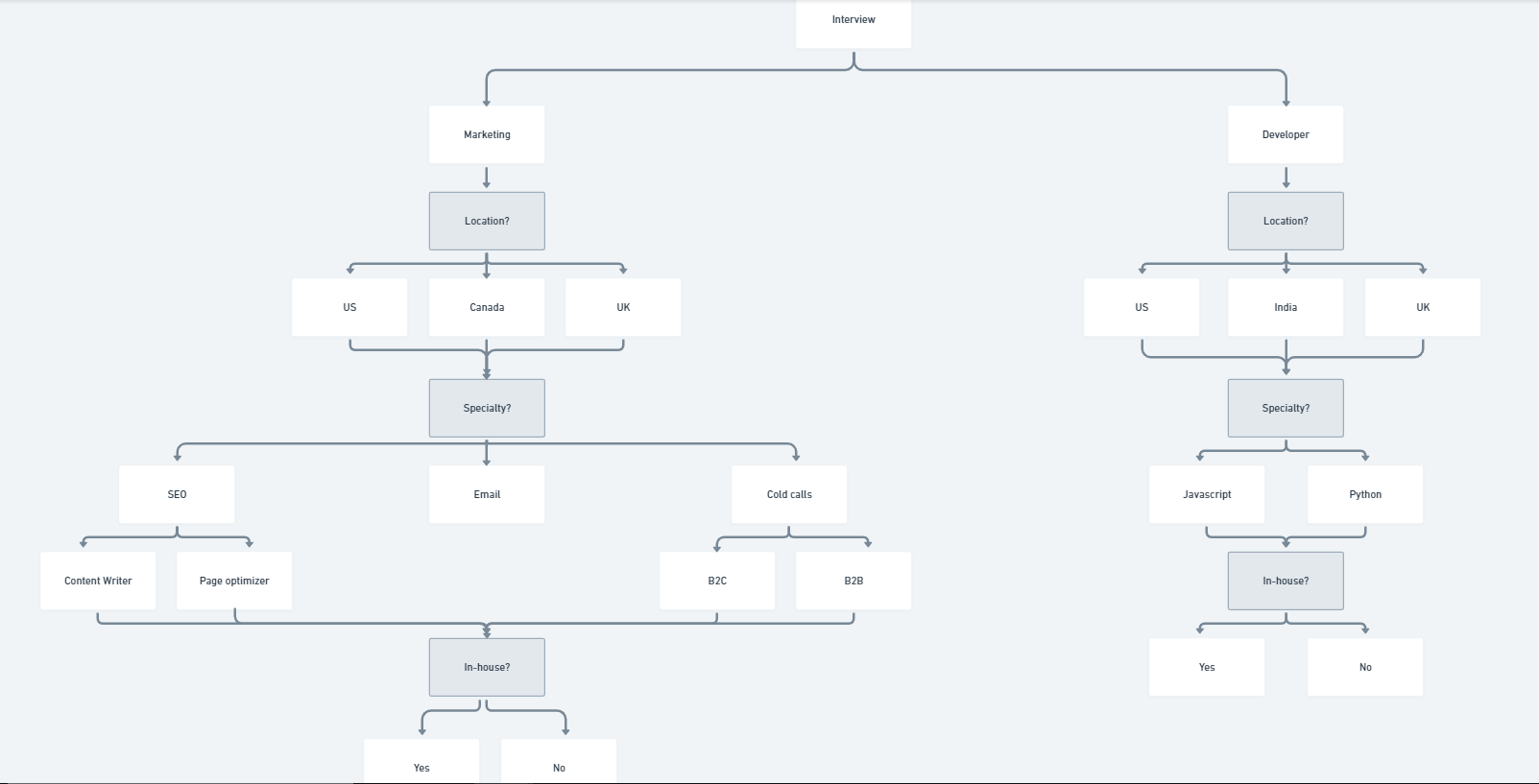
Intelligent use of optionSet attributes can be very useful here, and would avoid having to use conditionals for every different combination of previous selections; you use a single dynamic expression to capture all the possible combinations.
Attributes can be set to lists of other options. For example in your Location optionSet you could create an attribute called ‘Department’. It would be of type Department, and it would be a list.
For each Location, you would manually set the list of Departments on which the particular location is selectable:
US = Marketing, Developer
Canada = Marketing
UK = Marketing, Developer,
India = Developer
Then in the datasource for selections you can simply use All Locations:filtered > Constraint = This Locations's development contains [Dynamic experssion for selected department]
Read the general tip at the end to see how i would populate the dynamic expression for selected department
The nested selections (SEO>Content writer/Page Optimiser & Coldcalls> B2C/BSB) can be dealt with by creating options for all these selections on the Specialty Optionset, and then creating two extra attributes on the Option set.
- Subselection? - A yes/no attribute for whether the option is a subselection or not.
- Subselections - A list of Specialites containing the sub-selections of that particular specialty (Bubble allows optionsets to reference themselves, which is quite cool),
For the first Speciality Dropdown, its datasource should be
All Specialties: filtered > Constraint 1 = This Specialty's department = Selected Department & Constraint 2 = Subselection is 'no'
Create a second speciality dropdown. It wold be visible only if first dropdown's value: subselections: first item is not empty, and it would have as datasource the first dropdown’s value: subselections.
I can see from your PNG that you don’t have a huge array of possible selections, however the above method is very scalable and organised, and works well when your possible selections increase/change.
A general tip for setting up forms:
With the new WU pricing scheme, i would recommend avoiding autobinding, as well as triggering ‘make change to thing’ on every input change. Using customStates which get updated when input fields are changed can help reduce WU consumption & increase performance. The type of these custom states would be the underlying optionset. When the form is completed, use the ‘make change to thing’ action once, and update all the relevant fields to the corresponding customStates.
This also helps deal with user backtracking (when a user returns to a previous step and changes a selection which affects following steps)