Anyone knows why I am getting this error with bulk create? There is no problem with single create. Some had this problem before and Bubble supposedly has fixed it.
I would love to help you with that. Bulk create with the data API u bubble works great, but only if you set up the flow correctly especially the authentication header, privacy rules and the structure of the JSON body.
Do you want to bulk-create from an external system or inside bubble
If you want, I can jump in and set the full request for you clean, scalable and tested. I’ve done this for several bubble users who needed thousands of rows created at once without errors. Just tell me your exact use case, and I’ll show you the easiest path.
I checked your setup the issue is coming from the JSON body format.
Right now you’re sending two separate { } objects without wrapping them in an array, so the API can’t parse it.
Just change:
Content-Type → application/json
And wrap your objects like this:
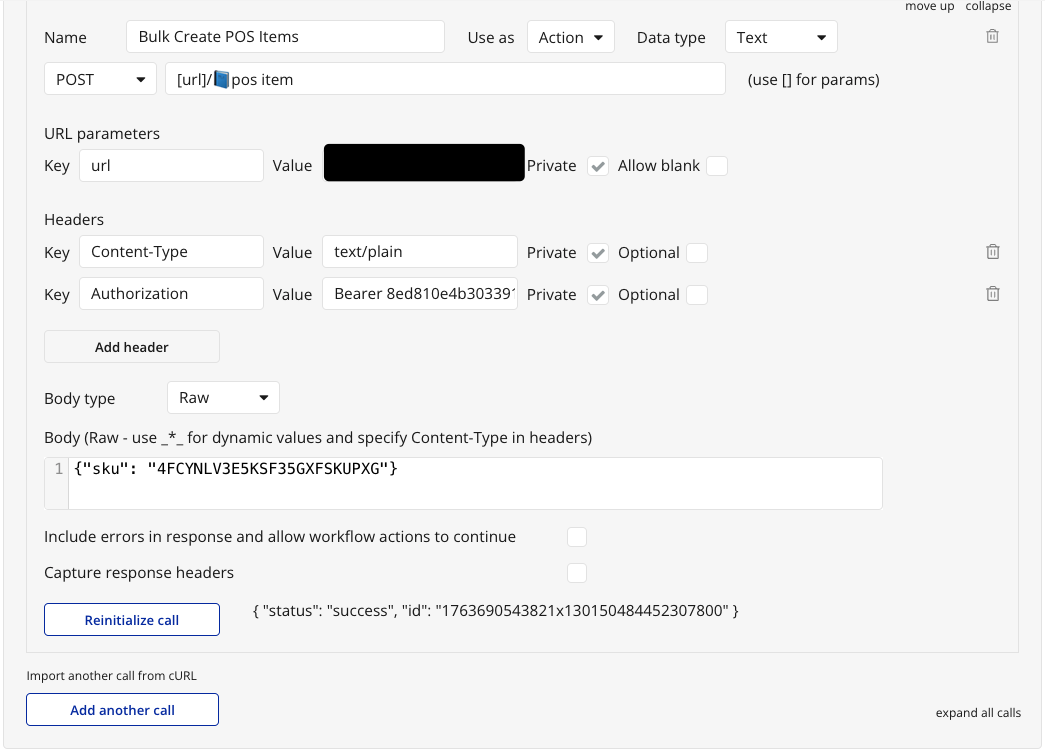
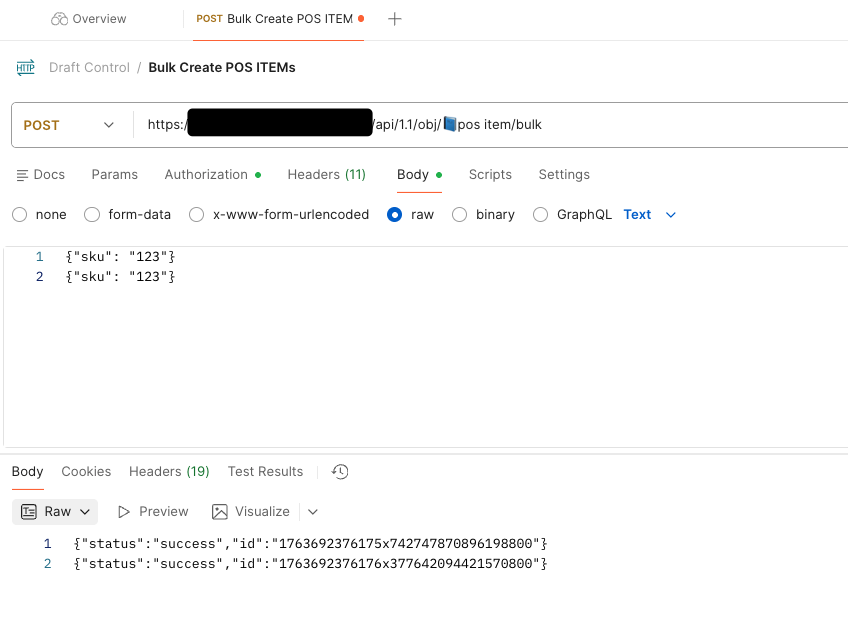
The issue I see if I compare to your postman request is the key you are using. In Bubble you have set “sku id” in one of you screenshot while this is sku in postman. So be sure to use sku
As for data type, this must be set to TEXT because this is not a JSON that is return but a text with a JSON on each line
One of your screenshot also show a POST create a thing (not in bulk) and this returned a JSON (so you should set this a JSON not text. First screenshot)
I think it is a client side bug to this Bubble app. The same setup works from another Bubble app calling this app’s bulk API. I have submitted a bug report.
Note: This is from another Bubble app calling the app’s bullk data API in the OP app.
Create a beeceptor (or similar service) endpoint and send the request that work from postman and after from Bubble. Compare both call, including headers
Also, create a new call from scratch. If you played a lot with a call, sometimes, this can create issue with the call that keep some old settings from previous try.
Finally, be sure that the key you are using is exactly the same that you get when you do a GET request to an existing thing. For example, there’s good chance that Sku ID is sku_id. If you have modified the field name, this is possible that the old name is used as key for API. Using a get request with show you what you need to use (or you can use the API swagger generated by your app if activated)
Is the issue not just that you have a space in your actual URL? You seem to be trying to do a post request to /pos item/bulk which will fail. You can’t have spaces in api workflow names you want to call like this. It’s treated as a URL so name it as such.
As you can see from this screenshot, Bubble and Postman both can handle emoticon and space in the API URL (for bulk). It will just do url encoding. And the field name exists.
Think about deleting your result in webhook site because there’s some sensitive data. From what I see, both are the same in webhook site. Can you share your setting in API connector for this one sent?
I suggest you to use swagger to validate the field name used for API or do a get request to one of your existing item.



 I have submitted a bug report.
