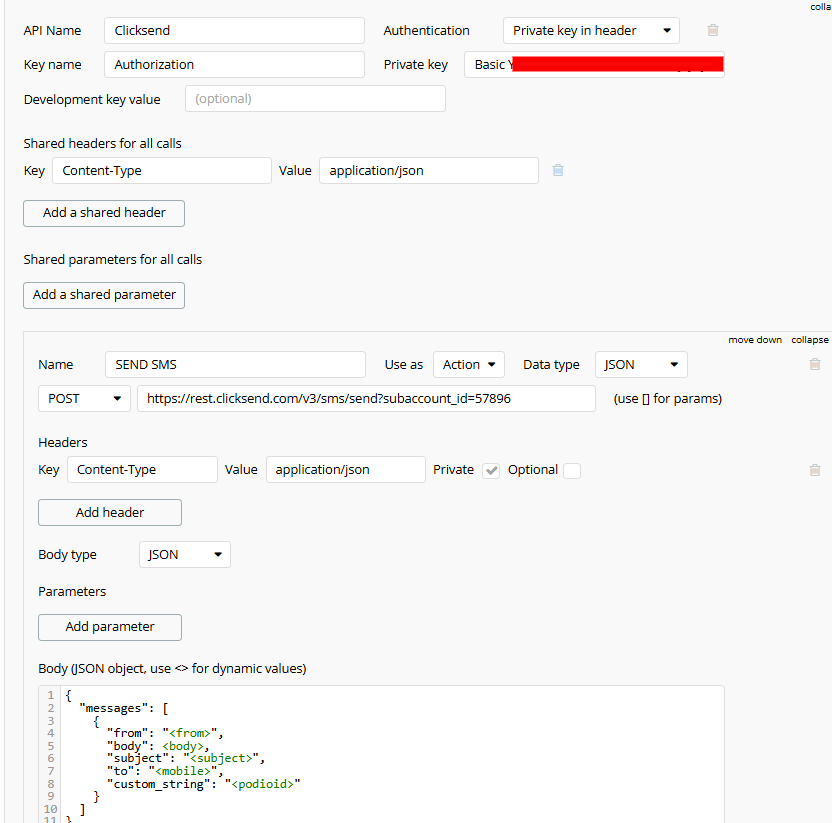
Hey all! I’m desperately trying to get my Clicksend working for sending SMS. Clicksend support are about as helpful as a chocolate teapot.
The person I hired to do this let me down and I’ve managed to solve one of the issues. (On this element, there are more).
For context, the user data type has a field ‘phone:text’ which stores user’s intl phone numbers in +447743777777 format. I have a backend workflow that does this:
This worked, and I received the message, so it’s not a plugin issue. It has to be something, I suspect, to do with ‘each item’s reader’s phone’ on the first image. This evaluates to a list? But honestly, this stuff is above my paygrade.
Can anyone offer some experience? I’d be very grateful! @J805
That crossed my mind, too. But it’s supposed to send to more than one number, as it should send to all the users’ numbers that the workflow identifies.
Okay, I think I’m getting closer. I took the whole expression out and just input my number and it worked. So now I need to figure out how to get it to send to a list of numbers. The only other option, it seems, is the ‘send SMS to a contact list’ trigger, but that involves using a contact list hosted on Clicksend which I’m very much against. There must be another way to send to multiple people?
According to doc, you can’t send to more than one number without repeating the message object (that it’s an array).
I don’t think it’s possible with the plugin, but you can build your own clicksend integration
However, you can also solve this by using Schedule API WF on a list (of text, the text will be the list of number) and in this API workflow, send the SMS (one request / number)
ah, okay. Thank you for all your help! I don’t know how to do either of those things so I’m wondering if I would be better off just seeing if there’s a different tool I can use.
I’m afraid the little grey cells are broken after trying to learn Bubble on the fly, I don’t think there’s any room in there for learning how to set up my own Clicksend integration haha. But thank you, I do appreciate your help and time!
Normally you don’t need to configure API calls with their Plugin, I’ve been using Clicksend for 1 years now on a Bubble app and everything works perfectly fine.
I set up the workflows with their help and here’s what I can tell you:
The easiest way is to validate with them what they call an ‘Alpha Tag’ which allows you to send SMS from a ‘Name’ and not a ‘Number’ (same thing but more professional if you’re a brand and it works much better).
Then select the Workflow “Clicksend - Send SMS (Shared)” and fill in the various fields according to your needs.
Clicksend regulates unregistered numbers to avoid spam (which may be your case), so try this ‘Alpha Tag’ (they validate requests pretty quickly).
If you need more help, I can help or give you the contact I have at Clicksend to see what they can do.
Another option that works very well for me is to use Telegram (with a bot), it’s free and works very well. You can make workflows with buttons and automations much more advanced…
Please, take time to read the whole post before answering. There’s nothing relevant on your reply that help to answer the question.
The reason why I suggest to set his own API call instead of using plugin is to handle multiple to phone in one request, something that the plugin doesn’t allow directly (but we can use SAWOL to solve that. However, this cost more WU).
Yes you’re absolutely right, I was only sharing a complement.
This is the information I received from Clicksend on the use of “Alpha Tag” as a message sender instead of using a number. From what they’ve told me, it’s more efficient and less prone to blocking than using a number (whether for batch sending or not).
This doesn’t change the fact that it can also make its own API calls using this Alpha Tag…