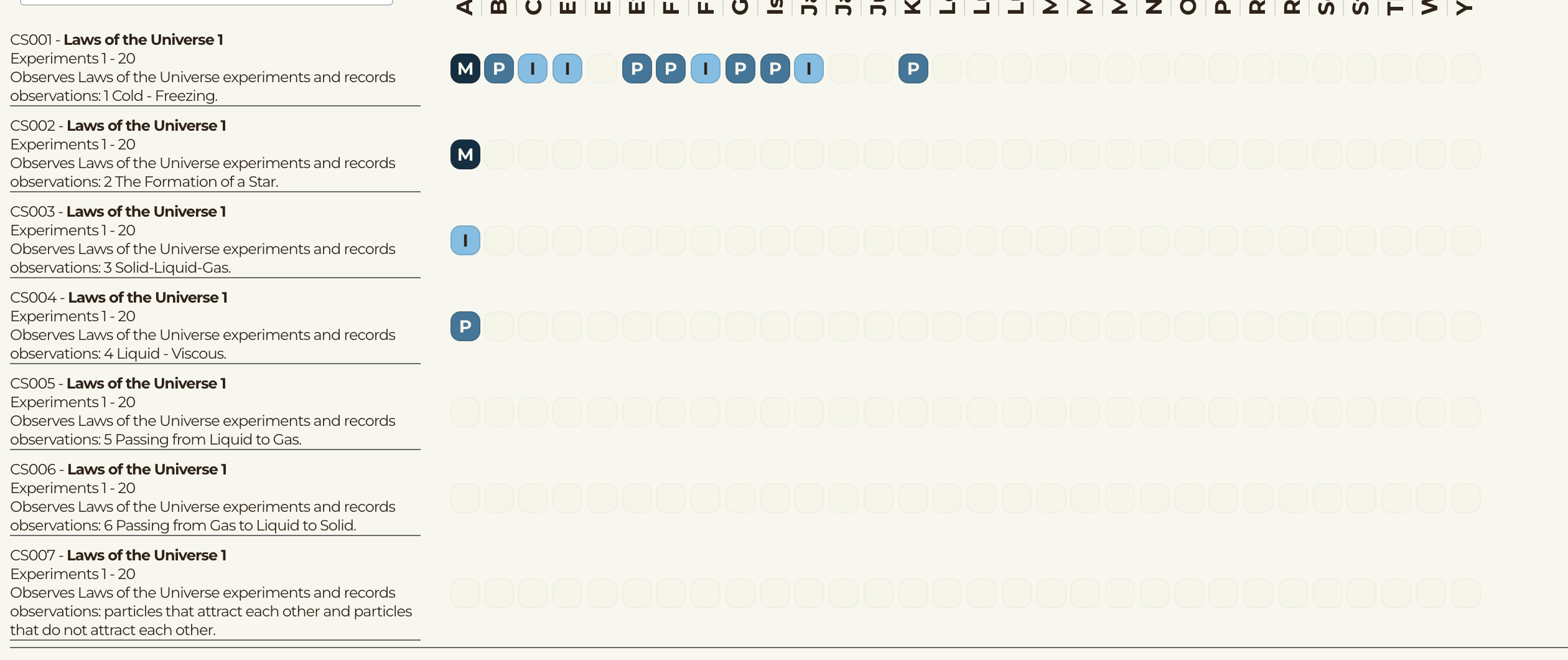
So I’ve created an app that tracks student progress over around 2000 standards. There are roughly 250 students. I have multiple databases and the main teacher screen shows a grid of about 300 icons at a time. Each icon represents the student’s progress and is filled by a search matching one of the 2000 standards against records of completion in another database.
While working on this full time for the last couple of days, I have used around 80,000 workflows. We have the Starter plan which gives use 175K workflows.
Now for the questions:
Are the workflows different for dev vs user? It shows them separate and it shows a total.
Does what I described seem like 80K workflows would be reasonable? (I doubt I have it optimized correctly, but it does a ton of work for each page)
Can you explain what a workflow is like I’m a 10 year old (I understand what they are but my boss does not and I can’t get her to understand my explanation).
Currently it has real data in it (just student names, but still). If anyone would be willing to give it a look, I would gladly setup a Zoom/Google Meet for a quick look / advise section. I’n not looking for lessons or the like, but just someone to same its good enough or that I need to redesign the databases and searches.
My boss loved what I showed her up to the point where I let her know it was not free and might end up being more than the original $32 a month.
Workload Units for your app is shared across Dev and Live, so your 175K is available to be used between the two, meaning you can use 100K in Dev and 85K in Live and go over your allotment by 10K.
For an unoptimized app yes, I can imagine 80K being consumed.
It is a set of instructions for the computer to know what to do based on a user action like click of a button. It requires power, like electricity, but it is Server Power that it requires or Device Power that it requires. If it is Device Power (from phone or computer of user) it doesn’t cost any workload units to run the actions. If it is Server Power it requires it costs workload units. Most actions dealing with data require the Server Power.
I can tell you without looking at it that it is not good enough if it is not optimized.
Yes, sticker shock for paying app owners can be challenging to deal with.
I have ways to optimize for workload units beyond the legacy approach to optimizing and I use a Hybrid data structuring approach using my plugin Data Jedi that allows me to reduce the costs of data retrieval by 95%. I’ve made it such so that one search consuming 250,000 WU a month only requires 25,000 WU a month, with the same functionality as the legacy approach, but also with faster page load speeds as well. For a system with 2000 standards to compare records against, my hybrid data structuring approach is a great way to reduce the WU costs.
What this sounds like is for each student (250) there is a need to run a search on each icon (300) which means there are 250x300=75,00 searches taking place
what I am unsure of is how the 2,000 standards are matched against only 300 icons if the icon represents the students progress matching one of the 2,000 standards.
If you provide some screen shots and more details of how the 2,000 standards, 250 students and 300 icons are working together, it will be possible to reduce the WUs without the plugin, but once that is done without the plugin, the plugin hybrid data structuring approach would enable a further 95% reduction of WUs as compared to an optimized setup using the legacy data structuring.
The standards, students, and their progress are in three different databases. The ‘grid’ is really 30 inactive buttons with the letter code for the student’s progress. So each row in the repeating group consists of the standard (about 4 rows of text) and 30 boxes. The boxes are filled out by search the standard’s ID code and the student’s (in that column) unique ID in the Progress Database. This is done for each student in the top (separate) repeating group of students in this classroom.
Example: The first row, first icon is a dark blue M. This means they have mastered that standard. The “code” to fill the box is:
Search for Student Progress where:
-----lesson code = Parent Group’s Standards’s ID
-----student ID = Search for Students:first item where:
-----------unique id = RepeatingGroup Student’s List of students item#1’s unique ID (where 1 is the column from the student names RG)
I tried NOT searching for the student’s ID using the RG of students, but could not get the types to match (must be a Student not just text).
3 Different data types in the one bubble database.
So for every single box that might exist (30) you are performing a search in it one each row in the RG which is done for each standard (2000) for each student (250).
I’m not sure what that screen shot shows because the CSOO1 or CS002 is that what is called a ‘standard’ and sho that screen shot is showing me a repeating group with 2,000 standards that are needing to search on 30 different icons for each of the 250 students? If so, which it sounds like it, you are performing 1 search for each icon, for each standard for each student…so I could just be misunderstanding the setup but you are definitely doing too many searches.
Using legacy bubble database structuring I do not see a way to remove the need to search as much as you are. Maybe somebody else would have some more insight into how to reconfigure the data structure using legacy approaches, but based on how I understand this at the moment, I do not see an obvious fix to the issue.
But if I were building this for a client, my standards would be api objects and I’d use my plugin Data Jedi to make all things necessary simpler. This would allow me to have all the 2,000 standards downloaded to client device for 95% less WUs than legacy approach with custom data type. I would also have all Lesson codes as API objects as well since in a Hybrid Data Structuring approach those are basically options to choose from. I would also have a student progress data as an api object so that when a student takes a lesson, I save all details to that object. Then all that is left to do is just reference each data value that is already on the device using the IDs of each thing…this would reduce the WUs by 95%.
I went through the videos you posted but I couldn’t find one on just searches. They want to be able to search using keywords now as well. I’m using the Search&AutoCorrect plugin for this (not sure if that’s the best one but it works).
Any plans to do a tutorial video on how to d searches on the client side? This one page is the issue due to the number of searches, all of the other pages only use a few workload units each.
The way fuzzy search plugins work is they download all possible results from the server, and then filter them client side. That contributes to increased workload usage because of 1. the number of Things returned and 2. the data for the things returned.
Normally, we filter server-side. Let’s say we’re searching for Students by name.
We would use Do a search for Students where name contains X. Bubble will only ever return those specific students to the client, which will only be the relevant results.
Let’s say we do the same with a fuzzy search plugin.
We Do a search for Students and stick that in the fuzzy search plugin data source. We’re searching all students. Then, in order to filter over it, it has to load all results with no pagination, to ensure it has all of the data to search over. Once it’s got all of the possible results, the browser can check each one and find out if it matches your conditions.
As more results are returned to the browser, the workload usage is generally higher.
All true points. When using a legacy approach to data structure and relying only on custom data types, you face such issues related to WUs and searches. This is why a Hybrid Data Structuring approach is so valuable. With a Hybrid Data Structuring approach you can save all the API objects to a single data entry, which means instead of being charged WUs for each thing returned (let’s say 2,000 things) you get charged WUs for ONLY ONE Thing returned. Another option with Hybrid Data Structure approach, especially for a situation like 2,000 standards, is you can just save a JSON file to an Option set Attribute and you get charged ZERO WUs for returning all 2,000 items.
On top of that, with a Hybrid data structuring approach, you can reduce the WU because of the amount of data returned is less…and not less as in less items or less fields, but just simply factually a lesser number of characters due to the fact that you do not have the appended and prefixed characters Bubble adds to custom data type fields, and you do not have the doubling of certain data fields that Bubble does when returning custom data types.
This is why for any situation in which there is a need to download a entire list of things for filtering, it doesn’t matter if you choose to use a fuzzy search plugin or not, there is HUGE cost savings to using a hybrid data structure approach comparative to the legacy approach relying solely on custom data types.
This is all true. And something important to remember is that not all of the 250 students NEED to be fetched in order to utilize the cost savings of a hybrid data structure approach for the real problem of this app, which is the need to compare one student against 2,000 standards. So whether you need to check all 250 students or just one, you need to fetch the entire 2,000 standards in order to populate the values of the 300 icons correctly.
If the correct problem is understood and the constraints of the situation, the developer could make an informed decision on the best way to approach the situation.
It is also highlighting an issue with Fuzzy search plugins, and not an issue with a hybrid data structuring approach. When experienced with a hybrid data structure approach you learn some things about how it works, such as it undergoes the same lazy loading in a RG as custom data types do, so whether or not you do pagination, so long as on the RG you do not check the box ‘show all items immediately’ the time it takes to show the first set of results in the RG is the same for API Objects saved as a list field compared to custom data types.
True, especially when using a legacy data structure and needing to pay for each item returned. This is true for a hybrid data structure approach, but only in as much as it means for each additionally entry you have additional characters of data returned, but are not charged more for each item. What that translates into as a comparison between legacy approach and hybrid data structure approach is that the WU savings of a hybrid data structure approach is exponentially compounded as you have larger lists of items.
It is basically the same as filtering on custom data types. You put the Data Jedi plugin element onto the page, it is then going to be a value source for the list of data. You put that has the value source of a repeating group and then setup the constraints on the fields of the API Object, just like you would for fields of a custom data type.
I’ve made the functionality of the Data Jedi plugin allow for an option to create unique IDs for items, so that working with the Data is just like working with Custom data types and not like working with JSON, because normally when working with JSON a most JSON plugins do it, is you need the ‘index’ value which often enough starts at zero and makes it complicated to target the correct item. But, if you have a unique ID on the API Objects you can use that ID field key value to correctly target the api object in the list.
Your problem here is UI, not the costs. There’s no way to manage this much information at a glance, it’s very overwhelming. It’s like 100x the amount of indicators on a car dashboard. You should break this up into several tabs and only run whatever searches are necessary.
This is not sound advice to follow. The issue is not the UI, it is the costs, because if the OP followed this advice, and put in tabs, the costs would increase because it is HIGHLY likely the use case is to show the 300 icons based on whether or not they should be shown.
Do not get confused, there are times when reducing WUs is the answer to a problem related to the costs of WUs and in most cases, making some UI adjustments does not reduce the costs but will likely increase them, especially when the need of the application would be to present all information at a glance.
I don’t believe he is showing all at once, I think it is that up to 300 might show and each depends on some condition to make them visible or not. But yeah, being a fighter pilot is tough work.