Today, I’ve encountered a strange situation while defining random values to a data field. Here’s the situation:
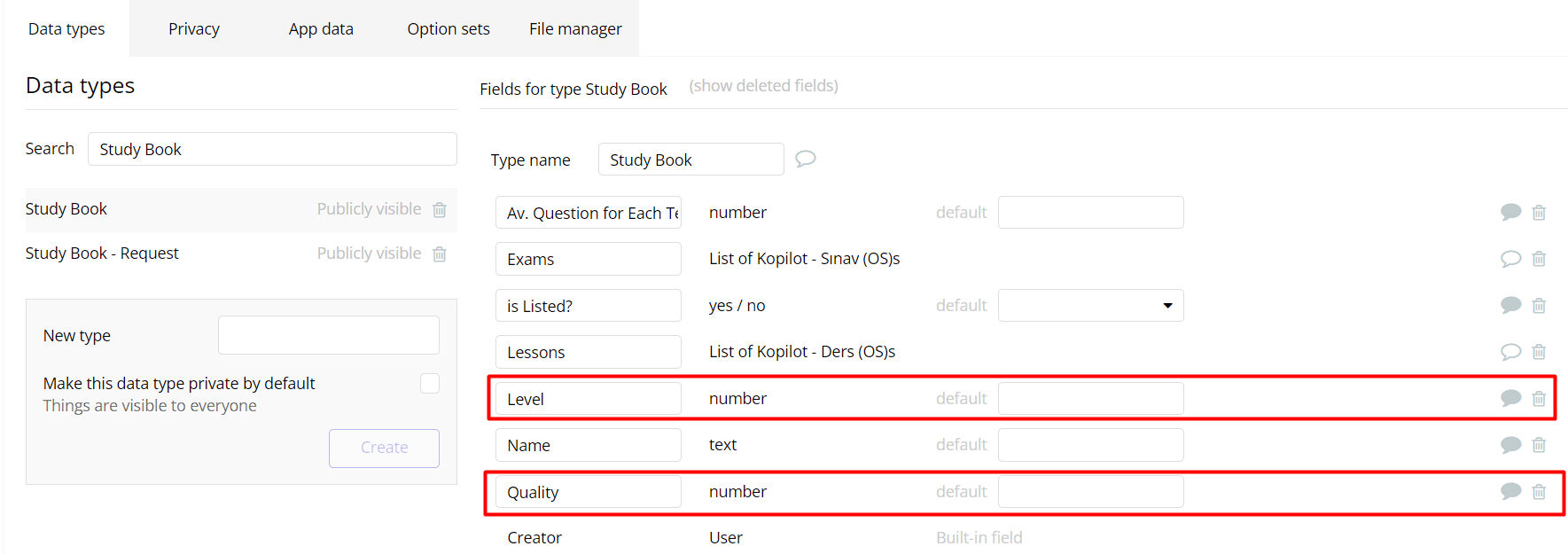
I have a data type named “Study Book,” which contains several data fields. However, we are interested in two new fields in this case named “Quality” and “Level.” These fields are of the “number” type and must receive decimal values between “0.0” and “5.0.”
For testing purposes, I’ve created a Backend Workflow to assign random “Quality” and “Level” values to approximately 800 data entries in the “Study Book” type using a bulk operation.
There is a Backend WF event named “define-quality-level,” which has a “Book” parameter of the “Study Book” type. This event runs an action with the following flow:
Make changes to Study Book
Define the “Quality” field by converting an “Arbitrary text” to a number. This “Arbitrery text” includes two “Arbitrary text” that has number values seperated by comma in it, then splitted by comma to create list and get random item from them.
Define “Level” field by copying expression of “Quality” field defination.
Here is the weird part. All data entries’ “Quality” and “Level” values are exactly the same. I expected different random numbers in both data fields. And I don’t understand why these values are copy of each other. Therefore, I decided to share this on the forum to understand how Bubble handles this case.
that is weird…test out having two actions, one for the quality and one for the level and see if it makes the two values different.
Another option. Use one action, but instead of your setup for generating random numbers, use the calculate random string function. So, arbitrary text, random string (select numbers only and length is 1) then comma, then another random string and length is 1 - one problem with this though is the first value may not be between 0-5 and would be between 0-9…so maybe combine the two approaches…use your approach for first value to get 0-5 and then the calculate random string for after comma to get 0-9
Random is just terrible in Bubble in general. If Calculate random string is used elsewhere in the workflow or page, it will use the same random string for all apperances of it (similar to how an API call is cached). To get a more (not truly) random string, you’re best off calling a backend workflow from the API connector that returns a new random string to use.
test out having two actions, one for the quality and one for the level and see if it makes the two values different.
It was only for test purpose. So, it’s not a real problem that the 2 data field has exactly same value. I just want to understand why Bubble works like this.
Use one action, but instead of your setup for generating random numbers, use the calculate random string function. So, arbitrary text, random string (select numbers only and length is 1) then comma, then another random string and length is 1 - one problem with this though is the first value may not be between 0-5 and would be between 0-9…so maybe combine the two approaches…use your approach for first value to get 0-5 and then the calculate random string for after comma to get 0-9
Yes, I know there is a function like this. But as you know, it doesn’t match my needs. So, I prefer build with this way.
I hope someone have an idea. Because I think it’s an important case.
If Calculate random string is used elsewhere in the workflow or page, it will use the same random string for all apperances of it
Yes, I’ve dozens of time experienced it. After your reply, I’ve tried get data from “Search for Users:random item” in different actions, but in the same backend WF event. And I realise that all the expressions get the same user data. It’s really weird because there is a random item operation. But all the time it takes the same data.
Actually I know if you ask exactly same search from Bubble, it does do the search once and get action with that. But I didn’t know it still acting on same data when you use operator such as :random-item. And also, it’s not about only searching on database. I noticed it thanks to “Arbitrary text” sample.
Here is setup for the last suggestion to use a combination of your approach for numbers 0-5 and the last set of numbers to be 0-9.
So yes, the use of random item gets the same result, but the use of calculate formula random string does not…hence the results are different from each other, although they have the same leading number.
Here is another solution and results: notice the order of the leading second is different than the first…this gets different leading numbers even though they are in the same flow. If working with real data, solution is same, sort it differently as the source before you give random item operator.
Sorry I mean just in the workflow - different places on the page will show different random strings.
If you use two identical Calculate random string functions in the same workflow, the random string will be identical (I believe this is because for server-side workflows, Bubble passes the random seed when the workflow is initiated, hence the random seed is same for both instances of Calculate random string - but don’t take my word for that.).
You put a big effort. Actually, I’d just like to understand how does Bubble approach on my case. But I’m sure about that someone get benefit from your solution suggestions. So, big thanks!
This is not true. I showed in the screen shots the fact that is not true. Using two different calculate random string functions in the same workflow action, can result in two different strings. I ran five simple runs of the backend workflow and each had different results for the first and second value, which each had their own calculate random string function to create the value, which were identical as they both asked for only number and length of both was 1.
It is true, however, that if you use the :random operator it will be the same value.
And it might be true, if you are running a recursive flow, I am not sure as I didn’t run a recursive flow.
Calculate random string is different than using :random operator.
The big takeaway that I showcased there is two fold. One, it is not the case that if you use two or more calculate random string functions in the same workflow action that the return the same value. Two, for anybody struggling with the issue of using :random operator and getting the same result in a backend workflow function, the solution is to change the order of the dataset value using the sort operator before you use the :random operator.
Another benefit is seeing how we can use a custom workflow trigger in a backend workflow to use return data there as well, which is somewhat new for backend workflows and might not be widely used.
It seems there’s some kind of difference under the hood that appears to affect how it’s used.
In the simple example I gave, it shows the identical generation behaviour. In yours, it shows a different behaviour that’s the distinct strings. What exactly causes this difference, I’m not sure
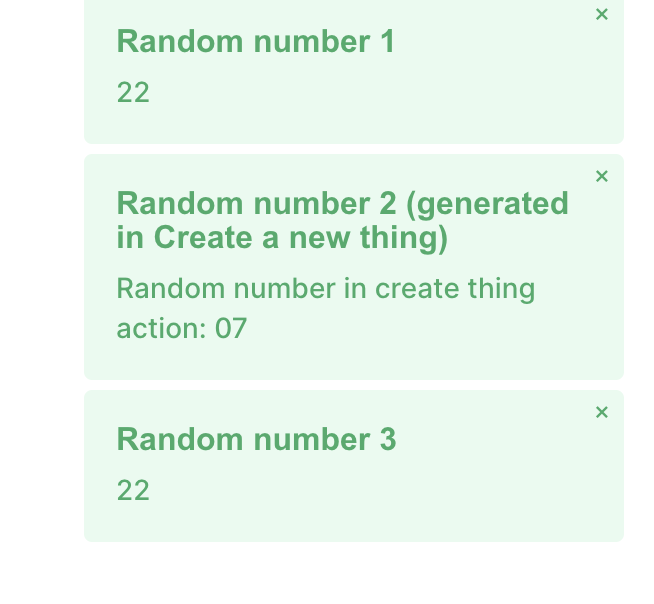
In this scenario, we have 3 identical Calculate formula expressions. Two of these are on client side alert actions, and one of these involves the server (Create a new thing). The two client side alert actions share the randomly generated string, yet the Create a new thing’s number is a different randomly generated number.
So, it seems that server side actions will generate a new random string each time, whilst client side actions will share the same random string. In the above screenshot, 1 and 3 are client side alerts, and 2 and 4 are Create a new thing.
Can you try on my app and send a screenshot of the alerts you see? This is what I get, same result with debug mode on and off (in case that made a difference). Same client side random string, different create a new thing random string