
Hi to all Bubblers 
I haven’t seen much on this, so I’m sharing a trick I tested to force the update_app screen. Since it only shows when the app hits the backend, and the users don’t necessarily hit it when opening the app. The work around is that I compare a local packaged version (Option set) with a dynamic version in the database.
Setup
-
Option set (local, fixed in the build)
-
Create an option set
versionwith an optionactualversion. -
Add a field
version(text). -
Before each new build, update this value to the version you’re about to release (ex:
1.1.2). -
This option set is compiled inside the app, so users will always keep the version value of the build they installed.
-
-
Database entry (dynamic, editable after release)
-
Create a data type
version_newwith a fieldversion_update(text). -
After publishing to App Store / Play Store, edit this entry manually to the new version value (ex:
1.1.3). -
This lives on the backend and can be changed anytime.
-
-
Workflow check
-
On the homepage (or a reusable header), add a workflow:
-
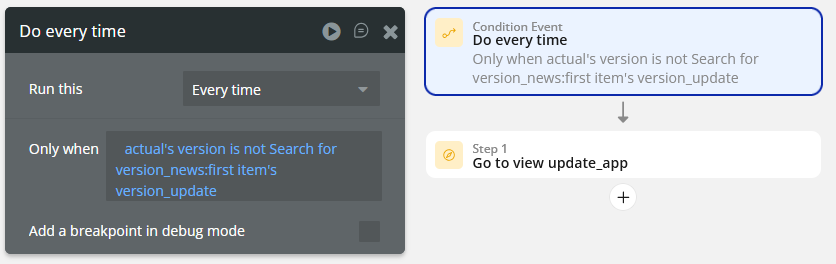
Do every time → Condition:
version:actual's version is not Search for version_new:first item’s version_update. -
Action: Go to view update_app.
-
-
Logic:
-
If the version hard-coded in the app ≠ the one in the database → redirect user to the
update_apppage. -
If the user has already updated, both values match and nothing happens.
-
-


How it works in practice
-
Example:
-
Current build 1.1.2 → Option set =
1.1.2. -
Update the Option set =
1.1.3(the version you are about to release) -
After pushing 1.1.3 live on stores, update the database value to
1.1.3. -
A user opening the app on 1.1.2 will see a mismatch (
1.1.2≠1.1.3) → workflow redirects them to theupdate_appscreen. -
Once they install 1.1.3, the option set in their build is also
1.1.3, so it matches the database and they can continue.
-
Notes
-
Versioning is manual:
-
Update the option set before building.
-
Update the database field after release on store.
-
-
Tested with one minor update, about 5–10 users so far. It worked, but I can’t guarantee consistency across all devices or over time.
-
This relies on a DB read (so it costs WU). Without touching the backend, the
update_appscreen doesn’t appear.
If you see something not logical in this Option set / Database behavior, or have ideas to improve this method, let’s talk about it 