Hello, I am having a bit of a hard time getting the correct data to show up in a text box and would appreciate some help. Thanks!
There are my current data types:
User - username, email etc
Contractor - email, company name, unique ID, etc
Client - email, company name, manager name, unique ID etc
CONTRACT - contractor, client, created by etc.
I have 3 usertypes (Agency, Contract and Contractor) and each one is shown a different group/dashboard when they log in.
When i log in as an agency I am able to see all contracts I have created - that bit is pretty easy since my username is in the “created by” field associated with the contract. I could cheat here and add a contractor email and client email to the contract data type but i would prefer to understand how to do this properly.
On the contractor dashboard I want to display some data that relates to their contract but does not sit in the contract data type (as this data type is made up of 2 data types).
An example of this is:
When logged in as a contractor I want to be able to view details of my current contract - The client name, the agency information (contact created by) etc.
So i need to look for contracts and then match the unique ID in the contractor field to the unique ID in a contractor record where the email address associated with that contractor record is my email address. If i find a match (which I will) then i would like to display the client name associated with the contract.
This all feels a bit overly complex - I could just put all of the information in the user data type and only fill in the fields relevant to each user and then set the contract data type to have a field linking to the users involved.
Can you provide a screenshot of your search? Where is it breaking down for you?
Your data types look good to me as a contract is combination of many of the other data types and has attributes that are not relevant to the User type. So I would agree that you shouldn’t just take it and put it in with User type.
You should do a Search across types something like: Search Contracts where contractor id = current user id display client name
The text box or group you are displaying the information in should be of type contract and you do your matching search on type user…
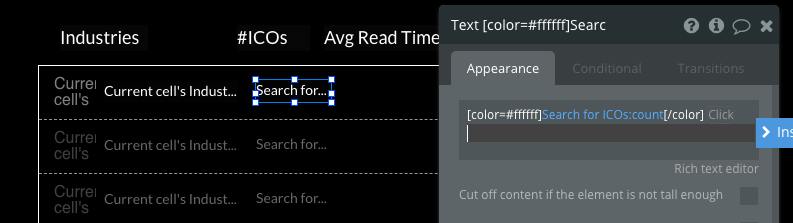
Here’s a example where I have a repeating group for industry and do a search for ICO to bring back matching data for Industry:
The problem is that when I find that contractor ID from that search i then need to match that to a contractor and match that contractor to a user (does that make sense?)
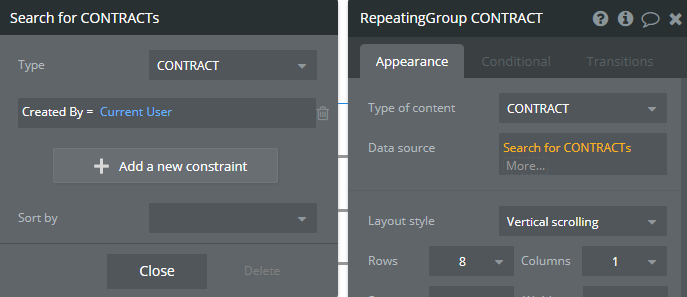
My current format for a different dashboard is below, this works because this dashboard is for an agency to view and the agency email is also the “created by” field in the contract datatype.
This bit is for the whole repeating group and just shows the contracts that were created by the current user:
This is the group inside the repeating group that contains all of the text cells. I added this partly because i wanted to colour rows alternately, not 100% sure i need the parent group bit?
This bit shows the info I want in the cell, this is data from the contract datatype.