
Hello. Can i compare current row with previous row in table to check if they are equal?
Is it possible to compare current row with previous row on a workflow or conditional state? To show element only when current row name is not equals to previous row’s name?

Hey @ForeverLive , you’ll just need to compare it with this repeating groups’s item #:(current index - 1 )
Good luck!
Yes, but i using table, not repeating group.
How to add () symbols to expression? It not allows me to do it.
I cannot believe that it’s impossible to compare 2 rows data in table! Any suggestions?
Can you help please?
@ForeverLive , I’ve actually never used the table element, as you can create the same behaviour with repeating groups.
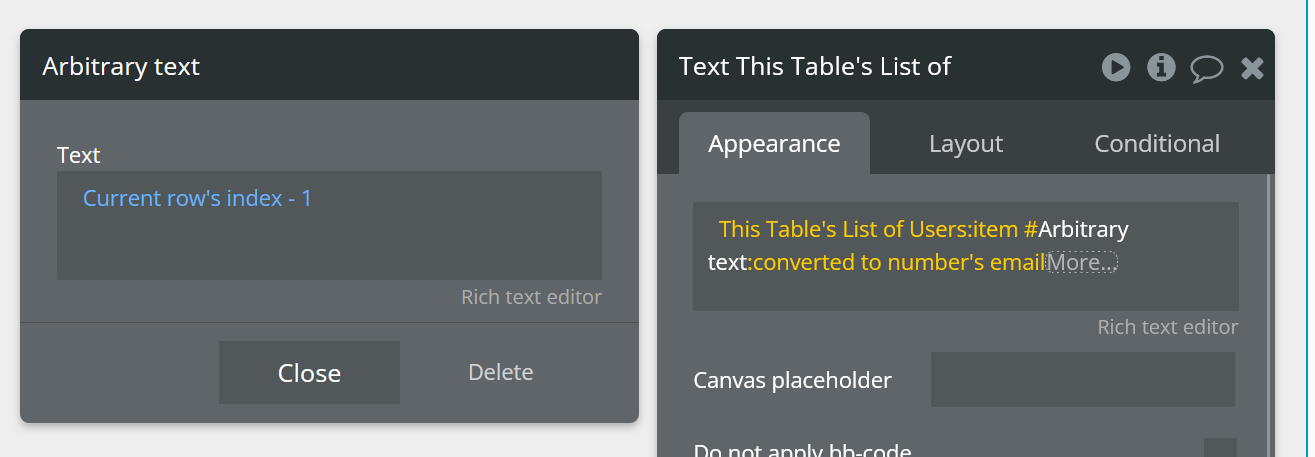
Anyway, you can set this up without bracket, *this repeating groups’s item #arbitrarytext:(current index - 1 )*converted to number.
This allows you to run a second operation (index-1) and then convert the output to number.
Good luck!

Here you go @ForeverLive
You are the best! I spent 10 days and was not able to find the answer! Amazing. Thank you very much
No problem @ForeverLive.
Bear this trick in mind when building expressions. This is one strategy. Sometimes you will need to have different groups performing part of the calculation.
Good luck!