
My app is for creating invoices. A user can create an invoice by filling in form fields (item, price, VAT etc) and then they click ‘Preview’ to see a PDF.
The pdf convert is done with Digital Eye’s ‘Advance export to PDF’ plugin.
The trouble is, users create an invoice on Page A which is optimised for mobile (small) view. The data is then sent to Page B where a full page invoice is generated.
So, Page A’s ‘Preview’ button needs to convert page B. Any idea how I can achieve this?
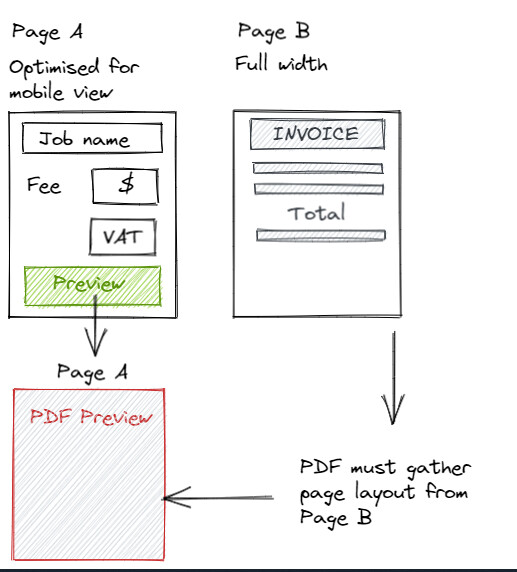
The other way I was thinking to do it is the Preview button opens Page B which is immediately converted to PDF so that the whole invoice fits onto the smaller mobile view. But not sure how to do this either!?
Bubble’s SelectPDF plugin would do the job but it is ridiculously expensive, Single Developer License – $499 just to convert HTML to PDF!
One idea which almost worked was to open a new invoice page when the Preview button is clicked and to have an action ‘When page loads’. This action immediately converts the page to pdf and displays in a popup. However, the Digital Eye’s ‘Advance export to PDF’ plugin recreates the image exactly, so if a user is on a mobile, the html-invoice page is squashed and so the pdf recreates the squashed image. I need the pdf to create the full wide invoice somehow.

